


 147
147
AI support agents can now handle 80% of customer tickets independently, dramatically reducing costs and response times.
Over 90 days, we tested autonomous AI agents with a SaaS company handling 5,000 support tickets monthly. The results? First response times dropped from 1 minute to 4 seconds, resolution costs fell to $1 per ticket (from $3–$7), and human agents could focus on complex issues instead of repetitive tasks. The AI achieved an 80% resolution rate by handling routine inquiries such as password resets and order updates, while escalating more complex issues to humans.
Key Results:
- 80% of tickets resolved by AI without human input.
- First response time: 4 seconds (down from 1m 12s).
- Cost per resolution: $1 (vs. $3–$7 with humans).
- Human agents are redirected to high-priority, complex tasks.
Challenges included integrating AI into workflows, fixing outdated documentation, and ensuring accurate responses. By introducing confidence thresholds and improving data quality, the system became more reliable and efficient.
AI for customer support is proving to be a game-changer for managing high-volume, repetitive queries while freeing up human agents for more nuanced work.
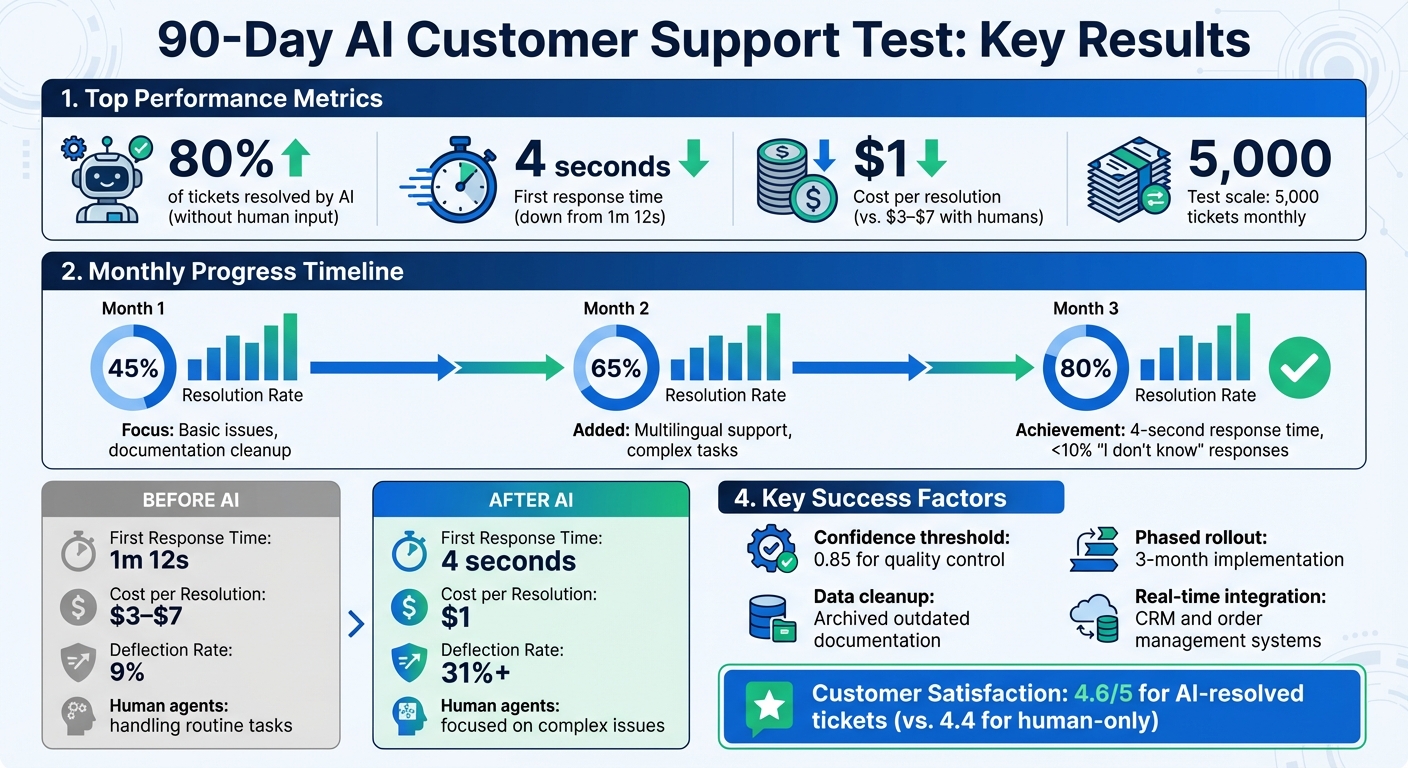
90-Day AI Customer Support Test Results: Key Performance Metrics
How We Set Up the Test
Client Profile and Support Problems
The SaaS company we worked with faced a significant challenge: their support team was swamped, managing about 5,000 tickets monthly across email, chat, and a help widget. This workload led to first response times exceeding one minute during peak hours and ticket resolution costs between $3 and $7 - expenses that were unsustainable as the company continued to grow.
The root of the issue? Routine inquiries. Tasks like password resets, account access problems, and basic "how-to" questions were eating up agent time - time that could have been spent addressing more complex customer needs. The company needed a solution to handle roughly 80% of these repetitive tasks, allowing their human agents to focus on higher-priority issues.
Traditional self-service methods were falling short, deflecting only 9% of tickets. With strong documentation already in place, the company decided to test autonomous AI agents to see if they could resolve tickets from start to finish without constant human intervention. To tackle this, we planned a phased rollout.
3-Phase Rollout Plan
We designed a three-phase rollout to ensure a smooth implementation, allowing for adjustments while minimizing risks.
Phase 1 (Weeks 1–4): The first phase was all about onboarding and keeping things small-scale. We connected the AI to the help center, imported pre-existing response macros, and routed just 10% of authenticated traffic to the AI. This resulted in fewer than 150 conversations in the first week, giving us enough data for manual review without overwhelming the system.
Phase 2 (Month 2): In this phase, the rollout expanded to cover all incoming traffic and a larger variety of ticket types. The AI was integrated into the existing workflow, including Slack for internal escalations. It moved beyond FAQs to handle procedural requests like order status updates and account changes. To maintain quality, we set a confidence threshold of 0.85, ensuring human review for any response below this level.
Phase 3 (Month 3): The final phase focused on fine-tuning and cleaning up content. Outdated help articles confusing were removed, and the AI’s tone was adjusted based on Customer Satisfaction (CSAT) feedback. The AI also began proactively engaging with customers, learning to escalate issues appropriately by picking up on contextual cues.
"Agents perform best when you tell them what to achieve, not how to achieve it. We call this 'letting the LLM be an LLM.'" - Salesforce
With the rollout complete, we measured performance using clear, predefined metrics.
Performance Metrics We Tracked
To address the original challenges of slow response times and high resolution costs, we established clear baseline metrics before deploying the AI. This ensured that our insights were backed by solid data, avoiding what some refer to as "AI theater." Data was collected from Zendesk logs, post-chat surveys, and weekly spreadsheet exports to monitor progress and maintain quality.
Here’s a breakdown of the core metrics we used to evaluate the AI’s impact:
| Metric | Pre-Test Baseline | Target Goal |
|---|---|---|
| First Response Time | 1m 12s | 4 seconds |
| Resolution Rate | 0% (manual only) | 80%+ autonomous |
| Deflection Rate | 9% | 31%+ |
| CSAT Score | 4.4/5 | Maintain or improve |
| Cost per Resolution | $3.00–$7.00 | Under $2.00 |
We focused on metrics like First Response Time (FRT), Resolution Rate (percentage of tickets handled fully by AI), Deflection Rate (tickets resolved without human input), CSAT scores, and Cost per Resolution. Reopen rates were also monitored to ensure tickets weren’t just closed but genuinely resolved.
The key takeaway: A phased approach, combined with meticulous tracking of both quantitative and qualitative metrics, was critical. By monitoring everything from response times to customer feedback, we were able to refine the AI’s performance and effectively automate routine customer support tasks.
sbb-itb-97114f1
Results: What Happened Over 90 Days
Performance by Month
Month one: The AI successfully resolved 45% of tickets, excelling at basic issues but struggling with conflicting documentation. To address this, the team manually reviewed conversations, identifying patterns and updating outdated help articles that confused the system.
Month two: Things improved dramatically, with the resolution rate jumping to 65%. Multilingual support was introduced, and unified data streams were established to create a single source of truth. The system also began handling more complex tasks, like order status updates and simple account modifications, without needing human assistance.
Month three: The AI reached an 80% resolution rate, with response times averaging just 4 seconds. The percentage of "I don't know" responses dropped from 30% to under 10%, thanks to continuous system refinements.
Key Takeaway: Cleaning up data, integrating multilingual capabilities, and ongoing training can significantly boost AI performance, both in resolution rates and response speed.
These monthly improvements laid the groundwork for examining how the AI performed with real customer interactions.
How AI Handled Real Customer Queries
The true test came when the AI was used in real-world scenarios. Between Fall 2024 and July 2025, Salesforce deployed its Agentforce system on its own support site, handling actual customer queries. Early on, the AI misinterpreted product names like "Digital Engagement" as requests for human escalation. To fix this, the team shifted from rigid rules to a coaching approach, teaching the AI to "act in the best interest of Salesforce" rather than following strict if-then logic.
By July 2025, Agentforce was managing 45,000 conversations weekly, achieving an 85% resolution rate. Customer satisfaction scores for AI-resolved tickets reached 4.6 out of 5, outperforming the 4.4 average for human-only interactions.
Key Takeaway: Coaching AI to adapt its behavior, rather than relying solely on scripts, allows for more nuanced responses, improving both resolution rates and customer satisfaction.
Fixing AI Accuracy Problems
From the start, outdated documentation created accuracy problems for the AI. Salesforce referred to these as "content collisions", where conflicting or obsolete guidance led the AI to reference outdated information, such as 2018 release notes instead of current ones. The team resolved this by archiving articles unused for over a year and consolidating scattered data sources to ensure the AI had access to clear, up-to-date information.
"There's a common misconception that with AI, more content equals better answers. The reality is that more curated content equals better answers."
- Zachary Stauber, Senior Director of Agentforce Data & AI, Salesforce
To further enhance accuracy, confidence thresholds were introduced. Responses scoring below 0.85 were automatically escalated to a human agent. ServiceNow reported similar success, achieving resolution rates above 99% for tasks like account unlocks and VPN issues by using similar escalation protocols.
Key Takeaway: Maintaining accuracy in AI systems depends on curating high-quality content and implementing confidence thresholds. These steps build trust and ensure reliable autonomous support.
The results are clear: with ongoing data improvements and smart escalation strategies, AI systems can steadily enhance their ability to resolve customer issues, proving the importance of focusing on quality content and adaptive learning over rigid rules.
We Automated 80% of Customer Support With One AI Agent (No Code)
Problems We Faced and How We Solved Them
Our 90-day test revealed several challenges that shaped how we refined our system.
Early Accuracy Issues
During the first month, AI agents experienced a hallucination rate of 3% to 27%. The system struggled with complex scenarios, such as addressing billing disputes or resolving questions about third-party product integrations. In some cases, the AI provided outdated policy references or generic troubleshooting tips that failed to address the actual problem.
To tackle this, we introduced a 0.85 confidence threshold to flag uncertain responses. This allowed us to route lower-confidence answers to human review, significantly reducing inaccuracies. Instead of relying on rigid, rule-based directives, we shifted to a coaching framework with high-level goals, giving the AI more flexibility to determine the best approach.
"We had been treating our AI agent like an old-school chatbot with overly prescriptive directions, when what we really needed to do was give the agent a goal and let it determine how to deliver on it."
- Joe Inzerillo, President, Enterprise and AI Technology, Salesforce
Another critical step was cleaning up outdated documentation. By archiving older materials, we eliminated conflicting information, which reduced hallucinations across all ticket categories.
Key Takeaway: Setting confidence thresholds and maintaining up-to-date content are vital for improving accuracy and preserving customer trust. Once we addressed these issues, we turned our focus to integration challenges.
Integration and Workflow Changes
After improving accuracy, we faced hurdles in integrating the AI with live data. Initially, the AI lacked access to real-time information, leading to generic responses for questions like, "Where's my order?"
We addressed this with a phased approach. First, we synced the AI with our CRM and order management systems to create a unified data source. Next, we implemented a multi-agent architecture, assigning specialized agents to handle tasks like classification, policy checks, and ticket routing.
To enhance customer experience, we also improved escalation protocols. The system was programmed to detect frustration cues, profanity, or direct requests for a human agent. When escalating, the AI provided a concise summary of the conversation, so customers didn’t need to repeat themselves.
Key Takeaway: Real-time data access and smart escalation workflows are essential for smooth AI integration. Specialized agents and clear processes ensure better performance. With integration challenges resolved, we could assess the financial impact of our efforts.
Cost Savings Breakdown
The financial results were striking. With AI managing 80% of routine tickets, our resolution costs dropped to about resolution costs dropped to about $1 per conversation per conversation, compared to $3–$7 for human-handled tickets. These savings stemmed from reduced staffing requirements, no overtime during peak periods, and faster resolutions that avoided ticket backlogs.
That said, achieving these efficiencies required upfront investments in data cleanup, system integration, and ongoing model training.
| Feature | Autonomous AI Agent | Human Support Team |
|---|---|---|
| Availability | 24/7, infinite scale | Limited by shifts/headcount |
| Response Speed | Near-instant (seconds) | Seconds to minutes |
| Complex Problem Solving | Low (17–63% resolution) | High (100% resolution) |
| Tone/Empathy | Often clinical/robotic | High emotional intelligence |
| Cost | ~$1 per resolution | $3–$7 per resolution |
| Best Use Case | FAQs, password resets, triage | Billing disputes, technical debugging |
Key Takeaway: While AI can significantly reduce costs, teams should plan for upfront investments and ongoing maintenance. A ramp-up phase is necessary before achieving full ROI.
Final Results and Lessons Learned
Final Numbers and Outcomes
Over 90 days, autonomous AI agents in customer support delivered impressive results. They resolved a large percentage of tickets independently, leading to reduced costs and faster response times.
The system handled peak periods with ease, managing high ticket volumes without needing extra support agents. Response times dropped dramatically, from 72 seconds to just 4 seconds when AI managed the initial triage and resolution process.
Cost efficiency also saw a big improvement. The cost per resolution fell from $3–$7 to roughly $1 per ticket. These savings were achieved after initial investments in areas like data quality, system integration, and training.
Key Takeaway: While autonomous AI agents can significantly reduce costs and scale operations, their success depends on careful planning and consistent maintenance.
These findings provide a roadmap for support teams to enhance their strategies.
What Support Teams Should Do
Start by automating high-volume, low-risk queries, such as password resets or order status updates. This is a quick way to reduce costs while improving efficiency.
Leverage sentiment analysis to identify when customers are frustrated or requesting human assistance. In our test, tracking these signals allowed the system to escalate conversations to specialists promptly, preserving customer trust and satisfaction.
Shift your focus from producing more content to maintaining high-quality, well-organized information. The 90-day trial highlighted that automating simple queries works best when you focus on the pillars of AI in customer support: accuracy, automation, and high-quality data.
"There's a common misconception that with AI, more content equals better answers. The reality is that more curated content equals better answers." - Zachary Stauber, Senior Director of Agentforce Data & AI, Salesforce
Regularly updating and centralizing documentation ensures the AI provides precise and reliable responses.
Key Takeaway: Automate routine tasks, monitor customer sentiment closely, and prioritize well-curated content for sustainable success.
What's Next for AI in Customer Support
With these results in mind, the next step for AI in customer support is moving toward proactive engagement. The future isn't just about answering questions - it’s about anticipating needs. AI agents will soon recommend solutions or even take corrective actions before customers reach out.
For example, ServiceNow’s internal AI agent resolves 90% of Level 1 IT tickets with a 99% success rate in specific categories, showcasing the potential of advanced AI systems in automating support tasks.
As AI takes over routine tasks, human agents will focus on more complex and nuanced issues. Our test showed that automating simpler tasks allows teams to dedicate more attention to challenging, cross-functional problems, setting the stage for proactive AI solutions.
"Routine, procedural issues get automated away, and what remains are harder, more ambiguous, more cross-system problems." - Charles Betz, Forrester
The future of customer support will rely on a hybrid model: AI handles the repetitive tasks, while humans tackle the more intricate ones. This combination ensures efficiency and positions AI as a critical part of operational infrastructure.
Key Takeaway: Adopt AI for routine tasks and empower human agents to address complex issues, creating a proactive and highly effective support system.



.png&w=96&q=75)

.png&w=96&q=75)
.png&w=3840&q=75)