.png&w=96&q=75)

Choosing the right AI customer support platform can make or break your efficiency and customer satisfaction. Here's a quick breakdown of how Zendesk, Freshdesk, and Intercom stack up:
- Zendesk: Best for large enterprises. Offers advanced AI for ticket routing and sentiment analysis, and compliance-heavy industries. High upfront cost but strong long-term ROI. Setup takes months.
- Freshdesk: Ideal for small to mid-sized businesses. Affordable, quick to implement, and includes essential AI features. Great for teams with limited budgets and resources.
- Intercom: Perfect for SaaS startups. Focuses on real-time, conversational support powered by GPT-4. Usage-based pricing can get expensive for high volumes.
Key Insights:
- AI can cut response times by 85%, automate 80% of routine queries, and improve satisfaction by up to 60%. Solutions like CoSupport AI help teams resolve tickets automatically to achieve these results.
- Zendesk excels at enterprise-level customization, Freshdesk balances cost and features, and Intercom prioritizes live engagement.
- Pick Zendesk for scale, Freshdesk for affordability, and Intercom for conversational support.
Quick Comparison:
| Feature | Zendesk | Freshdesk | Intercom |
|---|---|---|---|
| Best For | Large enterprises | SMBs | SaaS startups |
| AI Approach | Predictive/Classification | Assistive/FAQ | Generative/Conversational |
| Setup Time | Months | Days to weeks | Weeks |
| Pricing Model | Fixed per agent + AI add-ons | Session-based | Usage-based ($0.99/resolution) |
| Automation Focus | Ticket routing, compliance | Routine task automation | Real-time engagement |
Your choice depends on team size, budget, and support strategy. Keep reading to dive deeper into the strengths and costs of each platform.
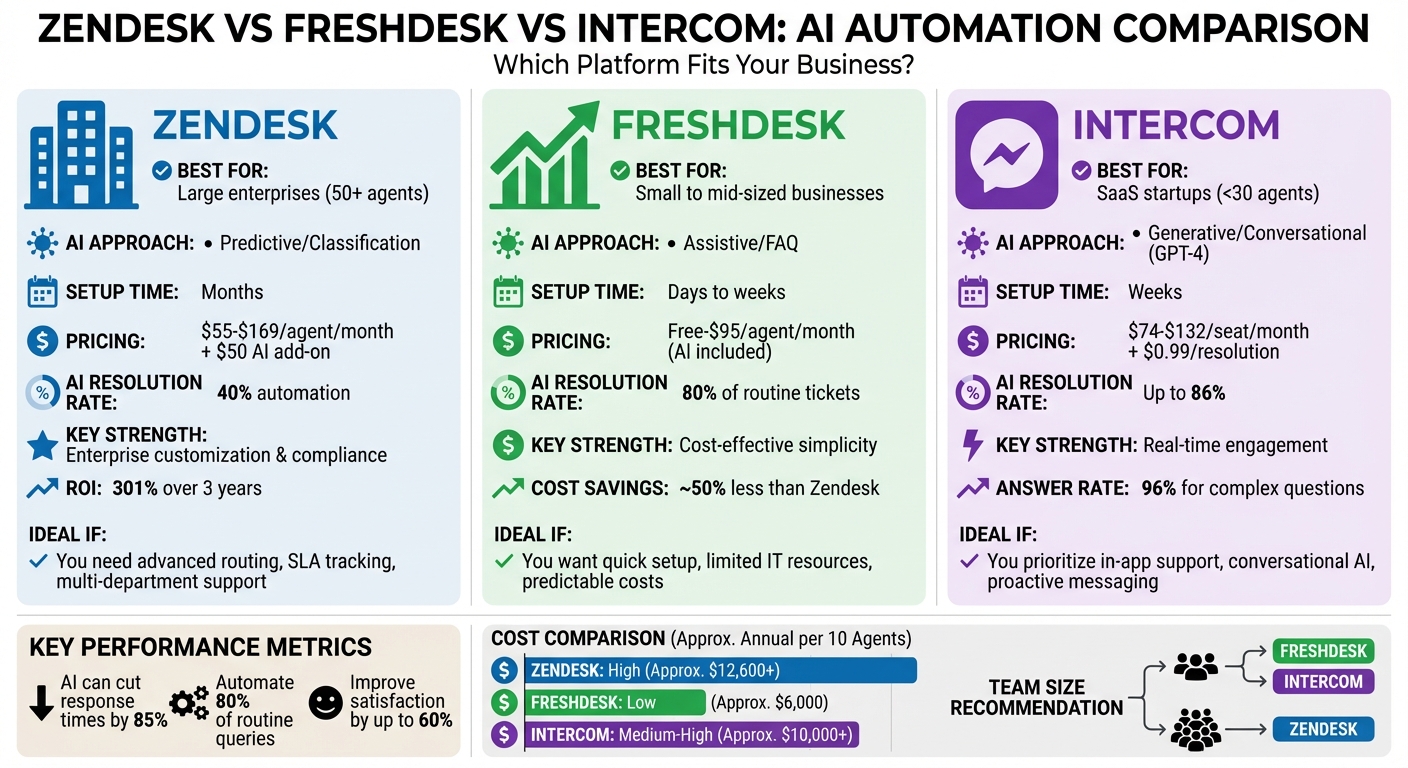
Zendesk vs Freshdesk vs Intercom AI Automation Comparison
9 Best AI Customer Service Software 2025 (AI Agents, Helpdesk, Voice Agents & More)
sbb-itb-97114f1
Key Takeaways
Here’s a breakdown of the standout features and differences between these platforms:
Zendesk is a powerhouse for enterprise-level support, leveraging AI trained on over 18 billion service interactions. Its Advanced AI excels at handling complex tasks like ticket routing and sentiment analysis, making it a go-to for large corporations managing massive ticket volumes across multiple channels. However, this level of sophistication comes with a higher price tag.
Freshdesk is a budget-friendly option tailored for small to mid-sized businesses. Its Freddy AI focuses on assisting agents with tools like predictive routing and text summaries. While it delivers about 80% of Zendesk’s functionality, it does so at roughly half the cost. Many of its AI features are included in higher-tier plans, starting at approximately $59 per agent per month.
Intercom's Fin takes a different approach, emphasizing real-time conversations powered by GPT-4. Tests show Fin outperforms competitors in answer rates, resolving up to 86% of support inquiries at just $0.99 per successful resolution. This makes it particularly appealing for SaaS companies that prioritize live engagement over traditional ticket management.
The key difference lies in their AI philosophies. Zendesk and Freshdesk focus on streamlining ticket management, while Intercom leans into conversational engagement to boost user satisfaction. Notably, Fin was 66% more likely to provide complete resolutions than competing AI tools, though its usage-based pricing could lead to unpredictable costs for teams handling high volumes.
Implementation time is another factor to weigh. Freshdesk can be up and running in days, Intercom typically takes weeks, and Zendesk may require months due to its enterprise-level configurability. Your choice should align with your team size, budget, and overall support strategy.
Zendesk AI Automation: Enterprise-Level Customization
Zendesk is designed for large-scale operations, offering a powerful AI system pre-trained on over 18 billion service interactions. This means it can understand customer intent right out of the box, reducing the need for extensive manual setup.
This capability allows enterprises to roll out automation across complex systems quickly. For industries like healthcare and finance, where compliance and audits are critical, Zendesk's transparent AI reasoning tools ensure every automated process is well-documented and easy to review.
"Zendesk's AI requires setup, but offers transparency and customization in return. For teams managing scale, that control matters." - Mark Sherwood, CX Strategist
Zendesk AI Features
Zendesk's AI suite is built to handle the demands of large-scale support environments, offering tools that combine flexibility with precision.
- AI Agent Builder: This low-code tool lets teams create hybrid conversation flows that mix generative AI responses with predefined paths. It uses Retrieval-Augmented Generation (RAG) to pull accurate, company-specific information from existing knowledge bases, ensuring responses align with brand policies.
- Intelligent Triage: Automatically categorizes tickets by intent, sentiment, and language (supporting over 80 languages). It routes complex issues to the right agents, cutting down on misrouted tickets and improving resolution rates. Companies using this feature have seen ticket handle times drop by up to 60%.
- Action Builder: Enables administrators to design multi-step workflows that integrate with platforms like Shopify, Microsoft Teams, and OpenAI. These workflows handle tasks like order cancellations, refunds, or account updates without human involvement. One e-commerce company reported a 425% ROI using these automations.
- Agent Copilot: Provides real-time, context-aware response suggestions or takes over routine tasks in autonomous mode. This feature helps teams manage peak periods without needing extra staff.
These tools streamline complex workflows while maintaining accuracy and efficiency.
When to Use Zendesk
Zendesk is ideal for enterprises that require robust support systems capable of managing high volumes of interactions across various channels.
- Large-scale support operations: Zendesk is tailored for organizations treating support as a professional discipline. It’s perfect for managing millions of interactions with features like parent-child ticketing, side conversations, and conditional forms.
- Multi-brand organizations: The platform allows companies to run multiple SEO-optimized help centers for different brands or user groups, all from one system. For example, Unity saved over $1.3 million in service costs by improving ticket deflection and self-service capabilities using Zendesk.
- Security-focused industries: Zendesk’s transparency and compliance tools make it a strong choice for industries like finance and healthcare. LATAM Airlines uses Zendesk to manage support for 30,000 employees, achieving an 80% accuracy rate. Siemens Financial Services leveraged Zendesk’s AI to streamline global customer journeys, earning an 86% CSAT score.
"Zendesk's integration capabilities, flexibility, and feature depth allow me to be creative with how we're using it. And they let us scale in really interesting and powerful ways." - Laurie Leduc, Head of Community Support
While Zendesk offers powerful tools, it does come with a learning curve. Implementation may take months, and having dedicated administrators to configure and manage the platform is essential. For organizations with complex workflows, this investment pays off in the long run.
Zendesk positions this breadth as one system: AI agents, ticketing, knowledge, and analytics in a single stack, which is why it tends to fit multi-brand operations with heavy compliance requirements.
Zendesk Pricing
Zendesk's pricing reflects its focus on enterprise-level functionality.
- Suite Team: Starts at $55 per agent/month (billed annually).
- Suite Professional: Costs $115 per agent/month.
- Suite Enterprise: Priced at $169 per agent/month, including features like sandbox environments and detailed audit logs.
Advanced AI features often require higher-tier plans or add-ons starting at $55 per agent/month. Alternatively, Zendesk offers an AI Agent pricing model at $1.50 per resolution, which can be more economical for businesses with predictable automation needs. A Forrester study found that Zendesk customers achieved a 301% ROI over three years, largely due to shorter handle times and better self-service deflection.
For growing teams, the investment becomes worthwhile when automation deflects at least 25% of support inquiries. Personify Health’s Director of Member Services highlighted that without their self-service strategy, they would have needed to increase their budget by 25–30% to handle rising volumes.
The takeaway: Zendesk is an excellent choice for enterprises ready to invest in setup and administration. It’s built for organizations managing complex, high-volume support with a need for top-tier security and automation. While the upfront costs might be higher, the long-term ROI makes it a solid investment for businesses aiming to scale efficiently.
Freshdesk AI Automation: Simple and Affordable
Freshdesk stands out by focusing on speed and simplicity, steering clear of the complexity often associated with enterprise-level platforms like Zendesk. It offers essential features at about half the cost, making it an attractive choice for teams with tight budgets. Setup is quick - taking days or weeks instead of months - and its user-friendly interface is designed for teams without dedicated IT administrators.
Despite its affordability, Freshdesk doesn't skimp on AI capabilities. The Freddy AI suite can handle up to 80% of routine tickets, with an impressive average resolution time of under 2 minutes. For startups and small businesses juggling high ticket volumes and limited budgets, this balance of cost and automation delivers immediate relief.
Here’s a closer look at how Freddy AI's three main features create efficient, cost-effective support systems.
"I had team members who weren't comfortable at all with emails. With Freddy AI, they've gained so much confidence, and the quality of emails they're sending now is remarkable." - Keira Hayter, Sales Team Manager, Woolacombe Bay Holiday Parks
Freshdesk AI Features
Freddy AI is built around three core functionalities:
Freddy AI Agent: This tool enables businesses to offer self-service options using a no-code builder. AI agents can be deployed on platforms like WhatsApp, Facebook, and web chat. With 50+ pre-built workflows tailored to industries like ecommerce, fintech, and travel, businesses can automate tasks specific to their field almost immediately.
Freddy AI Copilot: Designed to enhance agent productivity, this includes features like Auto Triage for automatic ticket categorization and prioritization. The Writing Assistant helps agents craft better responses, while the Summary Generator creates concise ticket overviews for easier handoffs. Additionally, the Solution Article Suggester recommends relevant knowledge base content in real time. Together, these tools can boost agent productivity by up to 60%.
Freddy AI Insights: This feature gives managers real-time alerts and analytics to identify and address bottlenecks. The Command Center, introduced in late 2025, consolidates multi-channel conversations and customer insights into a single, unified view.
In 2025, UK retailer Hobbycraft adopted Freshdesk AI chatbots to manage routine customer queries. Simon Birch, Head of Customer Experience, noted that these chatbots autonomously resolved 30% of inquiries, allowing human agents to focus on more specialized crafting advice.
These features make Freshdesk an excellent choice for teams looking for affordable solutions with quick deployment.
When to Use Freshdesk
Freshdesk is particularly well-suited for small to mid-sized businesses that need straightforward pricing and rapid setup, all while maintaining essential automation capabilities.
- Growing teams with limited IT resources: Freshdesk’s intuitive interface is perfect for teams without dedicated IT staff. Unlike Zendesk, which often requires outside consultants for setup, Freshdesk can be configured by support managers. Plus, its free tier for up to 10 agents makes it a risk-free option for startups exploring AI automation.
- Budget-conscious teams: At $49 per agent per month for the Pro plan, Freshdesk includes AI features without costly add-ons. For example, a 10-agent team handling 2,000 monthly AI interactions would spend around $590 with Freshdesk, compared to $2,150 with Zendesk.
- Multi-channel support teams: Freshdesk allows businesses to activate new communication channels almost instantly. Users report response times improving by up to 83% across email, chat, and social media. Trusted by over 73,000 brands, Freshdesk has proven its reliability.
For European businesses, Freshdesk offers a Frankfurt-based data center, simplifying GDPR compliance without requiring complex configurations.
Freshdesk AI Limitations
While Freshdesk excels in simplicity and cost-effectiveness, it has some limitations that may not suit all teams.
- Limited customization for complex routing: Freshdesk’s routing options lack the depth needed for intricate workflows. Similarly, its custom reporting tools are adequate for standard metrics but fall short compared to Zendesk Explore when deeper analytics are required.
- Basic conversational AI: Freddy AI Agent functions more like an advanced FAQ bot, excelling at ticket deflection but struggling with nuanced, context-heavy interactions. For more natural, conversational AI, platforms like Intercom’s Fin AI are better suited.
- Knowledge management constraints: Features like content versioning or formal approval workflows are missing. For businesses with strict documentation standards, this can be a challenge. The AI’s performance heavily relies on the quality of the knowledge base, so outdated or poorly structured content can hinder effectiveness, highlighting the importance of building a knowledge base ready for AI-driven support.
- Session-based pricing: Freshdesk charges per user interaction, unlike competitors that bill per resolution. While plans include 500 free sessions, additional sessions cost $49 per 100, meaning teams need to monitor usage to avoid unexpected expenses.
Freshdesk is an excellent choice for small and mid-sized businesses seeking quick results and predictable costs. It’s ideal for routine support automation but may not meet the needs of teams requiring advanced customization, deeper analytics, or sophisticated conversational AI. Next, we’ll explore how Freshdesk compares with other platforms in managing AI automation.
Intercom AI Automation: Conversation-First Support
Intercom approaches customer support differently than Zendesk and Freshdesk. Instead of treating support as a series of tickets to close, Intercom sees every interaction as part of a continuous relationship. Its messenger-first design, inspired by apps like WhatsApp, prioritizes real-time conversations over rigid forms.
This approach is especially effective for SaaS companies focused on product-led growth. Support happens right inside the app, enabling teams to engage users proactively based on their behavior. For instance, if a user struggles with a feature, Intercom can send contextual help messages automatically, turning support into a driver for growth.
Intercom’s Fin AI, resolves up to 65% of inquiries instantly, without human involvement. Unlike traditional chatbots that require manual setup, Fin scans your existing help center content to provide natural, accurate answers. A great example is Grover, a Berlin-based tech subscription platform, which switched from Zendesk to Intercom in 2023. They reduced first-response times by 70% and automated 30% of their conversations.
"Our bot deflection rate with our previous customer service solution was 5–10%. With Intercom, we achieved 65% bot deflection within just one week of going live." - Stuart Sykes, VP of Service Operations, Zilch
That said, Intercom’s focus on conversational support does have its limitations. Teams needing robust ticket categorization, formal SLA tracking, or advanced analytics might find it less suitable. Additionally, its wide range of features can present a steep learning curve. For European companies, shifting from U.S. to EU hosting requires creating a new account entirely.
Now, let’s dive into the standout features that power Intercom’s conversational model.
Intercom AI Features
Intercom’s AI tools are designed to make support feel natural and personal while enhancing efficiency.
- Fin AI Agent: This tool pulls answers directly from your help center, requiring no manual training. It handles customer questions autonomously and passes complex issues to human agents with full context.
- AI Copilot: Assists human agents during live chats by suggesting responses and linking to relevant knowledge base articles. This ensures consistent quality while speeding up replies. For example, Otus, an education technology company, reached a 22.2% automation rate while maintaining a 97% customer satisfaction score.
- Proactive Engagement Tools: These allow teams to send targeted messages based on user behavior or lifecycle stage. Whether onboarding new users or re-engaging inactive ones, tools like product tours, banners, and tooltips guide users effectively.
Intercom also includes a visual workflow builder, enabling teams to design routing and tagging rules without needing to code. This makes it easier to manage leads, qualify prospects, and assign conversations to the right team.
These features make Intercom a great fit for teams that prioritize proactive engagement over traditional ticket-based systems.
When to Use Intercom
Intercom shines for SaaS companies that see support as a way to build lasting relationships with their users.
- SaaS startups and scale-ups: If your product needs in-app guidance or contextual support, Intercom provides help exactly where users need it. Its proactive messaging also benefits teams blending support with sales and marketing.
- Engagement-first companies: Unlike Zendesk or Freshdesk, which focus on ticket efficiency, Intercom emphasizes keeping users engaged with your product. This makes it ideal for businesses where customer success impacts retention and revenue growth.
- Simpler support needs: If your team doesn’t require complex ticketing systems, SLA tracking, or custom reporting, Intercom’s streamlined approach can be a breath of fresh air. It’s particularly effective for straightforward support scenarios that benefit from a personal touch.
For example, a team of 10 agents handling 2,000 monthly AI resolutions would spend about $2,830 per month. While this is more expensive than Freshdesk, it’s on par with Zendesk when factoring in add-ons. The trade-off? A modern user experience tailored to SaaS-specific needs.
Intercom Pricing
Intercom uses a hybrid pricing model, combining per-seat costs with usage-based AI fees. While this offers flexibility, it’s important to monitor usage to avoid unexpected charges.
- Essential Plan: Starts at $29 per seat per month (billed annually). Includes Fin AI and basic ticketing.
- Advanced Plan: Costs $85 per seat per month. Adds multiple team inboxes and multilingual help centers.
- Expert Plan: Priced at $132 per seat per month. Includes SLAs, SSO, and HIPAA compliance.
AI resolutions cost $0.99 each. Intercom only charges when the AI delivers a satisfactory response, but even simple acknowledgments like "Thanks" count, which can drive up costs. For example, a 10-agent team handling 2,000 AI resolutions would pay $850 in base fees plus $1,980 in AI usage, totaling $2,830 per month.
The Proactive Support Plus add-on, priced at $99 per month, unlocks advanced tools like product tours and surveys. For growing teams, this can reduce onboarding challenges and improve feature adoption.
Intercom’s pricing scales based on resolution volume rather than agent count, making it cost-effective for smaller teams with high automation rates. However, teams with lower AI deflection rates might find the per-resolution model pricier compared to Freshdesk, which includes AI features at no extra cost. To manage expenses, teams can set usage caps and closely track resolution metrics while leveraging Intercom’s strengths in conversational support.
AI Automation Comparison: How They Stack Up
Each platform's approach to AI automation reflects its broader philosophy. Zendesk operates as an enterprise-focused solution, structuring every interaction as a ticket. Its AI emphasizes classification, sentiment analysis, and intelligent routing, making it ideal for managing high volumes efficiently. Freshdesk, meanwhile, appeals to small and medium-sized businesses (SMBs) as a cost-friendly alternative, delivering about 80% of enterprise-level features at roughly half the cost. On the other hand, Intercom takes a real-time engagement-first approach, treating support as an ongoing conversation rather than isolated tickets.
Performance metrics highlight the practical differences. In testing, Intercom's Fin achieved an impressive 96% answer rate for complex, multi-source questions, compared to Zendesk's 78%. Freshdesk's AI Copilot demonstrated its value by speeding up resolutions by 38% and boosting customer satisfaction scores by 6%.
"Fin can handle twice the number of complex questions Zendesk's AI agent can, transforming what's possible with automated support." – Intercom
Setup time and complexity also vary widely. Zendesk implementations often take months and typically require external consultants, making it a more resource-intensive option. Freshdesk, in contrast, can be up and running in days or weeks, even for teams without dedicated administrators. Intercom falls somewhere in the middle, with Fin's training usually taking a few weeks.
AI Capabilities Comparison Table
| Feature | Zendesk | Freshdesk | Intercom |
|---|---|---|---|
| AI Mode | Predictive/Classification | Assistive/FAQ | Generative/Conversational (GPT-4) |
| Setup Time | Months | Days to Weeks | Weeks |
| Setup Complexity | High (consultants needed) | Low (SMB-friendly) | Medium (SaaS-focused) |
| Channel Support | Omnichannel (phone, email, social) | Email & helpdesk focus | Messenger & in-app focus |
| AI Pricing Model | Fixed add-on ($50/agent) | Session-based ($490/1,000 sessions) | Usage-based ($0.99/resolution) |
| Advanced Features | Sentiment analysis, skills-based routing | Scenario automation, parent-child tickets | Proactive messaging, in-app nudges |
| Resolution Rate | 40% automation | Not specified | Up to 86% |
How Each Platform Handles Automation
Zendesk relies on a structured system of Triggers, Automations, and Macros. While this approach requires significant configuration, it ensures consistent and compliant outcomes, which is particularly important in industries like healthcare or finance. However, this rigidity can slow teams that need more adaptable solutions.
Freshdesk simplifies automation with its Scenario Automations and user-friendly interface. It efficiently manages workflows like parent-child ticketing and field suggestions, offering powerful functionality without overwhelming users. This makes it a solid choice for companies seeking straightforward yet effective automation. Similar efficiency can be achieved by using AI for Zoho Desk to automate ticket handling and chat responses.
Intercom focuses on conversational flows rather than traditional ticket systems. Its automation is designed for proactive engagement, sending targeted messages based on user behavior or lifecycle stage. This makes it highly effective for SaaS companies that integrate support directly into their products, though it lacks the formal ticketing structure of Zendesk.
Each platform's automation style reflects its priorities. Zendesk is all about structure and predictability, critical for compliance-heavy industries. Intercom prioritizes conversational, user-focused interactions, while Freshdesk strikes a balance between capability and ease of use. These differences lay the groundwork for further comparisons in cost and scalability.
Pricing and Scalability: Finding the Right Fit
When evaluating customer support platforms, pricing can be tricky. It’s not just about the sticker price - hidden costs and scalability can make or break your budget. Let’s break it down.
Zendesk uses a per-agent pricing model, which is straightforward for forecasting, especially for large enterprises. However, its Advanced AI features come with a hefty $50 per agent monthly fee, and GDPR-compliant EU data hosting adds another $50 per agent. On the other hand, Freshdesk is a cost-effective choice for small to medium businesses, offering about 80% of the features at nearly half the cost. Intercom takes a hybrid pricing approach, combining per-seat fees with usage-based AI charges of $0.99 per resolution. While this can seem economical at first, it can lead to unpredictable monthly bills as ticket volume grows.
But the base pricing doesn’t tell the full story. Additional costs often reshape the total expense. For instance, Zendesk implementations can take months and often require external consultants, inflating the total cost. Intercom’s "Resolution" fee applies even for simple customer responses like "Thanks", catching many teams off guard. Freshdesk’s lower tiers might require paid add-ons for advanced reporting, but it does include Frankfurt server hosting without extra charges - a rarity in this space.
"Intercom feels cheaper until usage ramps. Zendesk feels more expensive up front, but steadier at scale." – Mark Sherwood, CX Strategist
Pricing Comparison Table
| Platform | Entry Plan | Mid-Tier Plan | AI Pricing | Best For |
|---|---|---|---|---|
| Zendesk | Suite Team: $55/agent/mo | Suite Professional: $115/agent/mo | $50/agent/mo add-on + $2 per extra resolution | Large enterprises needing predictable costs |
| Freshdesk | Free (up to 10 agents) | Pro (Omni): $69–$95/agent/mo | Included in Pro/Enterprise; $49 per 100 extra sessions | Budget-conscious SMBs |
| Intercom | Starter: $74/mo (1 seat) | Advanced: $85/seat/mo | $0.99 per successful resolution | SaaS startups with low-to-moderate volume |
This table provides a snapshot of costs, but real-world examples bring these numbers to life.
Cost Examples by Team Size
For small teams under 15 agents, Freshdesk is the clear winner. Its free tier offers basic ticketing, while the Growth plan starts at just $29 per agent monthly. Intercom’s Starter plan at $74 per month is appealing for SaaS startups focused on in-app engagement rather than traditional ticketing, though adding extra seats costs $19 each.
Medium teams (15–50 agents) face tougher decisions. Zendesk offers advanced routing and SLA tracking but comes at a premium. For example, a 25-agent team would spend around $2,875 monthly for Zendesk Suite Professional with AI features, compared to $1,725 using Freshdesk Pro. Intercom becomes riskier here - resolving 5,000 tickets monthly via its AI feature would add $4,950 in resolution fees to the base subscription cost.
For large teams exceeding 50 agents, Zendesk often becomes the go-to choice despite its higher price. Its granular permissions and robust routing logic make it ideal for enterprises managing hundreds of agents across various departments. In fact, Zendesk users reported a 305% ROI over three years due to increased productivity. Intercom’s unified inbox struggles to scale at this level, while Freshdesk offers a middle-ground solution - enterprise-level features without the heavy operational complexity or consultant dependency.
These examples highlight how pricing aligns with team size and automation needs. If your team relies on high AI deflection rates, usage-based models like Intercom might work. But if your ticket volume is steady and predictable, fixed per-agent pricing from Zendesk or Freshdesk might be a better fit.
Summary: Freshdesk stands out for affordable scaling and simplicity. Zendesk shines when compliance and intricate workflows are priorities. Intercom works best for teams that can accurately predict resolution volumes and prioritize conversational engagement over traditional ticketing systems.
Front AI Automation: Built for Complex Customer Operations
Zendesk, Freshdesk, and Intercom all organize support around one team working a queue. When customer work moves across several teams and systems, a fourth option approaches the problem from a different angle.
Front focuses on complex customer operations. Its Autopilot handles multi-step workflows and coordinates work across teams and connected systems.
Front AI Features
- Front AI: resolves up to 70% of requests, handling complex inquiries from the first message to final resolution.
- AI Command Center: brings conversations, workflows, and connected systems into one AI workspace, so teams can coordinate complex requests in a single place.
- Shared Visibility: a unified view of customer conversations and history across teams, so context survives every handoff.
When to Use Front
Front fits B2B organizations managing complex customer work across multiple teams, systems, and stakeholders.
- Complex operational needs: logistics, professional services, financial services, manufacturing, and B2B tech, where one request often spans several departments.
- Resolution-focused teams: teams that measure accurate, complete resolutions rather than ticket close volume.
- Cross-department coordination: brings in the right stakeholders while keeping customer context and ownership intact.
Front keeps complex customer operations coordinated in one system, with context intact across every handoff.
Conclusion: Which Platform Works Best for AI Automation?
Each platform we've discussed shines in different areas, catering to specific business needs. There's no universal solution - your ideal choice hinges on factors like team size, budget, and how you approach customer support.
Zendesk stands out for larger enterprises with 50+ agents managing operations across multiple departments or regions. It's tailored for businesses requiring strict compliance, advanced SLA tracking, and predictable costs. A great example is Propelus, which saved 2,480 hours of manual work within months by using Zendesk AI vs traditional bots to handle routine queries. However, implementing Zendesk can take months and demands dedicated expertise.
Freshdesk appeals to budget-conscious SMBs. It offers essential enterprise-level features at a fraction of the cost, with GDPR-compliant server hosting in Frankfurt included at no extra charge. Its setup is quick - often completed in days - and it even provides a free tier for up to 10 agents. This makes it a solid choice for startups and smaller teams seeking simplicity without compromising on functionality.
Intercom is ideal for SaaS startups and product-led businesses with smaller teams, typically under 30 agents. It excels in environments where customer support overlaps with sales and product engagement. For example, Hospitable's lean team used Intercom's Fin AI to resolve 70% of customer interactions, demonstrating the power of an AI agent in customer service, allowing agents to focus on more complex issues. However, its $0.99 per resolution fee can become costly with higher volumes.
Ultimately, AI automation in customer support isn't a one-size-fits-all solution. The best platform for your business will depend on your team's size, compliance requirements, and how you want to engage with your customers. Matching the platform to your operational needs is key to boosting efficiency and keeping customers happy.
FAQs
How do I estimate AI costs before I choose a platform?
To get a handle on AI costs, start by looking at a few key elements: the expected support volume, the features you’ll need (like chatbots or ticket routing), and how much integration with existing systems is required. Most platforms offer either tiered pricing plans or pay-as-you-go options, but keep in mind that advanced AI features often come with additional charges.
It’s also important to account for setup, training, and ongoing maintenance expenses - these can add up quickly. To get a clearer picture of the total costs, consider asking for custom quotes or taking advantage of trial periods offered by providers.
What data should my knowledge base include for AI to work effectively?
To make the most of AI in customer support, start by building a well-structured and detailed knowledge base. This should include FAQs, troubleshooting guides, and policy documents. Additionally, incorporating customer interaction histories, support ticket data, and resolution records allows AI to recognize patterns and respond more accurately over time.
It's also crucial to ensure your content stays current, is neatly organized, and is clearly categorized. These steps help AI tools deliver quick, context-specific answers, ultimately improving the customer experience and satisfaction.
How should I measure AI automation success after launch?
To gauge the success of AI automation, focus on key metrics like First Response Time (FRT) to assess speed, First Contact Resolution Rate (FCR) to evaluate issue resolution, and Average Handling Time (AHT) to measure interaction efficiency. Additionally, keep an eye on the accuracy of responses, ticket deflection rates, and customer trust metrics. Pair these numbers with customer feedback to get a well-rounded view of performance and identify areas that need improvement.
.png)



