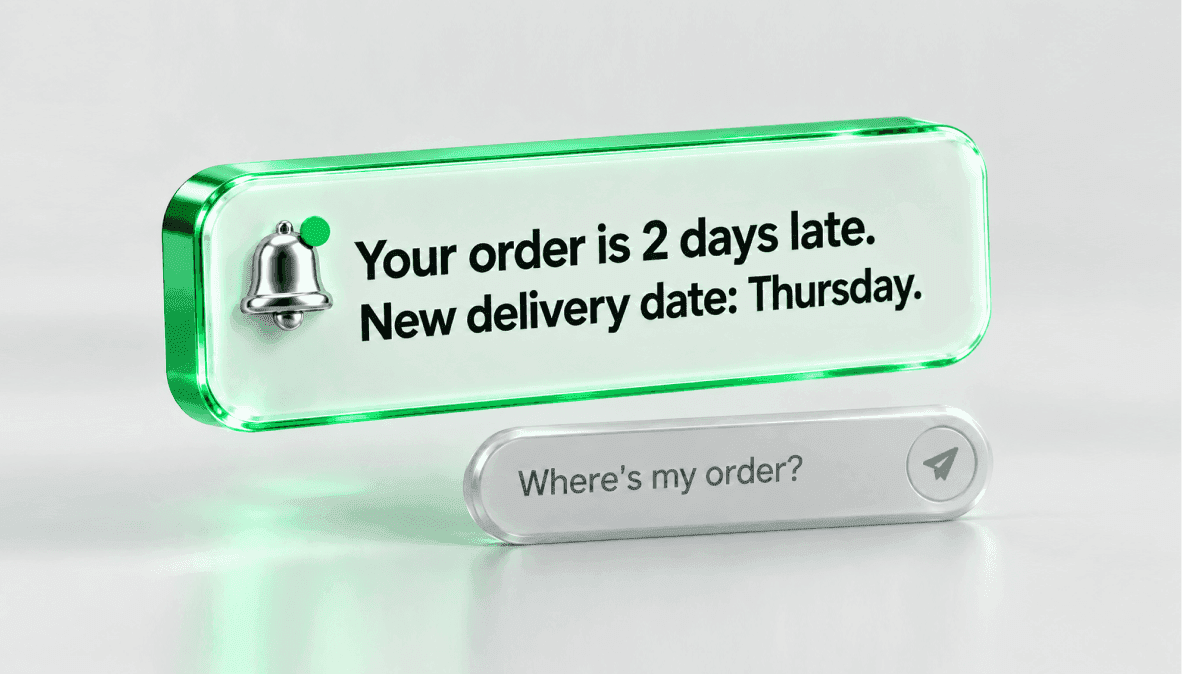
Proactive customer service means the company moves first. It fixes a problem, warns about it, or walks the customer past it before anyone opens a ticket. There are three types: prevent, notify and guide. Few customers get it, mostly because a person reaching out to every customer costs too much. AI changes that math: in the example below, the bill for one delay notice drops from $10,296 to $4,033 when AI answers first.
The gap is wide. In a 2019 Gartner survey of more than 6,000 customers, only 13% reported receiving any type of proactive customer service. Gartner's release on that research tied proactive service to "a full point increase" in Net Promoter Score, customer satisfaction, customer effort and value enhancement scores, without naming the scale (Gartner, 2020).
And customers expect it. Deloitte Digital's 2026 Global Contact Center Survey, cited in its Future of Service report, found that 77% of consumers expect companies to anticipate and solve problems before they reach out (The Future of Service, 2026).
Proactive vs reactive customer service
Reactive service waits for "Where's my order?". Proactive service sends the new delivery date before anyone asks.
The proactive version starts on your side. A signal shows up: a spike in one topic, a failed payment, a delayed shipment, a setup step nobody in the account has finished. You act on it before the customer has to.
Most teams run both: reactive for what nobody could see coming, proactive for what you can.
| Reactive customer service | Proactive customer service | |
|---|---|---|
| Who moves first | The customer | The company |
| Trigger | A ticket, chat, email or call | A signal: a topic spike, an outage, a failed payment, a stalled onboarding step |
| Typical example | "Where's my order?" | "Your order is 2 days late. Here's the new date and your options." |
| Where the cost sits | Every contact, handled one by one | Spotting the signal, then answering the replies |
| What you measure | Response time, resolution rate, CSAT | Avoided contacts, contacts after outreach, resolution on follow-ups, opt-outs, repeat contacts |
Why proactive service usually stops at the top accounts
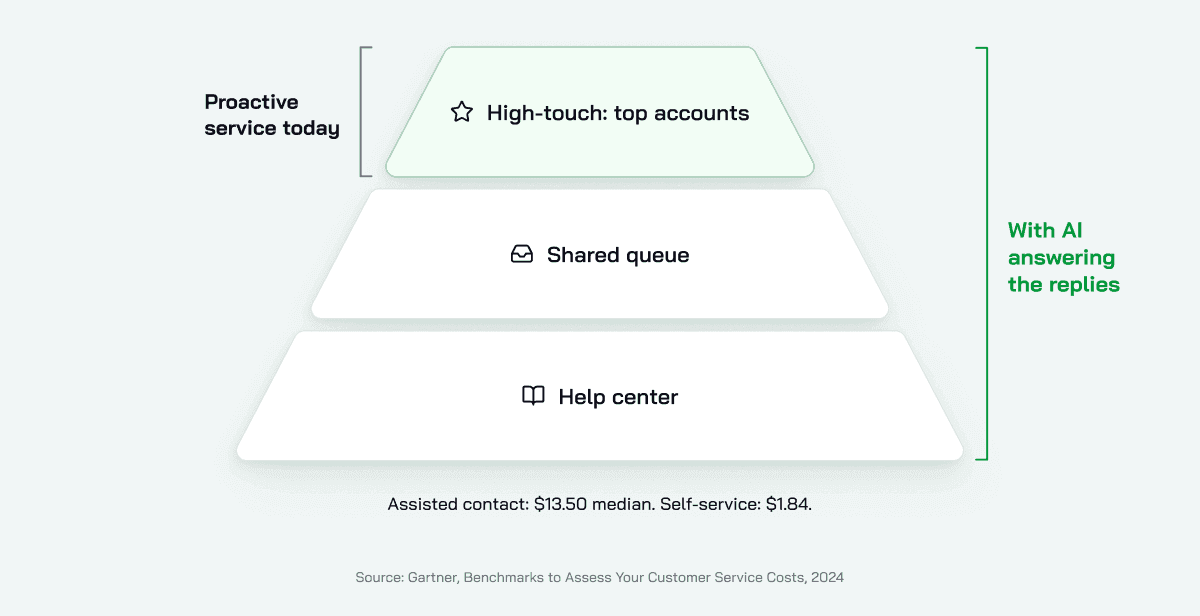
Human contact is expensive, and proactive service runs on it. Gartner puts the median cost of an assisted contact (phone, chat or email) at $13.50, against $1.84 for self-service (Gartner, 2024).
Now picture an account manager who checks in before renewal, spots a stalled setup and calls about it. Say you can pay for that on your 50 biggest accounts. On the next 5,000, you probably can't.
A common setup is a pyramid. High-touch at the top. A shared queue in the middle. A help center for everyone else. Below the top tier, service is reactive by design: the long tail gets help after it asks, and only then.
The pyramid is a cost decision. It says nothing about which customers would benefit. Take the cost of reaching out and answering the replies down far enough, and the same care that top accounts get becomes affordable for the rest.
The three types of proactive customer service
Each type answers one of three questions. Can the cause be removed? Can people be told first? Can they be walked past the next stall?
| Type | What you do | Signal that triggers it | Example | Who owns it |
|---|---|---|---|---|
| Prevent | Remove the cause so the contact never happens | Top contact drivers, repeat contacts on one issue | Customers keep asking why a charge shows twice. A line on the receipt explains the pending authorization, and the question stops coming | Support finds it, product or billing fixes it |
| Notify | Tell affected customers before they discover the problem | A spike in one topic, an outage, a delay, a failed payment | A sync bug hits one integration. Affected accounts get a note with the workaround and the next update time | Support with engineering |
| Guide | Walk a customer to the next step before they stall | A setup step left undone, an unused feature that fits their work, a plan limit coming up | A new account hasn't connected its data source after 3 days. One message offers the 2 steps left and answers the reply | Support, success and product |
Prevent: remove the top contact drivers at the source
A ticket that never gets created costs nothing. Prevention starts when someone stops working the next ticket and looks at the whole queue.
A monthly loop that works:
- Pull last month's contacts by topic. Rank them by volume and by time spent.
- Take the top driver to the team that owns its cause: billing, product, logistics.
- Fix the cause there. A confusing screen, a missing email, a policy nobody explained.
- Update the help content and the AI agent's knowledge the same day, so the answer matches the fix.
- Check the topic's volume a month later.
Expect the cause to sit outside support. McKinsey put it plainly: the root cause may reside somewhere outside the call center (McKinsey, 2017).
Support sees these patterns first. That makes the support lead the person who brings them to the teams that can fix them. More on that loop in how AI feedback loops improve support.
Notify: treat a ticket spike as an alarm
Your inbox is the earliest sensor you have. When 40 people ask about the same broken thing within an hour, you have an incident, whether or not your alerting caught it.
A notify checklist, in order:
- Watch contact volume by topic and set a threshold for "unusual".
- When it trips, define the issue: what's broken, since when, who's affected.
- Ask which agent already closed one of these tickets, and reuse the fix.
- Open or update the engineering ticket.
- Message the affected customers: what happened, the workaround, when they'll hear from you next.
- Put the same answer into the help content and the AI agent before the message goes out.
Step 6 decides the cost. Gartner's 2022 survey found that 66% of B2C and 82% of B2B customers contact the company after receiving proactive outreach. 10% of B2C and 24% of B2B customers followed up only to confirm the message wasn't a scam (Gartner, 2022).
A notice creates contacts. Decide who answers them before you hit send.
Guide: walk customers past the next stall
Take the new account that hasn't connected its data source after 3 days. Nobody has complained yet. That's a guide signal, and most of them are this quiet: a setup step left undone, a feature that fits the customer's work but hasn't been opened, a plan limit getting close.
A good guide message is a conversation. It asks what the customer is trying to do, offers one next step, and answers the reply. A link to a help article often doesn't finish the job, because the customer still has to find the right step on their own.
If you support a SaaS product, this is where onboarding and adoption live. More on that in AI for SaaS customer support.
Where proactive customer service backfires
Outreach costs attention, and customers notice when you spend theirs badly. It goes wrong in three ways.
It reads like a sales message. In a field experiment at a telecom company, customers who got a pricing-plan recommendation they hadn't asked for churned more: 10% in the following three months, against 6% in the control group (Ascarza, Iyengar and Schleicher, Journal of Marketing Research, 2016).
It leaves the next question open. Gartner's 2022 research on proactive outreach found that clear directions and confidence in the next step did the most to cut customer effort, and that outreach about issues customers saw as urgent, like a fraud alert, earned better effort scores than letting them discover the issue alone.
It hides the person. Treat an AI-sent message with no way to a person as a dead end. Every message needs a visible path to someone who can decide.
The rules that follow from this:
- Reach out when the issue is urgent for the customer, or when you know it affects them.
- One message, one issue, one clear next step.
- Answer the reply in the same thread, by whoever can close it.
- Keep a person one step away.
- Track opt-outs by message type and retire the messages people mute.
How to measure proactive customer service
Response time and CSAT alone tell you how you handled the contacts that arrived. This work also needs measures for the contacts that didn't.
| Metric | What it tells you | How to read it |
|---|---|---|
| Avoided contacts per topic | Whether a prevent fix worked | Contacts on the topic per 1,000 customers, before and after the fix |
| Contact rate after outreach | Whether the message answered the question | Share of notified customers who still wrote in. The 66% (B2C) and 82% (B2B) figures above are a reference point |
| Resolution rate on follow-ups | Whether the replies got closed on first contact | Resolved follow-ups divided by all follow-ups to the message |
| Repeat-contact rate | Whether the cause is really gone | Customers writing about the same issue twice within 7 days |
| Opt-out or mute rate | Whether people see the outreach as noise | By message type, week over week |
| Effort or CSAT, notified vs not notified | Whether outreach helped at all | Same issue, two groups, compared side by side |
For the cost side of slow, reactive support, see the hidden cost of slow support.
How AI makes proactive service work for every customer
Two costs kept proactive service at the top of the pyramid: spotting the signal, and answering the replies. The message itself still comes from your team or your messaging tools. AI helps on both sides of it, most of all with the replies.
Spotting. An AI agent on your first line reads every conversation as it arrives, and your team can audit any of them, so a repeat question shows up in the transcripts while it's still happening.
Answering. This is where the money goes. Here's the math for one notify message. It uses Deloitte Digital's 2026 average of $7.80 per assisted contact at large B2C companies (2026 Global Contact Center Survey) and Gartner's 66% follow-up rate for B2C customers. Deloitte's average is lower than Gartner's $13.50 median, so the saving below is the smaller estimate.
Say a delivery delay hits 2,000 customers. You notify all of them, and about 1,320 write in.
| People answer every reply | AI agent answers first, people take the rest | |
|---|---|---|
| Replies resolved by AI (65%) | 0 | 858 × $0.50 = $429 |
| Replies handled by people | 1,320 × $7.80 = $10,296 | 462 × $7.80 = $3,604 |
| Total for one message | $10,296 | $4,033 |
The 65% is the middle of the 60% to 70% that CoSupport AI Agent typically resolves in the first 60 days, across all ticket types. For replies to one notice, your number depends on the topic and on how complete the workaround is. The AI column counts only resolved replies.
Here's what CoSupport AI Agent does with each reply. It understands customer intent, responds using your knowledge base and business systems, and answers in the customer's language, across 60+ supported languages (120+ compatible). When the reply needs an action, like an order update, a refund or an account change, it takes it. What it can't close goes to your team with the full transcript and a summary of what it found and did. You pay $0.50 only when the AI resolves a ticket. Escalated tickets cost nothing.
Freeing people for the work that moves first. Once the first line runs on AI, the hours that come back can go to the monthly driver review from the prevent loop, and to the onboarding call for the account that stalled. Automating the repetitive first line is covered in customer service automation, and replies in the customer's language in multilingual customer service.
Where to start
- Pull 90 days of contacts by topic and pick your top 5 drivers.
- Run one prevent project on driver number one, with the team that owns the cause.
- Set one notify trigger: a volume threshold on a topic, plus a message template with the workaround and a path to a person.
- Pick one guide signal, usually the onboarding step most new accounts skip.
- Load the answers into your help content and your AI agent first. Then send.
- After 30 days, read the metrics table above.