.png&w=96&q=75)


 22
22
AI can transform customer support by automating repetitive tasks, reducing delays, and improving efficiency. Here's what we discovered while scaling AI in Zendesk:
- Faster Ticket Handling: Automating triage saved 30–60 seconds per ticket by identifying intent, language, and sentiment, cutting response times significantly.
- Improved Self-Service: Connecting AI to a well-maintained knowledge base helped deflect up to 47% of tickets, allowing customers to resolve common issues without agent involvement.
- Agent Productivity Boost: Tools like automated summaries and suggested replies reduced resolution times - from 2 hours to just 6 minutes in some cases - while maintaining accuracy.
- Gradual Deployment Works Best: Starting small with tools like triage and agent assistance, then scaling to customer-facing AI, ensured smooth implementation and fewer errors.
- Data Integration is Key: Unified systems provided AI with the complete context needed for accurate responses, avoiding generic or incorrect answers.
How to be successful with Zendesk AI agents - Essential | Zendesk Customer Success
sbb-itb-97114f1
The Challenges of Deploying AI in Zendesk at Scale
At first glance, deploying AI in Zendesk might seem straightforward. But when you factor in thousands of support tickets, scattered data, and pressing team demands, the real obstacles emerge. Three key challenges consistently arise, slowing progress and preventing teams from unlocking the full potential of AI. Let's dive into these hurdles, starting with the technical setup.
Setup Complexity and Delayed ROI
The technical setup often becomes the first stumbling block. Many support teams juggle a mix of outdated systems, custom databases, and third-party tools that don’t integrate well. This lack of synchronization fragments workflows, creates duplicate tickets, and increases the burden of ongoing maintenance. In fact, 37% of automation projects fail due to high implementation costs - and the pattern is all too familiar.
Consider Mission Produce’s ERP rollout in 2025. The project ran nearly $4 million over budget because its complexity was underestimated. The company also lost critical visibility into key metrics and faced a nine-month delay. These kinds of setbacks don’t just postpone ROI; they disrupt the quality of customer service. When systems fail to connect properly, AI lacks access to the data it needs, stretching ROI timelines from weeks to months.
Maintaining AI Accuracy and Avoiding Hallucinations
Accuracy is another major challenge. Research shows that general-purpose chatbots can "hallucinate" - or provide incorrect information - up to 27% of the time, and 91% of organizations report concerns about ensuring proper data usage. Without safeguards, AI can fabricate answers when it encounters gaps in its knowledge.
Air Canada experienced this firsthand when their AI chatbot gave a customer incorrect details about bereavement refunds. The misinformation led to a legal tribunal ruling against the company. This incident highlights a critical point: AI accuracy isn’t just a technical issue - it’s a matter of trust and liability.
"It's also essential to address business risks such as biases in customer data, AI-generated errors or 'hallucinations,' and employee reservations about new technologies." - Cristina Fonseca, Head of AI, Zendesk
Next, let’s look at how data silos can further undermine AI’s effectiveness.
Breaking Down Data Silos for Better AI Performance
Fragmented data is a major roadblock for AI. When your knowledge base exists in one system, order history is stored in Shopify, and subscription details are managed in a separate billing platform, AI struggles to piece everything together. The result? Generic responses that fail to address customer needs.
For example, AI-driven intelligent triage has the potential to save an average of 45 seconds per ticket compared to manual sorting. But this efficiency is only possible when AI has a complete view of the customer. Without access to CRM data, purchase history, and product usage insights, AI operates in the dark, leading to unhelpful, one-size-fits-all answers that miss the mark.
What We Learned from Scaling AI in Zendesk
When we rolled out AI at Zendesk, the journey taught us three key lessons that bridged the gap between slow progress and immediate results. These insights, drawn from handling thousands of support tickets, helped us turn theory into action and significantly boost support efficiency.
Lesson 1: Speed of Deployment Matters
Getting AI up and running quickly proved essential for driving results. Traditional methods often relied heavily on developer support, creating bottlenecks. But in March 2025, Zendesk's support team embraced a new approach with agentic AI.
Austin Lacey, Zendesk’s Director of Chatbots, AI & Automation, shared how this shift transformed their process:
"Using our AI agent builder, we simply describe business procedures in natural language and the AI agent is ready to go. No flows, no code, no developer support needed."
This streamlined approach allowed Zendesk to automate over 60,000 service requests per quarter, including 2,000+ complex cases that previously required human input. The takeaway? Start small, test incrementally, and refine as you go to avoid unnecessary rework.
Lesson 2: Focus on Ticket Deflection and Self-Service
Once deployment was underway, the next priority was reducing routine ticket volume. The biggest gains came from automating repetitive, high-volume tickets. By linking AI to a well-organized knowledge base, we managed to automate over 10% of all support interactions with minimal setup.
Before launching AI agents, it’s crucial to optimize your help center with up-to-date FAQs and clear documentation. Liberty London applied this strategy in 2025 and saw impressive results: a 73% drop in first reply time and a 9% increase in customer satisfaction. AI classified and directed conversations based on customer intent, making the process faster and more efficient.
Ideal starting points for automation include password resets, order tracking, and basic troubleshooting. These use cases not only show AI’s potential but also deliver measurable reductions in ticket volume while improving customer experience.
Lesson 3: Integrate AI Into Existing Zendesk Workflows
The final step was embedding AI into the agents’ daily routines. We discovered that integrating AI into existing workflows - not replacing them - produces better outcomes. For example, intelligent triage can save 30 to 60 seconds per request by identifying intent, sentiment, and language, then routing tickets to the right agent instantly.
NEXT, a retailer, tested this approach in 2025 by equipping their email support team with AI tools. The results were clear: an 11% reduction in average handle time and a 4-point improvement in service quality. AI didn’t disrupt their workflow; it enhanced it, making processes faster and more accurate.
We also balanced generative AI’s flexibility with structured controls. Generative responses worked well for general troubleshooting, while scripted "hybrid flows" handled high-stakes tasks like fraud prevention or data exports. This combination ensured accuracy while scaling support for complex queries.
"Agentic AI has opened the door to use cases we simply couldn't support before... It's a level of scalability we never would be able to achieve with traditional flows." - Austin Lacey, Director, Chatbots, AI & Automation at Zendesk
Real Results: How AI Improved Zendesk Support Metrics
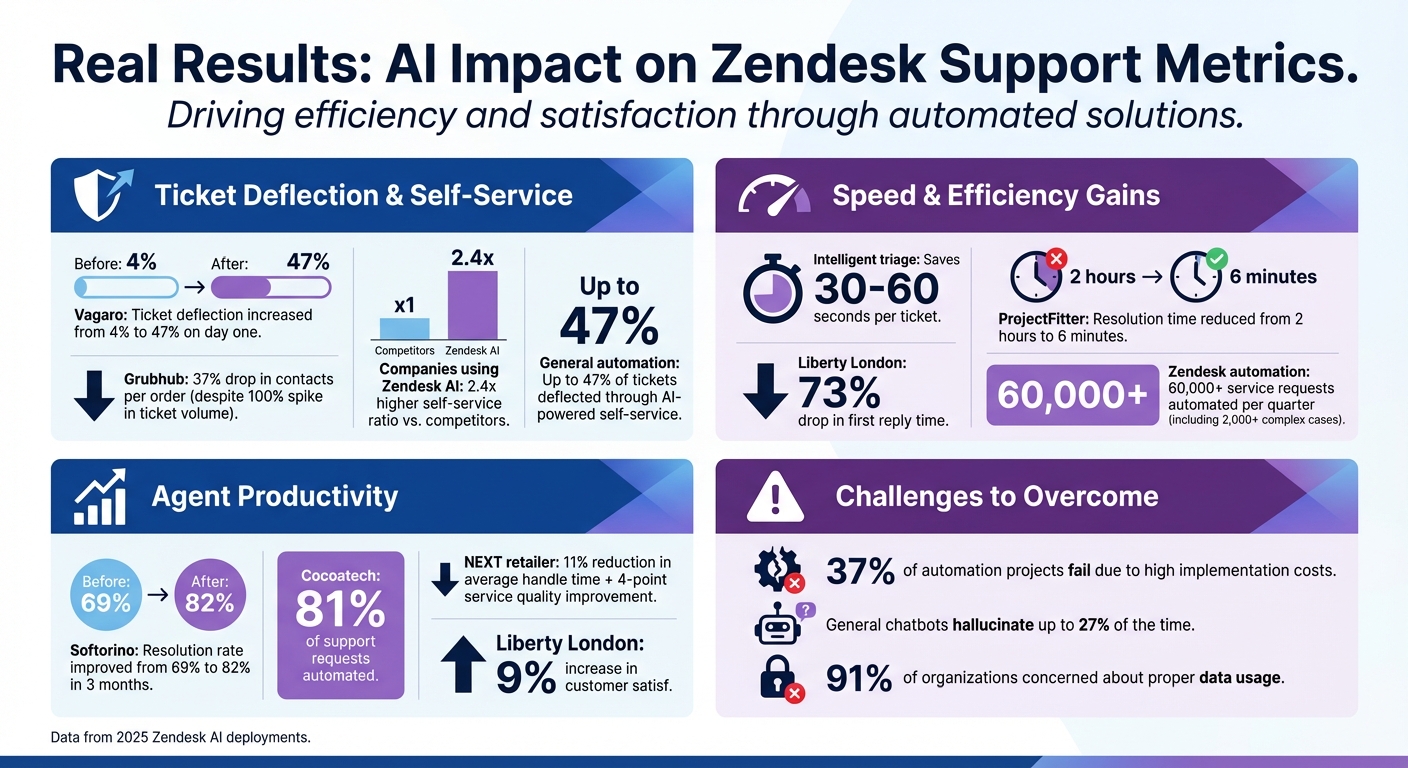
AI in Zendesk: Key Performance Metrics and Results
By focusing on rapid deployment and integrating workflows, fast-growing teams using Zendesk AI have seen measurable improvements in support performance. The data isn't hypothetical - it represents actual results from teams that adopted AI automation in 2025.
Faster Response Times Through Intelligent Triage
Intelligent triage transformed ticket handling by automatically detecting intent, language, and sentiment. This eliminated the need for manual sorting, cutting down handling times significantly. When scaled across thousands of requests, these time savings became substantial.
Take Vagaro, for example. After deploying a Zendesk AI agent connected to their knowledge base, their ticket deflection rate skyrocketed from 4% to 47% on the very first day. The AI instantly resolved common inquiries, allowing agents to focus on more complex cases that required a human touch.
This efficiency boost not only sped up response times but also laid the groundwork for reducing overall ticket volume and improving agent productivity.
Reduced Ticket Volume with AI-Powered Self-Service
Self-service emerged as a powerful tool for cutting down ticket numbers. For instance, Grubhub faced a 100% spike in ticket volume but managed to implement automated workflows for tasks like order changes and refunds. The result? A 37% drop in contacts per order. Customers quickly found the answers they needed without having to involve support agents.
Companies leveraging Zendesk AI achieved a self-service ratio that was 2.4 times higher than their counterparts. The key to this success? Connecting AI tools to well-maintained knowledge bases, enabling customers to resolve issues independently.
While self-service reduced ticket numbers, AI also helped agents work faster and more effectively on the remaining cases.
Better Agent Productivity and Lower Workload
AI didn’t just reduce the volume of tickets - it also made agents more efficient at resolving the ones that remained. Features like automated case summaries allowed agents to quickly review issues, while suggested replies enabled professional responses in less time.
The impact was dramatic. ProjectFitter slashed their average ticket resolution time from 2 hours to just 6 minutes after integrating AI into their workflow. Similarly, Softorino improved their resolution rate from 69% to 82% within three months. Meanwhile, Cocoatech automated 81% of support requests, significantly easing the workload for their team.
These outcomes highlight the importance of speed, self-service, and seamless workflow integration in modern support systems.
"CoSupport AI takes care of nearly 70 percent of our support tickets and turns tasks that once took hours into minutes. It honestly made our support process so much faster and easier." - Yaro Burgman, Project Manager, ProjectFitter
How to Successfully Deploy AI in Zendesk
After achieving measurable improvements, the next challenge was deploying AI effectively within Zendesk. The approach to deployment proved just as important as the technology itself. Teams that rushed into automation often faced workflow disruptions and accuracy issues. In contrast, those who succeeded took a thoughtful, step-by-step approach.
Start Small and Scale Gradually
Begin by introducing AI in low-risk areas. A good starting point is intelligent triage, which identifies intent, language, and sentiment - saving 30 to 60 seconds per request.
Once you're comfortable with that, move on to agent copilot tools like ticket summaries and suggested replies. These tools speed up workflows while giving you an opportunity to monitor how AI performs. Only after validating its accuracy should you deploy customer-facing AI agents for self-service tasks.
Follow a phased rollout over five weeks:
- Week 0: Optimize your knowledge base.
- Week 1: Launch intelligent triage.
- Week 2: Add agent assistance tools.
- Week 3: Introduce generative replies.
- Week 4: Evaluate and refine.
This gradual approach allows time for testing, adjustments, and building confidence before scaling AI across your operations.
Build in Visibility and Oversight
To maintain control, you need real-time visibility into AI operations. Dashboards are essential - not just for tracking success rates but also for reviewing conversation transcripts and understanding how AI makes decisions.
The Admin Copilot Overview dashboard can help monitor automated resolutions daily during the first month of deployment. Reviewing both successful and unresolved cases will highlight knowledge gaps or tone issues before they impact the customer experience.
For sensitive tasks like refunds or account changes, implement a human-in-the-loop model. In this setup, AI drafts responses, but a human agent reviews and approves them before execution. This ensures accuracy while still saving time.
"This balance - scalable where it needs to be, controlled where it matters - has helped us scale support without compromising quality or consistency." - Austin Lacey, Director, Chatbots, AI & Automation at Zendesk
Combining real-time oversight with seamless integrations ensures a smooth and reliable deployment process.
Use Unified Tools and Integrations
Fragmented systems can slow adoption and introduce errors. Teams that rely on tools natively integrated with Zendesk avoid these pitfalls. Native integrations eliminate the need for manual data transfers, ensuring AI works with up-to-date information. They also make setup faster - some implementations are ready in under 10 minutes instead of weeks.
For example, CoSupport AI connects directly to Zendesk, syncing your knowledge base automatically. It trains on your helpdesk content, uses reinforcement learning to maintain accuracy, and offers full visibility into every AI decision. Teams using CoSupport AI have reported cutting resolution times from hours to minutes, all while maintaining high-quality support.
Conclusion: Scaling AI in Zendesk Without Losing Control
Successfully scaling AI within Zendesk relies on balancing speed, precision, and oversight. Starting with smaller implementations, like Zendesk AI or traditional support bots, helps build trust in the system. This approach minimizes disruptions and ensures performance is validated before moving toward customer-facing automation.
Improving AI accuracy begins with well-organized help center content. Short, focused articles (100–500 words, addressing one question each) help reduce errors and improve resolution rates. For example, Cocoatech achieved an impressive 81% autonomous resolution rate by grounding their AI in clean, structured content.
Maintaining visibility is crucial. Tools like real-time dashboards and transcript reviews allow teams to identify and address issues quickly. For sensitive tasks - like processing refunds or making account changes - a human-in-the-loop model ensures AI drafts are reviewed and approved by a person, striking the right balance between scalability and accuracy.
Streamlining processes with native integrations is another game-changer. Solutions like CoSupport AI integrate in under 10 minutes, train directly on your content, and provide full decision oversight. This drastically reduces resolution times, transforming hours of work into just minutes.
FAQs
How can AI make Zendesk ticket handling faster and more efficient?
AI transforms ticket handling in Zendesk by taking over repetitive tasks and streamlining workflows. With advanced AI agents, customer inquiries from channels like email, chat, and web forms can often be resolved without human involvement. These agents tap into your existing content to craft accurate and relevant responses, freeing up time spent on routine requests.
Beyond handling tickets, AI can manage entire workflows, perform backend actions, and adjust to customer needs in real time, which helps speed up resolutions. It also enhances team efficiency with tools like sentiment analysis, ticket summaries, and proactive suggestions. This allows agents to focus on more complex issues while AI manages simpler ones, leading to faster responses, greater support capacity, and consistently high-quality interactions with customers.
What are the main challenges of deploying AI at scale in customer support?
Deploying AI at scale in customer support isn't without its challenges. One major hurdle is ensuring accuracy and reliability in AI-generated responses. As AI systems take on increasingly complex customer inquiries, there's always the chance of providing incorrect or irrelevant answers. These missteps can negatively impact customer satisfaction. To counter this, regular testing and incorporating feedback are critical for refining the AI's performance.
Another significant challenge lies in integrating AI into existing workflows. This process demands thoughtful planning, which includes training the AI with relevant data, defining clear goals, and making sure the system fits seamlessly with your team's processes. Without this groundwork, the introduction of AI could disrupt operations rather than streamline them.
Lastly, scaling AI systems presents its own technical obstacles. Tasks like configuring multiple channels, fine-tuning content, and keeping tabs on performance over time require ongoing attention. Regular reviews and adjustments are key to ensuring the AI adapts to evolving support needs while consistently delivering high-quality outcomes.
Why is it important to roll out AI in Zendesk gradually?
Rolling out AI in Zendesk step by step is a smart move because it lets you test and adjust the system before going all in. Starting small - like using a sandbox or staging environment - helps catch and resolve problems, such as inaccurate responses or workflow hiccups, without disrupting your live support operations.
Taking this gradual approach also gives your team the chance to track AI performance, collect feedback, and make improvements incrementally. By easing into the process, you minimize the risk of overwhelming your agents or frustrating your customers with unexpected errors. This method keeps your support quality intact and ensures customer satisfaction while making the AI integration process much smoother.
.png&w=128&q=75)


.png&w=96&q=75)
.png&w=3840&q=75)
