.png&w=96&q=75)


 119
119
AHT tells you how long support contacts take, but it does not tell you if customers got the right fix. If you only push AHT down, you can end up with more reopened tickets, lower CSAT, and agents who close cases too fast.
Here’s the short version:
- AHT = contact time + hold time + wrap-up time, divided by total contacts
- Low AHT is not always good if answer quality drops
- Channel matters: phone, chat, and email should not share one blended target
-
AI changes AHT in two ways:
- Agent assist cuts search, drafting, and note-taking time
- Autonomous resolution keeps routine tickets out of human queues
- Human AHT can go up after AI rollout because agents are left with harder cases
- You should check AHT next to quality and cost metrics, like QA Accuracy, Recall, token use, and LLM cost per ticket
A few numbers from the article make the point fast: phone AHT is often about 6 minutes, live chat about 10 minutes, and one team cut first response time from 2 hours to 6 minutes. Another now resolves 50% of incoming tickets with AI before an agent touches them.
| Area | What to watch |
|---|---|
| AHT | Time spent per contact |
| Quality | QA Accuracy, Recall, reopen rate, CSAT |
| Cost | Cost per contact, LLM cost per ticket |
| AI impact | Less lookup time, less wrap-up work, fewer routine tickets for agents |
My takeaway: use AHT as a workload and cost signal, not as the only score that matters. If time drops and quality stays steady, that’s progress. If time drops and resolution gets worse, the number is hiding a problem.
That’s the lens I’d use for the rest of this article.
What average handle time measures, and what it misses
Average handle time is the average time spent on each customer contact, from the first interaction to the last bit of wrap-up work. It’s a handy metric for tracking speed. But on its own, it doesn’t tell you whether the issue was solved well.
The AHT formula in customer support
Support teams usually split AHT into three parts:
AHT = (talk or reply time + hold time + after-contact work) / total contacts
In phone support, those parts are talk time, hold time, and after-contact work. In chat and email, talk time changes to reply time.
Why a lower AHT can still be a bad sign
A lower AHT may look good in a report, but it only shows how fast the contact moved through the queue. It measures speed, not the whole support experience.
That matters because teams use AHT to plan staffing, set targets, and track cost per contact.
sbb-itb-97114f1
Why AHT matters, and the benchmarks teams compare against
How support leaders use AHT for staffing and cost control
When handle time goes up, each agent gets through fewer contacts in a shift. That means daily capacity falls. And that’s why AHT matters before queue pressure turns into hiring pressure.
There’s also a direct cost angle. Longer handle time pushes up cost per contact, which can hit staffing plans and budgets fast.
Average handle time benchmarks by channel
Benchmarks only help if you’re comparing the same channel and the same ticket mix. A phone contact and an email thread don’t ask for the same kind of work, so putting them in one blended number can muddy the picture.
We look at AHT by channel because each one comes with a different workload:
| Channel | Typical AHT | What drives the number |
|---|---|---|
| Phone | About 6 minutes | Real-time conversation and after-call work |
| Live chat | About 10 minutes | Juggling multiple threads at once |
| Compare thread length and research time, not a blended average | Back-and-forth messages and manual review |
If one channel starts running high, the slowdown usually shows up in a few familiar places: research, repeat contact, or after-contact work. In plain terms, agents may be spending more time hunting for answers, passing cases between teams, or wrapping things up by hand after the contact ends.
What drives high AHT, and where AI changes the number
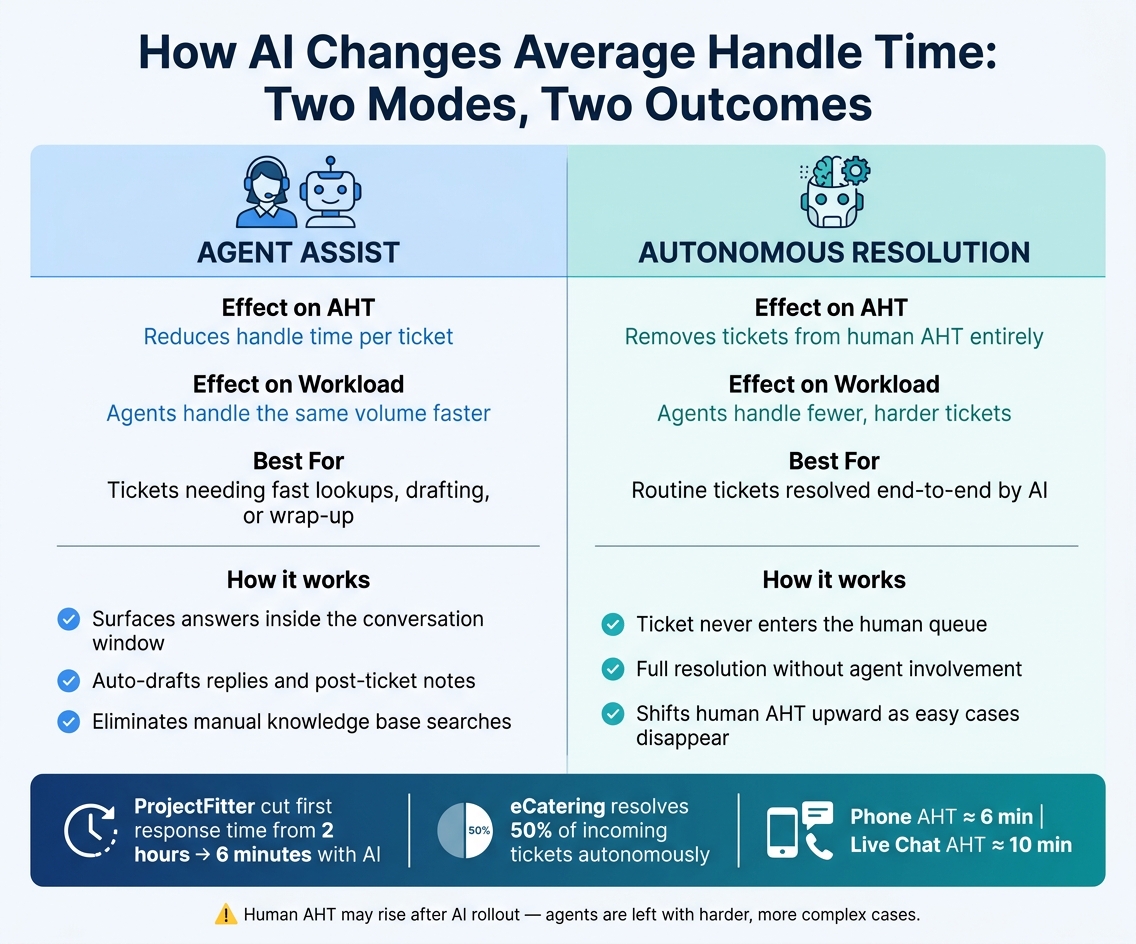
AI vs Human AHT: Agent Assist vs Autonomous Resolution in Customer Support
The biggest causes of long handle time
Once you know what AHT tracks, the next step is simple: figure out where the time actually goes.
In most support teams, handle time grows in the same few spots again and again. Agents lose minutes jumping between tools, hunting for account details, and pulling data by hand. They also spend time copying standard replies, pasting them into chats or emails, and then cleaning them up before sending. After the ticket closes, more time goes into writing notes and summaries.
Escalations make things slower too. If an agent has to bring in another team, the clock doesn't stop. The customer waits, the agent waits, and handle time keeps climbing.
How agent assist cuts lookup time and wrap-up work
Agent assist AI works next to the agent during a live conversation. Instead of digging through a knowledge base by hand, the agent gets the answer right inside the conversation window.
This helps most when the delay comes from searching, drafting replies, or writing notes. After-contact work gets shorter too, because the AI can draft summary notes once the ticket closes. That lowers handle time without hurting answer quality.
Put plainly: it helps agents move through the tickets they already own with less drag.
How autonomous resolution removes tickets from agent queues
Agent assist helps with tickets that still land with a human. Autonomous resolution works in a different way: those tickets never make it to the agent queue in the first place.
When AI resolves a routine ticket from start to finish, that contact never enters the human workflow. That's why autonomous resolution changes AHT more deeply than assist tools on their own.
The live results line up with that. ProjectFitter cut first response time from 2 hours to 6 minutes after deploying CoSupport AI.
eCatering now resolves 50% of incoming tickets autonomously on Freshdesk. That shifts AHT by reducing how many tickets agents touch at all.
There is one catch in the reporting. As AI takes care of routine, lower-complexity tickets, the cases left for human agents get tougher. So your agents' AHT can edge up a bit even while the team as a whole is working better.
| AI mode | Effect on AHT | Effect on team workload | Best-fit use case |
|---|---|---|---|
| Agent assist | Reduces handle time per ticket | Agents handle the same volume faster | Tickets that need fast lookups, drafting, or wrap-up |
| Autonomous resolution | Removes tickets from human AHT entirely | Agents handle fewer, harder tickets | Routine tickets that can be resolved end to end |
What most people get wrong about AHT, and what to track beside it
AI can bring AHT down fast. But that number, by itself, doesn't tell you much. What matters is whether the shorter handle time still lines up with good resolution.
What most people get wrong about average handle time
The biggest mistake is treating AHT like the goal instead of what it is: a signal.
When a team pushes too hard on lowering AHT, agents often start closing tickets faster while the quality of the resolution slips. On paper, that can look like progress. In practice, it can mean customers get answers that are rushed, incomplete, or off the mark.
A single blended AHT target also masks the fact that channels work differently. Chat, email, and phone support don't move at the same pace, so one rolled-up number can blur what's actually happening.
Lower AHT only matters when resolution quality holds. Speed without resolution is just a faster way to disappoint customers.
Once you see that AHT can hide weak outcomes, the next move is simple: pair it with checks that show whether the work still holds up.
The metrics that keep AHT honest
Before calling an AI-driven change a win, compare AHT with a small set of quality and cost checks. In our reviews of AI-driven support, we look at QA Accuracy and Recall to make sure speed isn't hurting resolution quality. We also track source-backed confidence tags, token reduction, and LLM cost per ticket.
| Metric | What it flags |
|---|---|
| QA Accuracy | Whether the answer stayed accurate |
| Recall | Whether the right information is found before the reply goes out |
| Source-backed confidence tags | Whether the reply used source data or an inferred link |
| Fewer tokens per ticket | Whether the system uses fewer tokens to do the same work |
| LLM cost per ticket | Whether cost stays under control as volume grows |
That mix gives you a clearer read on what's going on. If AHT drops, QA Accuracy stays steady, and Recall still looks good, that's a much better signal than speed alone. If token use falls too, and cost per ticket stays in line, the picture gets even clearer.
Use AHT as an operating metric, not the only goal
These checks help separate better work from simple ticket churn.
Look at AHT next to QA Accuracy, Recall, source-backed confidence tags, fewer tokens per ticket, and LLM cost per ticket before you judge the result. If speed improves and those quality signals stay steady, that's a good sign. If speed improves while quality slips, the workflow needs another pass.
Support leaders looking at AI should use that same lens. The key question isn't whether tickets are closing faster. It's whether they're getting resolved with accurate information.
See how the AI-powered support should work - start free pilot now.
.png&w=128&q=75)


.png&w=96&q=75)

.png&w=96&q=75)
.png&w=3840&q=75)
