.png&w=96&q=75)

CoSupport AI 2.0: Why AI Customer Support Accuracy Jumped from 74% to 85%
When a customer asks, "Why was I charged twice this month?", a support AI needs to do more than pull the first matching sentence from a knowledge base. It needs to understand the question, find billing policy information, cross-check the account context, and validate the answer before sending it.
Most AI customer support tools don't do that. They do a single search, find the closest match, and reply. It's fast. It's also where most accuracy errors come from.
This article explains what changes when AI thinks in steps rather than guessing in a single pass. And why that shift moved CoSupport AI 2.0's average resolution rate from 74% to 85%.
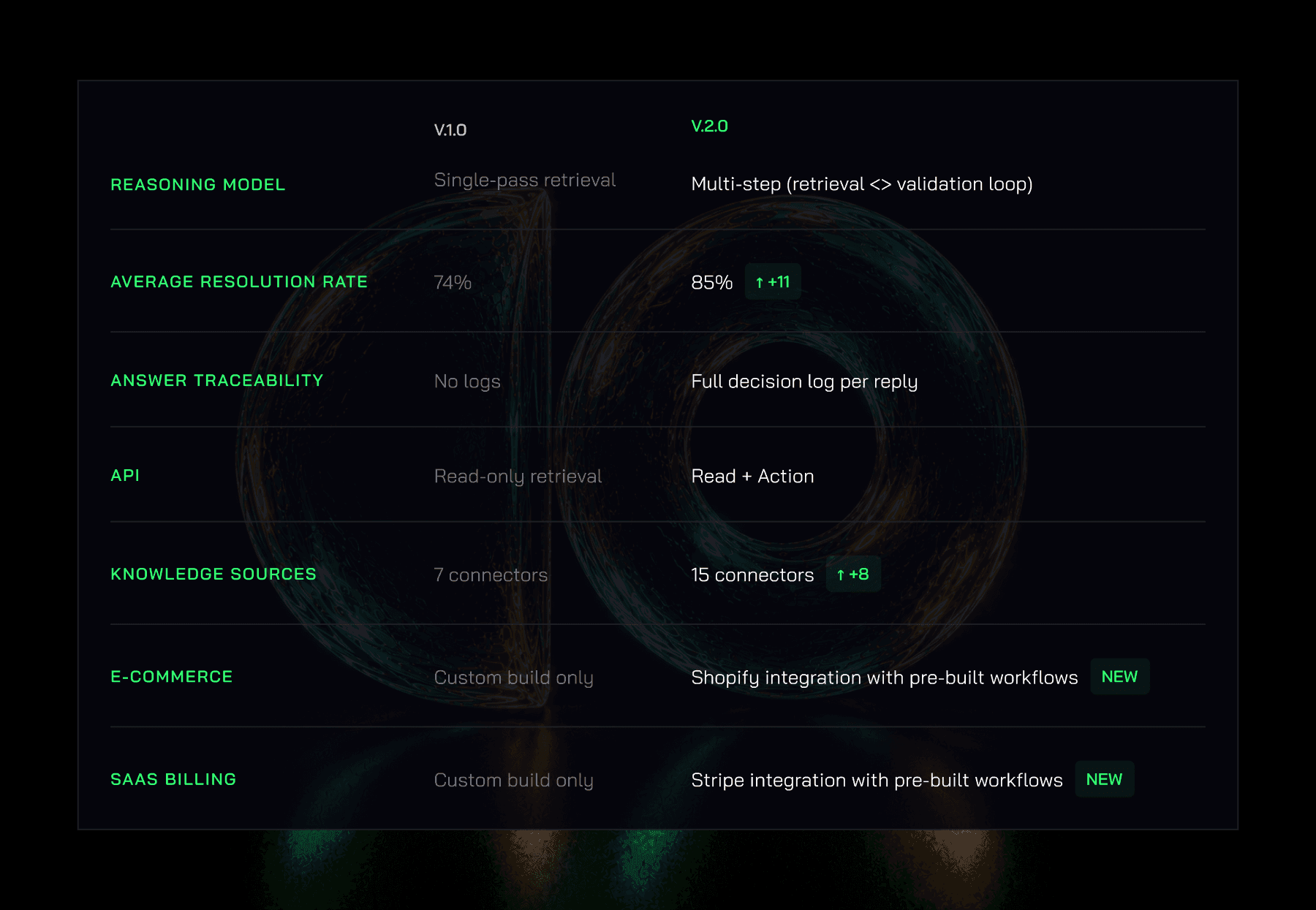
Key takeaways: What's new in CoSupport AI 2.0?
1. Multi-step reasoning — AI searches, analyzes, re-searches, and validates information before responding. Beta users report a 15–20% boost in AI response accuracy on complex tickets.
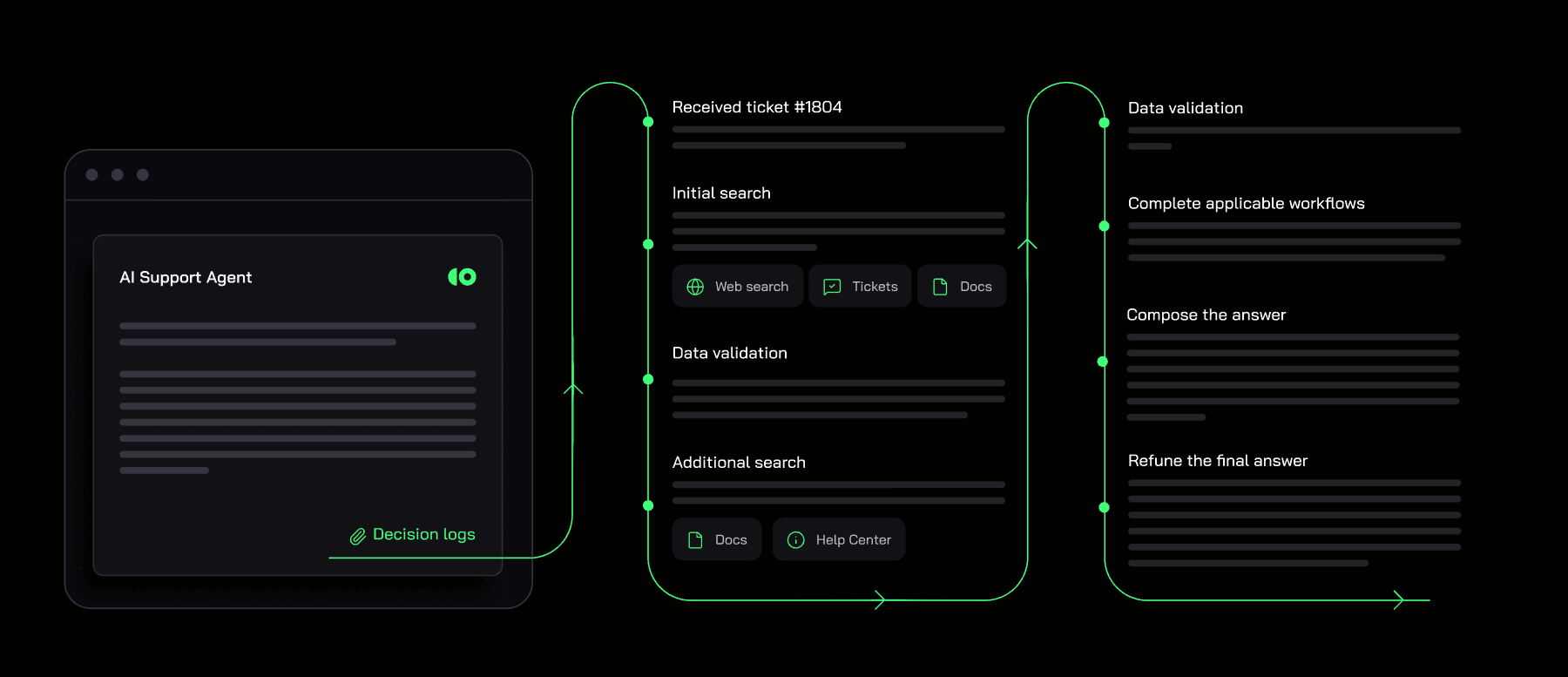
2. Decision logs — every AI-generated reply now includes a full log of the reasoning process, actions taken, and data sources used. Support leaders and QA teams can audit AI behavior ticket by ticket and identify improvement areas faster.
3. Agentic API — AI can now execute actions across external platforms in real time: update orders, cancel subscriptions, process refunds, and retrieve account-specific information. Not just replies — actual resolution.
4. 12 new integrations — including Shopify, Stripe, Notion, Confluence, HubSpot, and Pylon. Total supported connectors moves from 7 in version 1.x to 15 in 2.0.
The Single-Pass Retrieval Problem
First-generation AI customer support works like this:
- Customer sends a message.
- AI searches the knowledge base for the most semantically similar content.
- AI generates a reply based on that content.
The problem is step 2. A single search either finds the right content, or it doesn't. If the customer's question maps cleanly to one document, say, a return policy FAQ, single-pass retrieval works well. But real support tickets are rarely that clean.
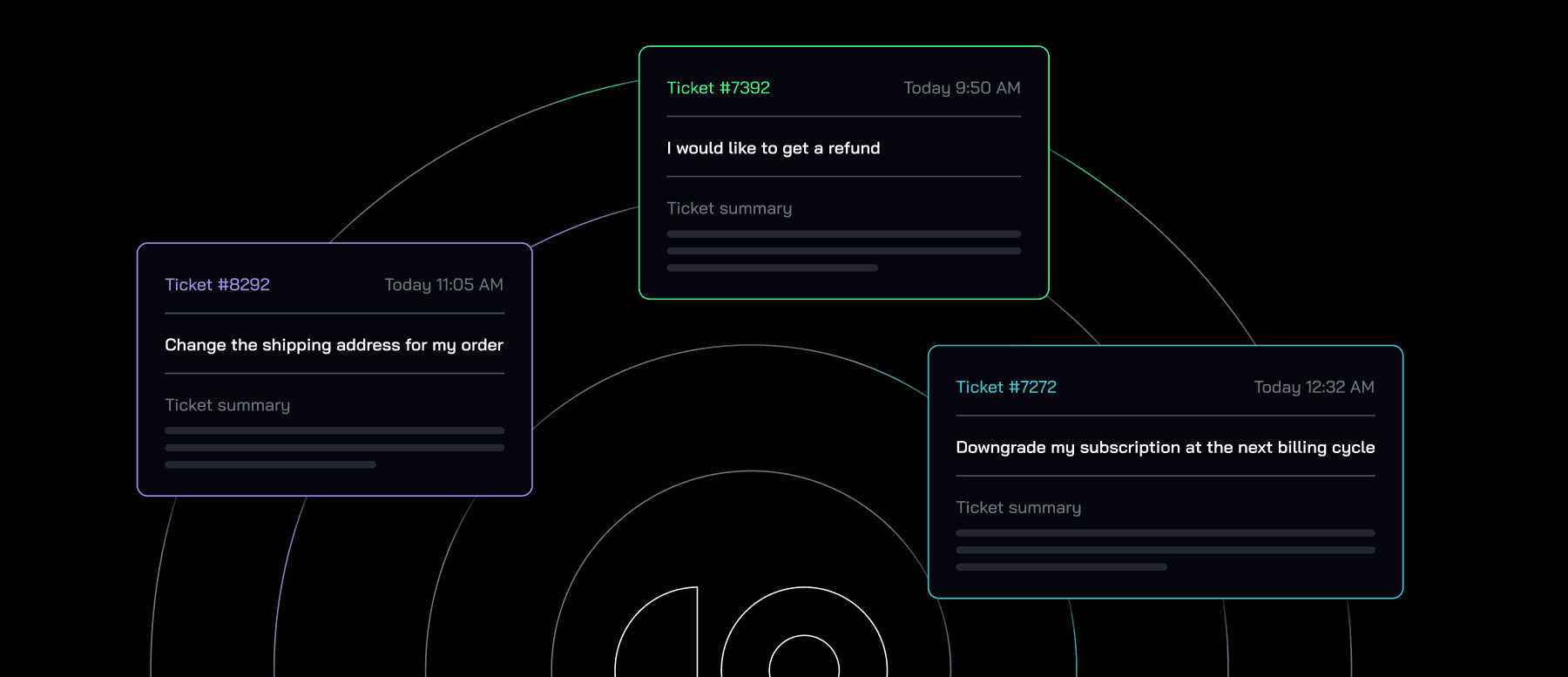
"I need to cancel my subscription, but I was already charged for next month" involves billing, cancellation policy, and refund eligibility, potentially three separate knowledge base sections. A single-pass retrieval typically finds one, misses the others, and generates a partially right reply. That's not a hallucination. It's a gap: the AI answered based on incomplete information because it never looked beyond its first search.
What Multi-Step Reasoning Changes
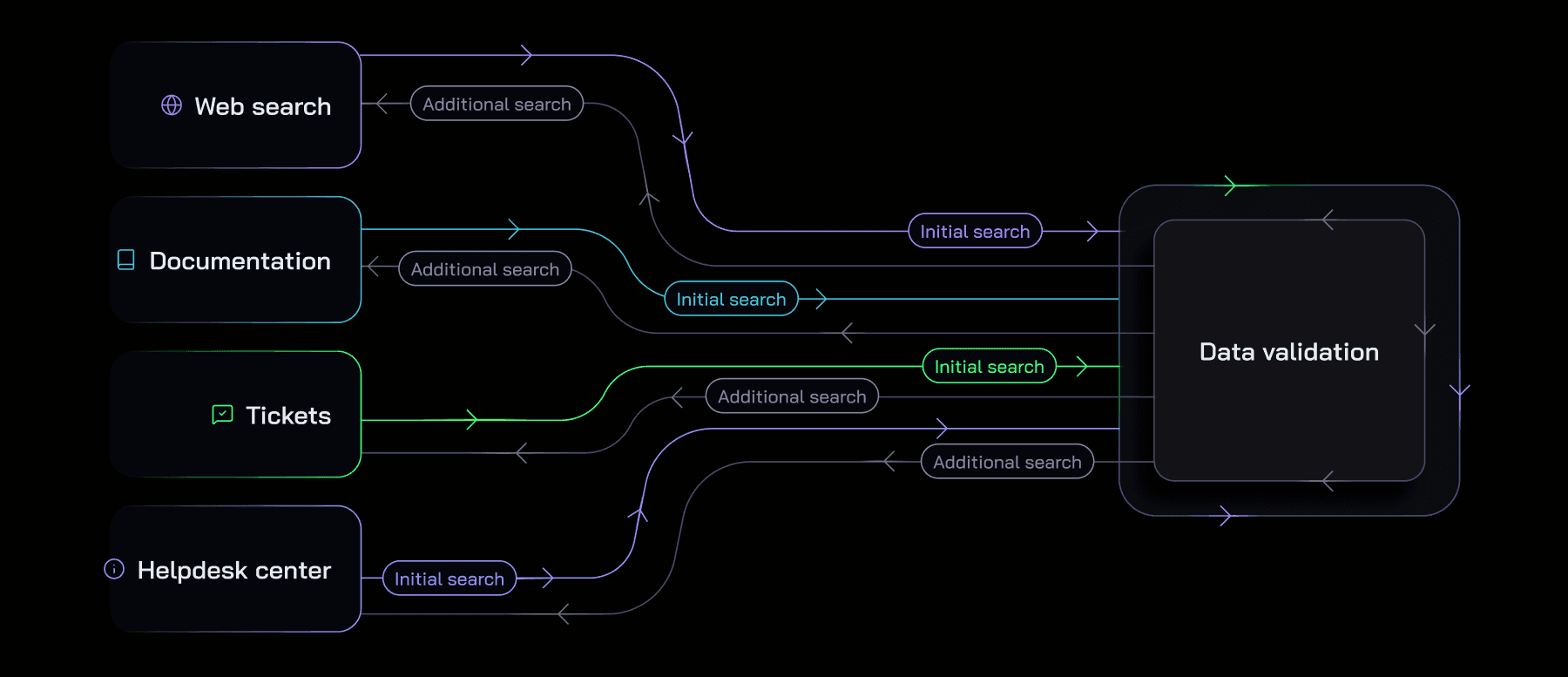
Multi-step reasoning introduces a loop between retrieval and validation. Instead of searching once, the AI:
- Reads the customer message and forms a reasoning plan.
- Searches the knowledge base for the first piece of relevant information.
- Evaluates whether that information is sufficient or whether something is still missing.
- Re-search with a refined query if gaps remain.
- Validates the combined information against the original question.
- Generates the reply only when the reasoning is complete.
It's the difference between a support agent who opens the first FAQ tab and immediately starts typing, versus one who reads the question, checks three sources, and confirms the answer makes sense before hitting send.
The added step takes time: in CoSupport AI 2.0, the average response latency increased from 2.1 to 3.3 seconds. Beta customers accepted that tradeoff without hesitation. When you're handling thousands of tickets a month, a 1.2-second delay per reply matters far less than a 15–20% reduction in wrong answers.
What the Numbers Show
In CoSupport AI 1.0, the average resolution rate across clients was 74%. The 2.0 architecture — built around multi-step reasoning — brings that to 85%.
The improvement isn't uniform across all ticket types. Where it shows up most clearly:
- Complex multi-part questions (billing + cancellation, account + subscription).
- Questions where the customer hasn't provided all the context upfront.
- Cases where the correct answer requires reconciling two pieces of information that don't live in the same document.
For simple, single-topic tickets — "What are your business hours?" or "Where is my order?" — the difference is minimal. Single-pass retrieval handles these well. Multi-step reasoning doesn't make them faster, but it doesn't slow them down meaningfully either.
The improvement focuses on where it matters most: the tickets that would otherwise have been escalated to a human agent because the AI gave an incomplete or slightly incorrect answer.
Why This Matters for Your Team
If you run a support team handling 500+ tickets a month, 74% AI resolution means roughly 130 tickets still land on a human agent every month — not because they're complex, but because the AI lacked enough context to answer correctly.
At 85%, that same queue drops to around 75 tickets. The 55 reclaimed tickets aren't glamorous — they're the ones that were almost handled automatically, but not quite. Multi-step reasoning is specifically designed to catch that gap.
The downstream effect is a support team that spends less time cleaning up partial AI answers and more time on the tickets that genuinely need human judgment. For the complex cases that do reach a human, the AI Assistant drafts replies and summarizes context so agents move faster without starting from scratch.
To Sum Up
Single-pass retrieval was good enough for the first generation of AI support tools. But as AI handles more complex ticket types — billing disputes, subscription changes, product-specific troubleshooting — "good enough" creates more exceptions than it prevents.
Multi-step reasoning doesn't make AI infallible. It makes AI more honest about what it knows before it answers. That's the shift that moves accuracy from 74% to 85%, and from 85% toward the ceiling of what your knowledge base actually supports.
Want to see what it does on your actual tickets? Use the ROI calculator to estimate your savings, then start the pilot — you measure your resolution rate on real traffic before any paid commitment.
.png)


.png&w=828&q=100)
.png&w=96&q=100)
.png&w=828&q=100)
.png&w=96&q=100)