.png&w=96&q=75)


 72
72
AI agents are transforming customer support by handling repetitive tasks, reducing costs, and improving efficiency. Here's why businesses are adopting AI for support and how it works:
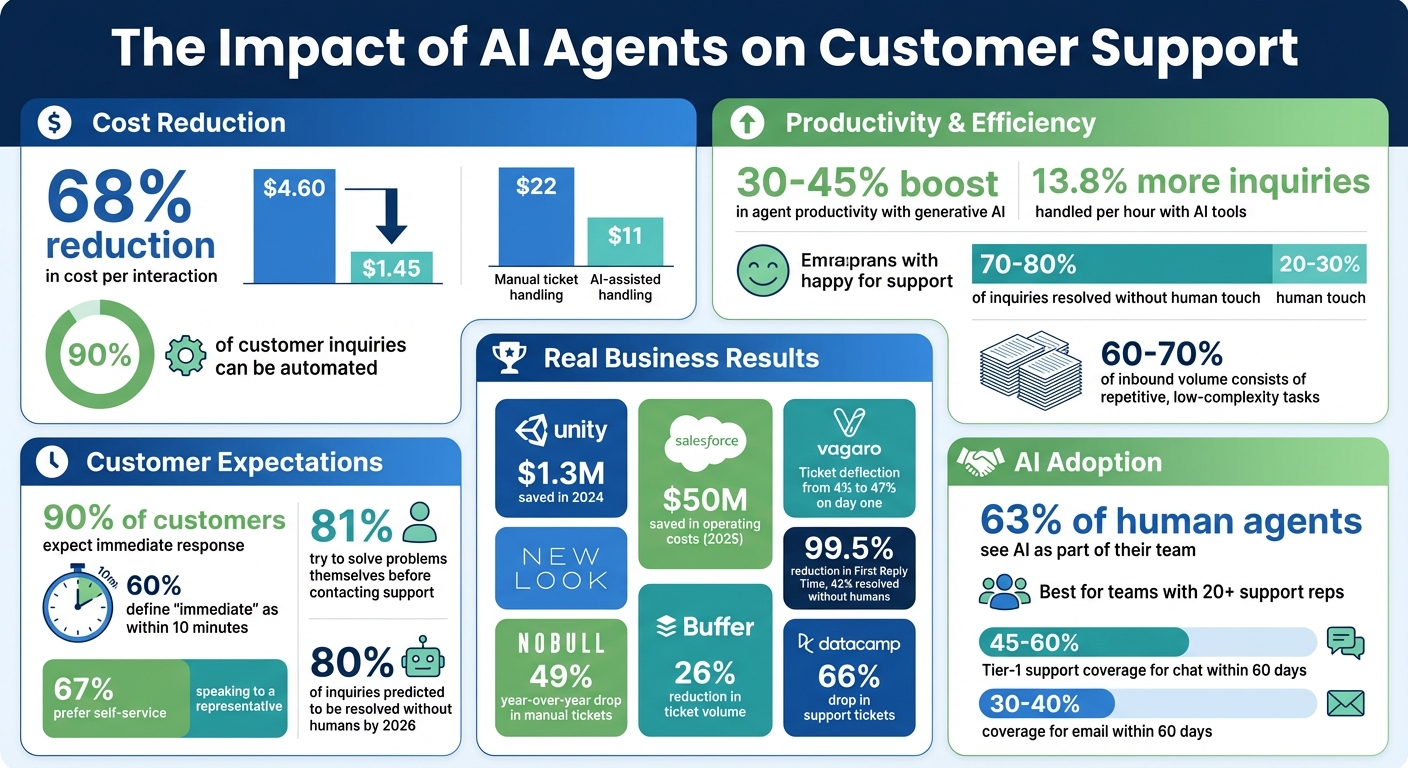
- Cost Savings: AI can reduce the cost per interaction by 68%, from $4.60 to $1.45, and automate up to 90% of customer inquiries.
- 24/7 Availability: Unlike human agents, AI works round-the-clock without the expense of night shifts or global staffing.
- Improved Efficiency: AI handles thousands of interactions simultaneously, freeing human agents for complex tasks.
- Proven Results: Companies like Vagaro and Grubhub saw immediate improvements in ticket deflection and contact reduction after implementing AI.
AI agents excel at automating simple, repetitive tasks like password resets and order tracking. Platforms like CoSupport AI make it easy to deploy AI agents by training them on existing helpdesk content.
To succeed with AI, businesses must:
- Identify repetitive tasks suitable for automation.
- Ensure you build a knowledge base ready for AI to support accurate responses.
- Implement clear escalation paths for human handoffs.
- Continuously monitor and improve AI performance.
AI Customer Support: Cost Savings and Efficiency Statistics
Common Challenges When Scaling Customer Support
Why Traditional Hiring Gets Expensive
Adding more agents to your team isn’t cheap. You’ve got salaries, benefits, training, office space, hardware, software licenses - the list goes on. And when employees leave, replacement costs pile up fast, not to mention the time it takes for new hires to reach full productivity.
The traditional approach to hiring means that if customer inquiries double, you’re likely doubling your workforce just to keep up. But this model isn’t sustainable. High turnover and burnout, often caused by repetitive tasks, make things even worse. For perspective, manually handling a support ticket costs about $22, while automating or using AI assistance cuts that down to around $11 per ticket.
How Manual Workflows Create Bottlenecks
Relying on manual processes slows everything down. Agents often spend too much time on tasks like categorizing and triaging tickets. For example, manually categorizing a single ticket can take 30 to 45 minutes. On top of that, around 35% of tickets are misrouted, leading to delays that frustrate customers.
Take Black Friday as an example. New Look faced a flood of inquiries that created massive backlogs. After introducing AI to handle repetitive tickets, they reduced First Reply Time by an incredible 99.5% and resolved 42% of inquiries without human involvement. Similarly, NOBULL, a fitness brand, struggled with routine questions like "Where is my order?" during influencer campaigns and rapid growth. By deploying AI agents to handle these simpler queries, they saw a 49% year-over-year drop in new manual tickets.
Peak seasons make these bottlenecks even more obvious. Papier, a stationery brand expanding into the U.S., experienced overnight backlogs because it lacked a U.S.-based night shift. Manual workflows couldn’t keep up with demand, and adding 24/7 human coverage would have been too costly. These challenges highlight the need for a solution that scales without breaking the bank. That’s where AI agents shine.
Why AI Agents Help You Scale
AI agents change the game by breaking the link between ticket volume and headcount. Instead of hiring more staff to match rising inquiries, you can automate repetitive, high-volume tasks like password resets, order tracking, or return forms. This frees your human agents to focus on complex, high-priority customer needs.
The efficiency gains are hard to ignore. Generative AI can boost agent productivity by 30–45%, and agents using AI tools handle about 13.8% more inquiries per hour compared to those working manually. For example, Unity saved $1.3 million in 2024 by using an AI agent connected to its knowledge base, eliminating over 8,000 support requests. Similarly, Salesforce saved $50 million in operating costs in 2025 by reallocating 500 customer service employees to other roles during its AI rollout.
"Scaling support is not about deflecting customers. It's about removing wasted effort." - IllumiChat Team
AI also solves the issue of availability. Offering 24/7 human support means costly shifts across multiple time zones, but AI provides round-the-clock service without adding to labor expenses. This makes it easier to handle spikes in inquiries, support global growth, and meet rising customer expectations - all without the financial strain of traditional hiring.
At very high volumes the same logic pushes teams toward dedicated agent platforms. Parloa handles conversations across voice and chat in multiple languages, with tooling to test and tune them.
Platforms like CoSupport AI showcase how automation can transform customer support. By taking over repetitive tasks, these tools ensure efficient, scalable service that keeps customers happy while reducing costs.
sbb-itb-97114f1
How to Assess Your Readiness for AI Agents
Finding Tasks That AI Can Automate
Start by reviewing your ticket complexity to pinpoint repetitive tasks. Break them into three categories: single-touch low-effort tasks (like password resets), single-touch high-effort tasks (such as refund processing), and multi-touch tasks (like troubleshooting). AI performs best in the first category - those straightforward, repetitive tasks that don’t require human judgment.
Next, dig into your historical data to identify the top 15–25 intents that dominate your ticket volume. These typically account for 60–70% of all tickets. Common examples include order status updates, password resets, billing inquiries, and return requests. If over 20% of your tickets fall into the single-touch, low-effort category, you’ve got a strong case for AI adoption. If it’s less than that, the potential return on investment becomes less clear.
For instance, in June 2025, Vagaro, a startup, implemented a Zendesk AI agent linked to its knowledge base. On day one, ticket deflection soared from 4% to 47%. This kind of immediate success is only possible when high-volume, automatable tasks are accurately identified.
Equally important is the quality of your documentation. AI’s performance hinges on the strength of your knowledge base. Review your top 50 help articles - if more than 10% need updates, prioritize fixing them before moving forward. Outdated or incomplete articles can lead to AI providing incorrect answers or escalating unnecessarily.
"The problem isn't AI capability. It's readiness." – Samir Said, AI Readiness Expert, LTVplus
Once you’ve identified tasks suitable for automation, assess whether your team has the resources and structure to support AI integration and its core pillars.
What to Consider Before Adding AI
Your team size and budget play a big role in determining the cost-effectiveness of AI. AI solutions generally work best for teams with over 20 support reps. For smaller teams - fewer than 10 - the cost of managing AI often outweighs the savings. To support AI, you’ll need to budget for an AI Operations team, which typically includes a documentation writer, a QA specialist, and an AI architect. This team alone can cost as much as hiring five or six additional support reps.
Before diving in, establish your CSAT (Customer Satisfaction) baselines. Review satisfaction scores by ticket category to identify areas where experimentation makes sense. Focus on categories with CSAT scores between 80–89% - these are your "testing zones." Avoid deploying AI in categories where human agents already achieve 90%+ satisfaction, as the risk of lowering performance is too high. For example, in April 2025, DiscoverCars introduced its AI agent "Carla" to handle repetitive inquiries. The result? The team saved 110 hours weekly and $138,000 annually while boosting CSAT by 5 points. Their success came from carefully selecting which tasks to automate.
It’s also vital to define your "never-automate" boundaries upfront. Tasks like health-related questions, legal advice, account security issues, and high-value billing disputes should always go to human agents. Set clear escalation triggers using tools like sentiment analysis, specific keywords, or low confidence scores. If your AI pilot sees an escalation rate higher than 40%, it’s a sign that the category isn’t ready for automation.
Lastly, keep in mind the 3:1 Paradox: automating 30–40% of your ticket volume usually only reduces workload by 10–20%. Why? AI takes on the simplest and quickest tasks first, so while it may handle a large share of tickets, the time savings won’t directly match the volume reduction. Factor this into your ROI calculations and ensure you have enough budget and staff to manage ongoing AI operations. These steps will help ensure your AI adoption scales effectively without unexpected challenges.
Where to Use AI Agents in Your Support Process
Using AI Agents to Answer Customer Questions
AI agents can make an immediate difference by tackling repetitive inquiries that flood your ticket queue. These agents go beyond simple scripted replies - they can handle complex tasks like processing refunds or resetting passwords by reasoning through queries and executing backend actions. When integrated with your knowledge base, they can resolve 70–80% of inquiries without needing a human touch.
A smart starting point is focusing on your top 20 inquiry types, which often account for 80% of your overall ticket volume. For example, in July 2025, Zendesk's internal support team implemented AI to manage over 60,000 support requests per quarter. This system automated more than 2,000 workflow-heavy tasks, such as activating international calling and extending trials, which previously required human intervention. The result? A 120% boost in high-quality responses, as verified by their QA team [Zendesk Blog, 2025].
To roll out AI effectively, consider a phased approach. Begin with Shadow Mode, where the AI drafts responses for human review. This helps validate accuracy and smooth out any rough edges. Once the AI proves reliable, gradually move to live deployment, keeping a close eye on customer feedback. Since 90% of customers expect an immediate response - 60% defining "immediate" as within 10 minutes - AI can drastically cut down response times, meeting these expectations with ease.
Beyond just responding to tickets, AI can shift into a proactive role, addressing issues before they even arise.
Preventing Problems Before They Happen
AI isn’t just reactive; it’s also a powerful tool for anticipating and preventing problems. By analyzing trends in real time, it can spot emerging issues and implement solutions before they escalate.
Sentiment analysis is a key feature here. Advanced AI can sense customer frustration during interactions, prompting immediate intervention or tailored solutions. When linked to backend systems, it can retrieve logs, environment details, and troubleshooting steps to resolve technical issues - like app crashes or device pairing problems - before a human agent even gets involved. For instance, during a major website migration and the busy holiday season in December 2025, Naomi Rankin, Global CX Manager, used Zendesk AI agents to detect and resolve potential issues in real time. This proactive strategy helped achieve a 93% CSAT score and saved $434,000 annually [Zendesk Case Studies, 2026].
To further streamline support, set up proactive triage using Zendesk AI intent and sentiment detection. This ensures tickets are routed correctly based on their content, avoiding unnecessary shuffling that can lead to SLA breaches. Use your AI analytics dashboard to track trending inquiries and create new help center articles to address these topics before they overwhelm your team. Many top-performing support teams report that 60–70% of their inbound volume consists of repetitive, low-complexity tasks that AI can handle independently.
Improving Self-Service Resources with AI
Once your response processes are automated and issues are proactively managed, AI can transform your self-service resources into dynamic, interactive tools. Customers can use natural language queries to find answers, provided your content is structured in machine-readable formats like H1/H2 tags, Markdown, or JSON. This approach not only improves accessibility but also encourages better documentation practices.
AI can also pinpoint gaps in your knowledge base by analyzing customer interactions. For example, if the AI fails to find answers to certain questions, you can use that data to create new help articles. Companies like Buffer have redesigned their help centers to suggest relevant articles before customers submit tickets - reducing ticket volume by 26%. Similarly, DataCamp optimized its documentation and saw a 66% drop in support tickets [Social Intents Blog, 2025].
Start by consolidating all your documentation - internal guides, Slack threads, wiki pages - into a centralized, structured format. Make this knowledge accessible via an API or data sync. Considering that 81% of customers try to solve problems on their own before contacting support, and 67% prefer self-service over speaking to a representative, investing in AI-powered self-service tools can deliver quick returns. Platforms like CoSupport AI make it easy to train agents on your existing helpdesk content from tools like Zendesk, Intercom, and Slack, without requiring any coding skills.
How to Train Your AI Agents
Using Your Existing Support Content
Once your automated content is set up, the next step is training your AI agents to ensure they deliver high-quality support. This process builds on resources you already have - like FAQs, guides, transcripts, and internal communications. AI agents use Retrieval-Augmented Generation (RAG) to break down your content into smaller, manageable "chunks" and encode them as vectors. When a customer asks something, the AI pinpoints the most relevant chunks from your knowledge base to provide accurate answers.
Platforms like CoSupport AI make this process seamless. They integrate directly with tools like Zendesk, Intercom, and Slack - no coding required. You can sync content using APIs, upload CSV files for secure data, or use web crawlers to pull information from public-facing pages. The platform even analyzes real customer interactions to spot missing help center articles and identify knowledge gaps, showing you exactly where to focus your updates.
The key to effective training lies in keeping things structured and specific. For example, instead of a broad "Billing" article, break it down into focused topics like "Payment Options", "Refund Requests", or "Challenging a Charge." Use titles that mimic how customers phrase their questions, such as "How do I reset my password?" rather than technical jargon. Stick to a consistent format - H1 for titles, H2 for sections, and H3 for subsections. Since AI struggles with interpreting images or videos without alt-text, always provide a text-only version of your articles.
One important tip: repeat the main question or key point within the article body, not just in the title. This repetition ensures that when the AI splits your content into smaller chunks, each chunk retains enough context to be useful.
"An AI agent doesn't just need information, it needs context. That context is built by giving your help center a logical structure." - Viktoriia Yadoshchuk, Content Writer at CoSupport AI
After this initial setup, refine the AI's training and improve its accuracy through continuous feedback.
Improving AI Performance Over Time
Once your AI agents are trained, the real work begins - making them better over time. Start with Shadow Mode, where the AI drafts responses for human agents to review and adjust before sending. These corrections become training data, helping the AI learn and improve. For example, during an October 2025 pilot with US-based support agents, an Agent-in-the-Loop (AITL) system was introduced. This setup used real-time feedback, including response preferences and relevance checks, to refine the AI. The results? Retrieval recall improved by 11.7%, precision by 14.8%, and agent adoption increased by 4.5%.
Use your analytics dashboard to track patterns, focusing on conversations that escalated to human agents or remained unresolved. These cases often highlight knowledge gaps. Start by addressing your top 20 most common customer intents, prioritizing the five areas causing the most issues. Set confidence thresholds so the AI handles straightforward, high-confidence queries on its own, while more complex cases stay in "suggestion mode" until the AI becomes more reliable. Regular weekly reviews help you catch "knowledge drift" caused by new product launches, policy updates, or seasonal changes. Businesses that follow structured training methods often see 45–60% Tier-1 support coverage for chat and 30–40% for email within just 60 days.
How to Combine AI and Human Agents
Deciding What AI and Humans Should Handle
Support teams often rely on the "Speed-and-Safety" Framework to balance efficiency and quality. AI is perfect for speeding through repetitive tasks like password resets, order status updates, and billing inquiries. These tasks follow predictable, rules-based processes, making them ideal for automation.
Meanwhile, humans excel in areas requiring empathy, judgment, or creativity. This includes handling legal disputes, addressing safety concerns, managing VIP customer support, and solving multi-step or emotionally charged issues. For these sensitive cases, create an "Always Human" list - flag topics like GDPR requests, data deletion, or customer frustration so they’re automatically routed to human agents.
| Task Category | Primary Handler | Examples |
|---|---|---|
| Information Retrieval | AI Agent | Order status, billing dates, policy lookups |
| Transactional | AI Agent | Refunds, password resets, and address updates |
| High-Value/Sensitive | Human Agent | VIP support, legal disputes, safety issues |
| Complex/Emotional | Human Agent | Troubleshooting, frustrated customers, negotiations |
Start by analyzing your top 10 ticket types. Identify which tasks follow clear rules and which need creative solutions. This clarity will help you determine where AI can save time and where humans are essential. Once roles are defined, focus on building smooth, context-aware transitions between AI and human agents.
Setting Up Handoffs from AI to Humans
Clear role definitions are just the first step. The real challenge lies in creating seamless handoffs between AI and human agents. These transitions shape how customers perceive your AI - helpful or frustrating. A smooth handoff should take less than 30 seconds and include all necessary context so customers don’t have to repeat themselves.
Set up escalation triggers to determine when AI should pass the baton. These triggers might include direct customer requests (e.g., "I want to speak to a person"), low AI confidence scores (below 70%), or sentiment analysis detecting frustration or anger. Use a "3-Strike" rule: if the AI fails to resolve an issue after two or three attempts, escalate to a human.
Ensure every handoff includes a full summary - like a transcript, customer ID, intent, and sentiment analysis. Tools like CoSupport AI can generate a quick, bulleted summary to help human agents get up to speed faster.
To further streamline the process, implement skills-based routing. Match specific issues to the right team: billing questions to finance, technical problems to product specialists, and legal matters to compliance. Also, check agent availability before initiating a live handoff. If no agents are online, redirect customers to email or ticket creation.
Zendesk’s internal team, for example, uses its "Resolution Platform" to handle over 60,000 service requests per quarter. By passing detailed context (over 150 data points) to human agents for tasks like fraud prevention or feature enablement, they improved response quality by 120%, verified through QA.
"The escalation experience - that moment when a customer moves from AI to human - defines whether customers view your AI as helpful or frustrating." - Michael Lansdowne Hauge, Founder & Managing Partner, Pertama Partners
Keeping AI Accurate and Reliable
Once your handoff system is in place, maintaining AI accuracy becomes critical. Human oversight ensures AI continues to perform well over time. Think of your team as AI supervisors - they shape responses, refine workflows, and conduct regular quality checks.
Set confidence thresholds to limit AI autonomy. For example, allow AI to act independently only when its confidence is above 70-80%. For anything below that, the AI should either suggest a response for human review or escalate the issue immediately. This prevents the AI from guessing when it’s unsure.
In the early stages, conduct daily QA checks on AI-handled interactions. Once the system stabilizes, shift to weekly reviews. Tag escalations with their outcomes - resolved, reopened, or transferred - to pinpoint areas where AI training needs improvement. Over time, this feedback loop helps refine your system.
Regularly update your knowledge base to keep AI accurate. Anytime you launch a new product, update policies, or experience seasonal changes, revise your content promptly to avoid outdated responses.
"Before I was purely a customer support agent. Now, I'm on the backend overseeing Carla as the person carrying out our automation projects." - Guleysha Hasanova, Automation and Helpdesk Manager, DiscoverCars
It’s worth noting that 63% of human agents see AI as part of their team, not a replacement. The goal isn’t to cut out human involvement but to free up your team for tasks that demand empathy, creativity, and problem-solving. With ongoing oversight, AI becomes a scalable tool that enhances - not replaces - your support model.
We Automated 80% of Customer Support With One AI Agent (No Code)
Conclusion
Scaling customer support doesn’t have to mean hiring more people or inflating your budget. AI agents can handle repetitive tasks like password resets, order tracking, and billing inquiries, freeing up your human team to focus on complex issues that require empathy and creative problem-solving. By 2026, 80% of customer inquiries are predicted to be resolved without human involvement, with businesses already experiencing ticket deflection rates increasing by up to 45%.
The key is finding the right balance. AI works best when paired with human oversight. Use AI to automate Tier 1 support, provide round-the-clock assistance across multiple channels, and deliver tailored responses at scale. Meanwhile, your human agents can take on roles as AI supervisors, refining workflows and addressing sensitive or high-priority cases. This hybrid model enhances, rather than replaces, your team.
CoSupport AI makes this transition seamless. It allows you to train AI agents on your existing helpdesk content from platforms like Zendesk, Intercom, or Slack - no coding required. Working in 60+ supported languages (120+ compatible), integrating with your tech stack, and offering real-time insights from support conversations, it's designed for flexibility. CoSupport AI Agent costs $0.50 per AI resolution, unresolved tickets are free, and the first 1,000 AI responses are free.
Start by automating your top 10 ticket types, setting clear escalation paths for complex issues, updating your knowledge base, and tracking AI performance daily. The goal isn’t immediate perfection - it’s creating a system that grows with your needs while keeping customers happy.
"This move to augment auto response with AI isn't about replacing people. It's about freeing up people so that they can focus on high-impact tasks that need creative thinking and human insight." - Stefan Steinle, EVP and Head of Customer Support, SAP.
.png&w=128&q=75)



.png&w=96&q=75)
.png&w=3840&q=75)
