.png&w=96&q=75)

BPOs can reduce support costs by up to 30% without cutting staff by automating repetitive tasks, improving self-service options, and enhancing agent productivity with AI tools. Here's how:
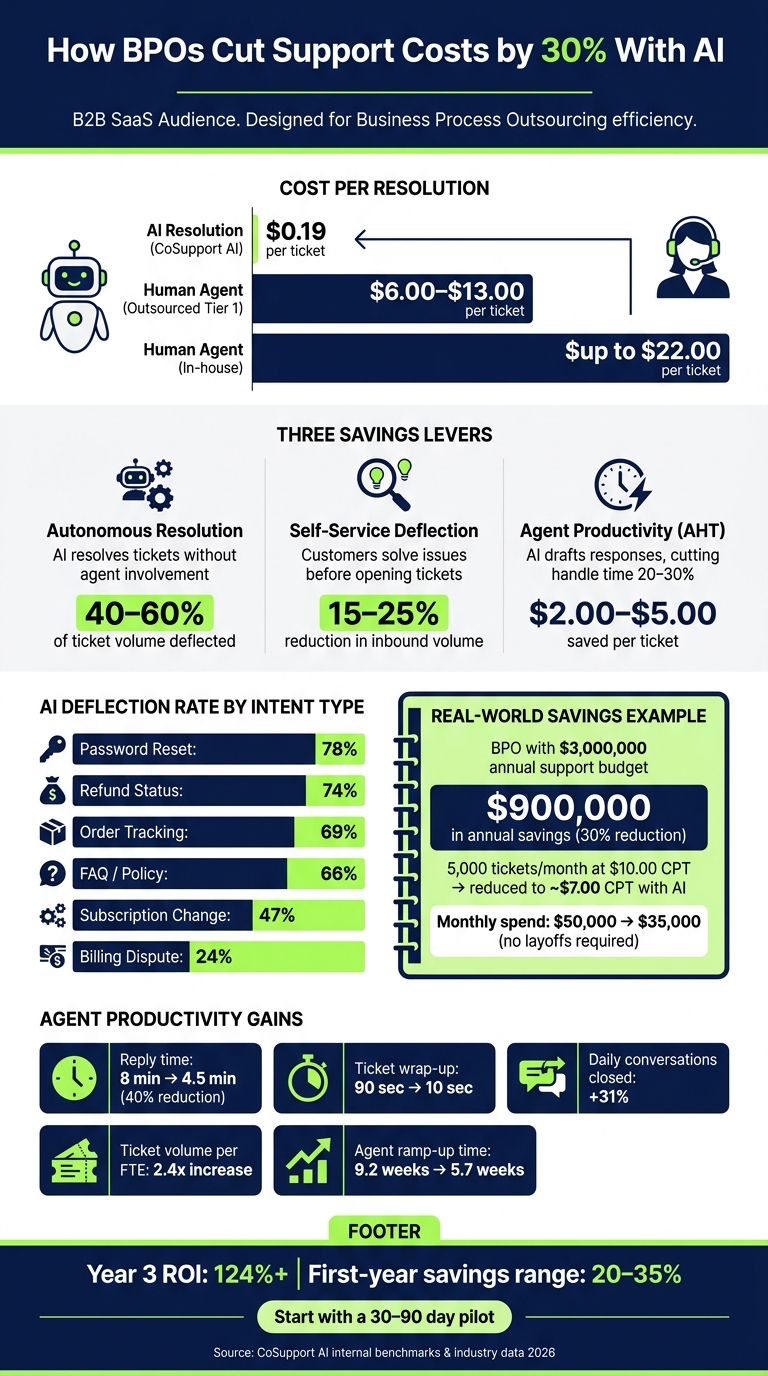
- Automate Tier 1 Tickets: Tasks like password resets, order tracking, and FAQs can be resolved by AI at a fraction of the cost ($0.19 per ticket vs. $6.00–$13.00 for human agents).
- Leverage Self-Service: AI-powered tools enable customers to resolve simple issues themselves, reducing ticket volume by 40–60%.
- Boost Agent Efficiency: AI assists agents by drafting replies and summarizing tickets, cutting handle time by 20–30%, and allowing agents to focus on complex cases.
- Cost Savings Example: A BPO with a $3M annual support budget could save $900K by combining automation and self-service.
This approach doesn’t require layoffs. Instead, AI handles repetitive tasks while agents focus on high-value interactions. By starting with a 30–90 day pilot and optimizing processes, BPOs can achieve sustainable cost reductions while maintaining service quality.
AI vs. Human Agent Support Costs: BPO Savings Breakdown
Mapping Your Current Support Costs and Metrics
To cut your support costs by 30%, you first need to understand your current spending. Many BPOs have a general idea of their cost-per-ticket but often miss the full picture, which includes benefits, training, QA management, and tools.
Set Your Financial Baseline
Payroll alone doesn't reflect the full cost of resolving tickets. To calculate the true cost-per-resolution (CPR), use this formula:
CPR = (Annual Agent Compensation + Benefits + Tools + Management Overhead) ÷ Annual Tickets Resolved
For U.S.-based outsourced operations, this typically falls between $6.00 and $13.00 per Tier 1 ticket. In-house operations, with their added overhead, can climb to $22.00 per ticket. Offshore operations in the Philippines or India cost $8–$12 and $6–$9 per hour, respectively. However, factors like handle time and re-contact rates have a bigger influence on the real cost-per-resolution than hourly rates alone.
Don’t forget to account for one-time transition expenses, such as $10,000–$30,000 for documentation and $5,000–$20,000 for integration.
Track Key Performance Metrics
Four key metrics are essential for understanding your current operations. Before making changes, pull these metrics from tools like Zendesk or Freshdesk:
| Metric | Definition | Industry Benchmark |
|---|---|---|
| Cost Per Ticket (CPT) | Total support spend ÷ total ticket volume | $6.00–$13.00 (outsourced Tier 1) |
| Average Handle Time (AHT) | Average time spent per interaction | ~6 min 10 sec |
| First Contact Resolution (FCR) | Percentage of issues resolved on first contact | 72% (outsourced average) |
| Deflection Rate | Tickets resolved without human involvement | 41.2% (enterprise median, 2026) |
These metrics are critical for evaluating how AI assistant for customer support agents can reduce ticket costs.
It’s important to distinguish between deflection rate and resolution rate. A ticket that doesn’t escalate isn’t necessarily resolved. To gauge true resolution, track your 72-hour re-contact rate - the percentage of customers who return within three days. Current AI systems show an 11.3% re-contact rate, compared to 8.7% for human agents, so this gap requires close monitoring.
Additionally, break down your metrics by intent type, not just volume. For example, password resets have a median deflection rate of 78%, while billing disputes drop to 24%, and complaints sit at 19%. Grouping these can obscure where automation will be most effective.
Build a Simple Cost Model
Once you’ve set your baseline CPT and intent-based volumes, you can calculate the savings from a 30% reduction. For instance, on a $3,000,000 annual support budget, a 30% cut equals $900,000 in savings.
Agent labor typically accounts for 55–65% of total ticket costs, with queue routing adding 8–12%, and tools/infrastructure making up 10–15%. Automation has the greatest impact on the labor portion, especially for the 40% of tickets that involve repetitive questions.
To project your post-automation costs, use this formula:
CPR_blended = Total CS Spend ÷ (Human-Resolved Tickets + AI-Resolved Tickets)
Aim for a blended rate of $2.00–$5.00 per ticket. For example, a BPO handling 5,000 tickets per month at a current CPT of $10.00 could reduce its monthly spend from $50,000 to around $35,000 - without cutting any agents.
With this foundation, you’re ready to align AI automation with your cost-saving goals.
sbb-itb-97114f1
Automating Repetitive Tickets With CoSupport AI
When it comes to cutting costs, automating repetitive tickets is a game-changer. CoSupport AI resolves tickets at just $0.19 per resolution, a fraction of the $6.00–$13.00 per ticket that most BPOs typically spend.
Identify High-Volume Repetitive Ticket Types
The first step is analyzing six months of ticket data, grouping it by intent. You’ll likely find that 60–75% of total ticket volume falls into 15–25 common categories. These often include tasks like order tracking, password resets, address updates, and return policy questions - perfect candidates for automation.
However, not all intents are created equal. Automation success varies by ticket type. For example:
- Password resets achieve a 78% median automation rate.
- Refund status inquiries hit 74%.
- Order tracking resolves at 69%.
- Billing disputes? Just 24%.
Here’s a quick breakdown to help set realistic expectations:
| Intent Category | Median Deflection Rate | Avg. Resolution Time |
|---|---|---|
| Password Reset | 78% | 0.6 min |
| Refund Status | 74% | 1.1 min |
| Order Tracking | 69% | 0.9 min |
| FAQ / Policy | 66% | 1.4 min |
| Subscription Change | 47% | 2.7 min |
| Billing Dispute | 24% | - |
Once you’ve pinpointed these high-volume intents, configure CoSupport AI to handle them efficiently.
Setting Up CoSupport AI for Automation
Getting started with CoSupport AI is simple. It integrates with platforms like Zendesk or Freshdesk in under 10 minutes. The AI learns your workflows by analyzing existing tickets, macros, and help center content - no coding required.
However, preparation is key. Spend two weeks cleaning up your knowledge base to ensure the AI has accurate, up-to-date information. Outdated or conflicting resources can lead to misrouted tickets and unnecessary escalations.
After cleaning your knowledge base, run the AI in shadow mode for 30 days. This allows it to process tickets alongside your agents without affecting live traffic. Teams that validate response quality in shadow mode often see double the deflection rates compared to those that skip this step.
Reduce Costs Without Cutting Headcount
Once live, CoSupport AI resolutions cost just $0.19 each, compared to the $6.00–$13.00 range for human agents. At a 50% automation rate, the freed capacity equals the workload of 6.3 full-time agents - and no layoffs are required.
Instead of handling repetitive tasks, agents can focus on more complex Tier 2 and Tier 3 issues like billing disputes, cancellation saves, and sensitive escalations. This shift not only protects margins but also improves client satisfaction. Plus, with the AI’s median resolution time of 1.9 minutes (versus 11.4 minutes for a human), your ticket queue stays manageable even during peak times.
These automation efficiencies lay the groundwork for a scalable cost model, which we’ll explore next.
Improving Self-Service and Ticket Deflection
Automation tackles tickets once they arrive, but self-service stops many of them from ever needing agent involvement. For most BPOs, a large chunk of inbound volume - about 40–60% - consists of low-complexity issues that customers could handle themselves if they had access to the right tools. Here's how using AI-powered self-service can be a game-changer in reducing the number of inbound tickets.
Deploy AI-Powered Self-Service for Customers
With CoSupport AI, you can make it easy for customers to resolve their own issues. Whether through web widgets or in-app support, these tools pull relevant help articles from your verified knowledge base in under 10 minutes. Initial rollouts typically deflect 40–60% of Tier 1 tickets (like order status inquiries, subscription changes, or policy questions). The best programs can even surpass 60% deflection within a year. For a BPO managing 5,000 tickets monthly, this means 2,000–3,000 tickets never make it to the agent queue. Some companies have even achieved an 81% auto-resolution rate within a month of implementation.
Keep Your Knowledge Base Current for Better Deflection
If your deflection rates are lower than expected, it might point to gaps in your documentation. These gaps can cause AI to escalate tickets unnecessarily, cutting into cost savings and slowing progress toward reducing inbound volume by 30%. With CoSupport BI, you can identify where the AI struggles by flagging content gaps based on intent categories. Teams that review these gaps weekly have reported resolution rates improving by 15–20% within just two months.
Measure How Deflection Affects Your Costs
It's important to distinguish between containment and true resolution. Containment means the AI interacted with the ticket, while true resolution means the issue was fully resolved with no follow-ups within 5–7 days. To get an accurate picture of savings, calculate true resolutions by comparing the costs of human-handled tickets ($6.00–$12.00 each) with AI-resolved tickets (just $0.19 when using CoSupport AI). Also, monitor CSAT scores for AI versus human-handled tickets. A small difference (0–3 points) shows AI is performing well, whereas a larger gap signals potential issues with your documentation.
| Metric | Formula | Healthy Benchmark |
|---|---|---|
| Autonomous Resolution Rate | AI-resolved ÷ Total inbound tickets | 40–60% (initial); 60%+ (optimized) |
| AI CSAT Gap | Human CSAT − AI CSAT | 0–3 points |
| Monthly Savings | (AI resolutions × human cost) − (AI resolutions × AI cost) | Varies by volume |
| Re-contact Rate | Tickets reopened within 7 days | <12% for AI-resolved |
These metrics, when paired with the cost models discussed earlier, help ensure consistent savings and keep you on track to cut support costs by 30%.
Increasing Agent Output With AI Assistance
Cutting costs by deflecting tickets is great, but boosting agent productivity takes those savings to the next level.
Use AI for Reply Drafts and Ticket Summaries
Tools like AI Agent by CoSupport AI simplify the agent's job by drafting responses, pulling context from past interactions, and suggesting the right knowledge base articles - all before the agent even starts typing. This reduces reply time from 8 minutes to 4.5 minutes, slashing 40% off the time spent on each ticket. Automated ticket summaries further cut down the time it takes to close out a ticket - from 90 seconds to just 10 seconds. For a BPO managing 5,000 tickets a month, these wrap-up time savings translate into a huge number of hours that can be reallocated to more complex tasks.
Improve Agent Performance Numbers
AI copilots don’t just save time - they elevate the entire team’s performance. Agents equipped with AI tools close 31% more conversations daily and manage up to 2.4 times the ticket volume per full-time employee compared to teams without AI. Average Handle Time (AHT) drops by 20–30% when AI copilots are effectively implemented. Even onboarding new agents becomes quicker, with ramp-up time decreasing from 9.2 weeks to 5.7 weeks. Plus, response consistency gets a major boost. CoSupport Agent pulls from your verified knowledge base, ensuring every agent uses the same policy language, no matter the shift. These improvements drive better performance and lower costs per ticket.
Link Agent Productivity to Cost Savings
When agents handle more tickets, your cost per ticket goes down. AI-assisted resolutions cost between $2.00 and $5.00 each, compared to $6.00 to $15.00 for tickets handled without AI. To calculate the savings from AHT reductions, try this formula:
For example, a 20% AHT reduction on a team of 40 agents, each costing $65,000 annually, delivers about $520,000 in savings per year. As Ami Heitner from Worknet explains, even a smaller team of 20 agents at the same cost would save around $260,000 annually - without cutting a single job. These savings come purely from productivity gains, not ticket deflection. When combined with self-service strategies, these improvements reinforce a hybrid AI-human model that reduces support costs by 30%.
Building a Cost Model and Rollout Plan
Translate Automation Gains Into Measurable Savings
Once you've established your cost baseline and identified automation opportunities, the next step is crafting a strategic rollout plan to maximize your return on investment (ROI). Start by calculating your fully loaded cost per ticket - this is your total annual agent costs divided by the number of tickets handled annually. Typically, this ranges from $6.00 to $12.00 per ticket, but with AI-handled resolutions, costs can plummet to $0.50–$2.00 per ticket. For example, CoSupport AI offers resolution-based plans starting at $0.19 per resolved ticket.
Here’s how you can combine three key savings levers:
| Savings Layer | Mechanism | Expected Savings |
|---|---|---|
| Autonomous resolution | AI resolves tickets without agent involvement | 40–60% of ticket volume |
| Self-service deflection | Customers solve issues before opening tickets | 15–25% reduction in volume |
| Agent productivity (AHT) | AI drafts responses, cutting handle time by 20–30% | $2.00–$5.00 saved per ticket |
For example, a 10-person support team with an annual cost of $350,000 could reduce equivalent labor costs to $120,000 by redirecting 70% of ticket volume to AI - all without layoffs. The remaining team can focus on handling complex Tier 3 issues that help retain clients. When presenting to your CFO, remember to factor in platform fees and a two-week knowledge base cleanup. These savings set the foundation for a controlled and strategic rollout.
Roll Out CoSupport AI in Phases
Phased rollouts are the best way to ensure smooth, data-driven adoption. Start small by deploying CoSupport AI with a single client or ticket category during a 30–90 day pilot before scaling further.
- Month 1: Begin with instrumentation. Analyze six months of ticket data and group them by intent. In typical BPO environments, 15–25 intents account for 60–75% of ticket volume. This is your target list.
- Month 2: Deploy CoSupport AI tools for high-volume, low-risk intents like order tracking, password resets, or refund statuses. Use shadow mode to validate AI performance without impacting live interactions.
- Month 3: Expand to Tier 2 workflows and measure reductions in human handling time. By day 60, you’ll have real-world data on deflection rates and cost-per-ticket comparisons, which can be shared during client reviews.
During the pilot, allocate 4–8 hours weekly for AI tuning to ensure optimal performance. This tuning time should be accounted for in your cost model.
Address Compliance and Data Security
For BPOs managing data across various clients and jurisdictions, compliance isn’t just a best practice - it’s a contractual obligation.
CoSupport AI adheres to SOC 2 and GDPR standards, meeting the requirements of most enterprise clients. Its zero-hallucination design ensures that the AI only provides responses based on your verified knowledge base. This means it won’t create answers it hasn’t been trained to provide. Additionally, every AI interaction is fully traceable, offering a level of auditability that surpasses offshore human teams, where only 2–5% of tickets typically undergo manual quality assurance. This enhanced traceability helps maintain cost stability and builds client trust by eliminating service quality gaps that could lead to SLA penalties.
For high-risk intents - like billing disputes, regulated topics, or anything involving dollar amounts - ensure that these are automatically escalated to senior human agents.
Conclusion: A Clear Path to 30% Lower Support Costs
The numbers speak for themselves: AI resolutions cost just $0.62 compared to $7.40 for human agents - a staggering 12x difference. By combining autonomous resolution, self-service deflection, and AI-assisted drafting, businesses can achieve savings between 20% and 35% in the first year alone, with an ROI topping 124% by year three.
These cost reductions don’t require layoffs. Instead, work is redistributed more efficiently. Companies that achieved these results started with a focused 30–90 day pilot program. Teams that updated their knowledge base before deployment saw double the deflection rates compared to those that didn’t - proof that preparation pays off.
Curious about how much you could save? Book a demo today and customize your cost model!
.png)



