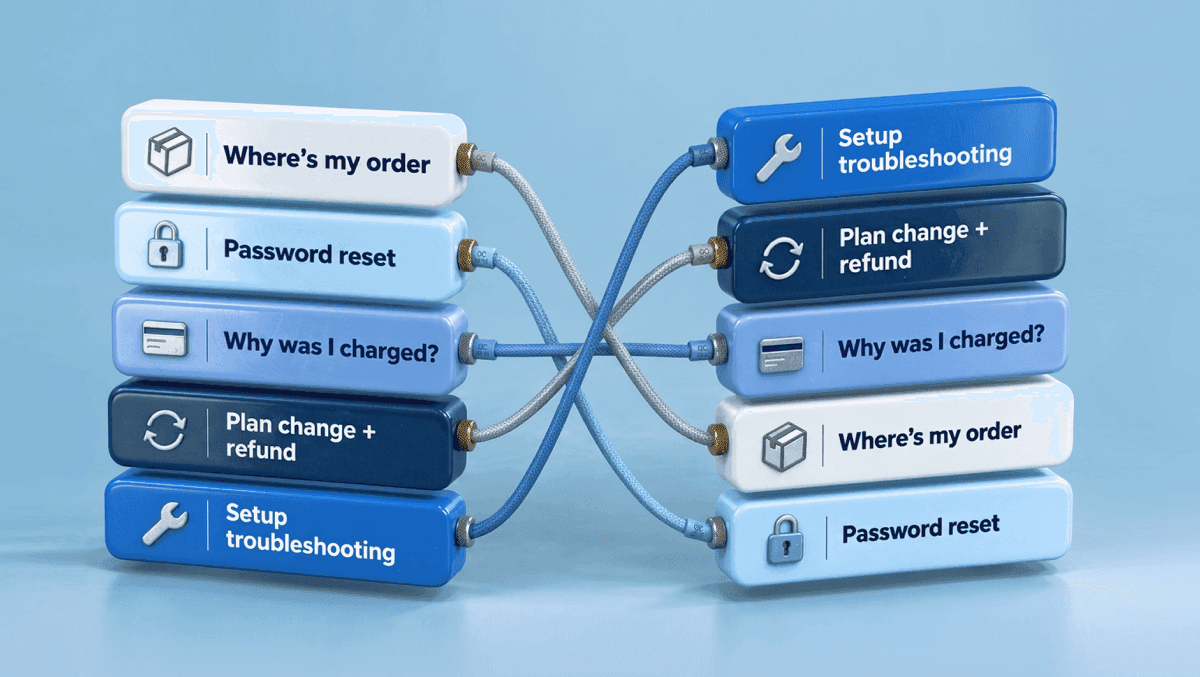
Prioritize support tickets for AI by their monthly cost to serve, not by volume. Cost to serve is volume times handle time times what an agent minute costs. Rank your ticket types by that number, keep the ones an AI can close with confidence today, and leave the risky ones with people. The cost list rarely matches the volume list.
Most guides say start with repetitive, high-volume questions. That works for a first week. Over a quarter, it leaves the expensive tickets with your team, because the tickets that drain your budget can sit lower on the volume chart. The usual order teams climb, from written answers to actions in your systems, is on customer service automation, and what counts as a first-line ticket is in AI for customer support. This guide adds the number that decides between ticket types.
Why ticket volume is the wrong filter
Volume tells you how often something happens. Cost needs handle time and an hourly rate on top.
Say a queue has two ticket types. "Where's my order?" arrives 900 times a month and takes 4 minutes. A new agent learns it on day one. "Move me to the annual plan, drop the add-on, and refund the difference" arrives 350 times and takes 14 minutes of reading the account, checking dates and applying policy. A new agent needs weeks to get it right. The second type eats more agent time, and it's the one your newest hires get wrong.
The channel doesn't change much either, as long as a person handles the contact. Gartner's 2024 benchmark puts the median cost of an assisted contact at $13.50, against $1.84 for self-service, and notes that phone, chat and email tend to have similar costs per contact (Gartner, 2024). Among assisted channels, then, the ticket type is what moves the cost.
Escalation adds cost on top. In HDI's benchmark for IT support, a ticket handled at the service desk cost $22, and escalating it to desktop support added $69, for $91 in total (HDI and MetricNet, 2018). A ticket that moves up a level gets worked twice.
Then there's teaching. MetricNet's 2023 benchmark of IT service desks found 43.1% annual analyst turnover and 92 hours of training for each new analyst (MetricNet, 2023). Every ticket type that takes weeks to learn is a cost you pay again with every hire.
AI can shorten the ramp too. In a study of 5,179 support agents at one software company, agents with an AI assistant at 2 months of tenure performed as well as agents without it at more than 6 months (Brynjolfsson, Li and Raymond, NBER, 2023).
Four kinds of tickets, by what the AI has to do
Sort each ticket type by the job it gives the AI. Each step asks for something extra: knowledge to answer, customer data to look things up, permission to change records, and judgment that stays with a person.
| Kind | Example tickets | What the AI needs | Risk if wrong |
|---|---|---|---|
| Answer | "How do I export a report?", "What's your return window?", "Do you ship to Canada?" | Your knowledge base and help center | Low |
| Look up | "Has my refund gone through?", "Which invoice is this charge from?", "When does my subscription renew?" | Read access to order, billing and account data, plus an identity check | Low to medium |
| Change | "Move me to the annual plan", "Update my delivery address", "Resend the invite to my teammate" | Write access to your systems, written rules and limits | Medium |
| Decide | Billing disputes, compensation claims, complaints, fraud reports, bereavement | A person, with the AI preparing the case | High |
Answer tickets are the easy start, because the answers already sit in your knowledge base. In the worked example below, the biggest savings come from look-up and change tickets. Decide tickets stay with people.
In tier terms, answer and look-up tickets are tier 1. Change tickets are tier 1 when the policy is written down and tier 2 when someone has to approve them. Decide tickets are tier 2 or 3.
Forrester put the warning plainly in its Predictions 2026 (November 2025): "Overautomating complex (and emotional) inquiries will frustrate customers and erode satisfaction" (Forrester, 2025).
The cost-to-serve scorecard
Score every ticket type on six factors. Pull the data from your helpdesk tags, your team leads and a quick test on past tickets.
| Factor | Question to ask | Where the data comes from | What it does to the score |
|---|---|---|---|
| Monthly volume | How many of these arrive each month? | Helpdesk tags or topics, last 90 days | Multiplies cost |
| Handle time | How many agent minutes per ticket, including back-and-forth? | Helpdesk handle time by tag | Multiplies cost |
| AI resolution share | What share could an AI close today? Is the answer written down, the data readable, the policy clear? | A test on 50 past tickets of this type | Multiplies value |
| Ramp time | How long until a new agent handles it well? | Team leads | Tie-breaker: longer ramp, more value in automating |
| Risk if wrong | What does a wrong answer cost in money, trust or legal exposure? | Policy owners | Gate: high risk means a person decides |
| Systems access | Does the AI need read access, write access, or nothing? | IT or engineering | Sets the work before launch |
The formula behind it is short:
Monthly value = volume × handle time (minutes) × cost per agent minute × AI resolution share − AI resolutions × price per AI resolution
Volume, handle time and AI share give the number. Ramp breaks ties, risk can veto, and systems access decides what you build first.
A worked example
Here's a made-up team handling about 2,500 tickets a month across six types. Agent time costs $40 an hour in this example; use your own loaded cost. The AI resolution shares are the team's estimates after testing past tickets. AI is priced at $0.50 per resolved ticket.
Cost to serve picks the candidates. AI share and the AI fee turn cost into value, which is why the most expensive type to serve here, setup troubleshooting, ranks third: the AI closes only 40% of it.
| Ticket type | Volume / month | Minutes each | Ramp | AI share | Agent time freed (at $40/h) | AI cost | Net / month | Rank by volume | Rank by value |
|---|---|---|---|---|---|---|---|---|---|
| Plan change and refund (one message) | 350 | 14 | 3 weeks | 60% | $1,960 | $105 | $1,855 | 4 | 1 |
| "Why was I charged?" | 450 | 9 | 2 weeks | 60% | $1,620 | $135 | $1,485 | 3 | 2 |
| Setup or integration troubleshooting | 250 | 22 | 2 months | 40% | $1,467 | $50 | $1,417 | 5 | 3 |
| Where's my order | 900 | 4 | 1 day | 70% | $1,680 | $315 | $1,365 | 1 | 4 |
| Password and login reset | 500 | 5 | 1 day | 70% | $1,167 | $175 | $992 | 2 | 5 |
| Billing dispute or chargeback | 60 | 30 | months | 0% | $0 | $0 | $0 | 6 | 6 (keep with people) |
The order flips. The plan-change-and-refund request jumps from 4th to 1st. "Where's my order?", the biggest by volume, drops to 4th, and password resets, the classic "automate this first" ticket, fall to 5th. They're frequent, but they're quick, and people learn them on day one.
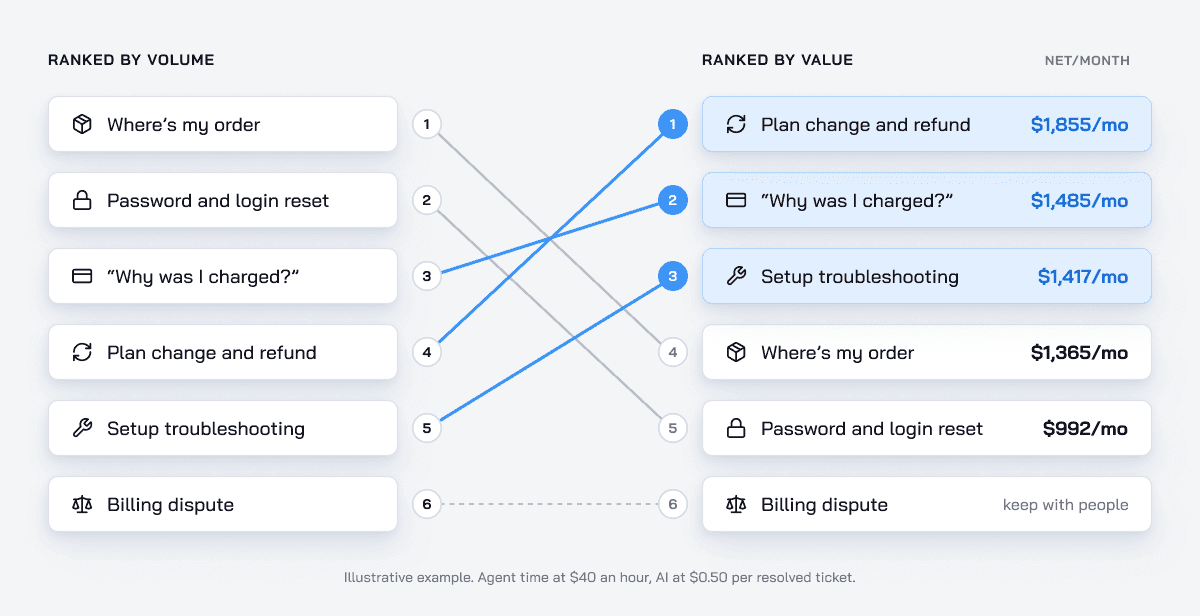
The five automated types free about $7,900 of agent time a month. After about $780 in AI fees, that leaves about $7,100 net, before you count the shorter ramp for new hires. It's time back on the team, and it turns into savings when you hire less or move people to harder work. To run your own numbers in our ROI calculator, enter cost per ticket as handle time times your cost per agent minute.
Rules for each ticket type: allowed, blocked, escalate
Write the rules before a ticket type goes live. Least privilege applies here as it does anywhere in security: the AI gets the access its allowed actions need, and nothing more. Here's a template for the top-ranked type in the example, with example values.
| Allowed actions | Blocked actions | Escalate when |
|---|---|---|
| Switch the plan from monthly to annual after confirming the account owner | Refund outside the refund window | The customer asks for a person |
| Remove an add-on from the next billing period | Promise a discount that isn't in the policy | The refund is above the set limit |
| Refund the unused part of the current period, within 14 days of the charge | Change who owns the account | The customer mentions a chargeback or legal action |
| Explain what changes on the next invoice | Delete account data | The account is flagged for fraud or an open dispute |
The allowed column tells engineering which permissions to grant. The blocked column tells them which ones to withhold. For handoff triggers by topic, see AI to human handoff.
One decision tree beats separate flows
Here's a message most subscription businesses see in some form: "Move me to the annual plan, drop the reporting add-on, and refund what I've paid for this month."
That's three requests in one message, and each changes the others. The refund depends on the new plan. The annual price depends on which add-ons stay. A flow built for one intent handles one piece, so a message that mixes them falls between flows.
Build one decision tree, and start it with the pivot fact: the piece of data every branch depends on. Here it's where the customer sits in the billing cycle, and whether they're on a monthly plan or a fixed term. Fetch that first, then make the changes in the order the policy allows. Close with one message that confirms all three.
CoSupport AI Agent handles this kind of request. It understands customer intent, reads account-specific data, and runs multi-step workflows in your tools: it updates orders, cancels subscriptions and processes refunds. When it reaches a rule it can't pass, it hands the ticket to your team with the full transcript and a summary of what it found and did. For order-heavy businesses, see AI for ecommerce support and how to stop processing refunds by hand.
The price of AI decides which tickets are worth it
The scorecard only works if the AI side of the formula stays small. Gartner predicts that by 2030, the cost per resolution for generative AI will exceed $3, higher than many B2C offshore human agents (Gartner, Jan 2026). At that price, automating a 4-minute ticket costs more than the agent time it saves: 4 minutes at $40 an hour is about $2.67.
With CoSupport, tickets the AI hands off cost nothing, and at the example's price even the 4-minute ticket nets about $2.17 of agent time per resolution.
How to start: small, then wider
Start with the ticket types that resolve reliably, and widen once they hold.
- Tag your recent tickets into types, for example the last 90 days into 10 to 15 types. Skip the long tail of rare ones.
- Score each type with the six factors. Take the top 2 or 3 that pass the risk gate.
- Write the guardrails for those types and get access to the data they need. Clean up the knowledge base articles they rely on.
- Test on a sample of past tickets per type, for example 50. Fix what the AI gets wrong before customers see it.
- Go live on real tickets. With CoSupport, the first 1,000 AI responses are free, and a resolution usually takes 1 to 3 responses, so you see roughly 300 to 1,000 resolved tickets before you pay anything.
- Review low-rated AI conversations every morning. Approve the fixes the same day.
- Add the next type once resolution holds steady, for example for 2 weeks.
Typically, teams land at 60% to 70% AI resolution in the first 60 days with CoSupport AI Agent, depending on how complete the knowledge base is and how much data the AI can read.
What stays with people
Decide tickets stay with your team: disputes, complaints, fraud, anything where the customer needs to hear a person decide. So does every case the AI hands off.
With the first line on AI, what reaches people is the harder part of the queue. CoSupport AI Assistant helps there: it prepares a ready-to-send draft from your knowledge base and past tickets, and summarizes long threads, so agents edit instead of writing from scratch. And some of the top-ranked types are better removed than automated. If one keeps topping your list, fix its cause with the team that owns it.