
.png&w=1920&q=75)
If return and refund tickets make up 40%–60% of your support queue, manual processing is costing you time every day. I’d fix that by moving standard returns into Shopify rules, sending edge cases to agents, and tracking refund speed, error rate, and review volume from day one.
Here’s the short version:
- I’d audit the current refund workflow first
- I’d split standard returns from cases like damage, fraud, and orders over $500
- I’d use Shopify self-serve returns, Shopify Flow, and refund rules to auto-approve low-risk requests
- I’d use CoSupport AI to answer return-status questions and pass risky cases to a human
- I’d watch auto-approval rate, days to refund, self-service resolution rate, and refund errors
- I’d start with the 3–5 most common return types and test in Draft Mode for 2–3 weeks
A simple setup works best: Shopify handles the rules, AI handles the repeat tickets, and agents handle the cases that need judgment. That’s how I’d cut manual refund work without losing control.
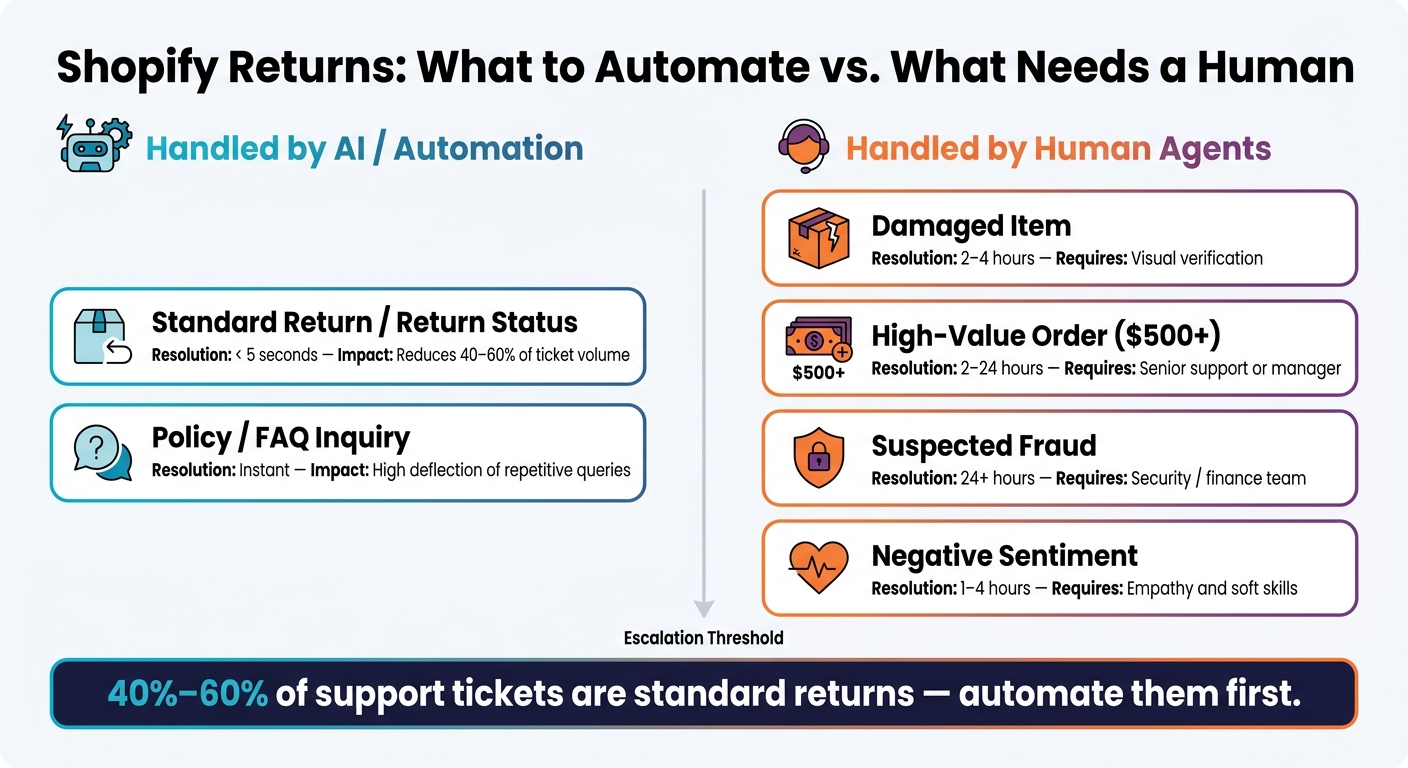
Shopify Returns Automation: AI vs. Human Agent Decision Split
1. Audit your manual refund workflow before you automate it
Before you automate anything, lay out the exact refund workflow your team uses right now. If the process is messy, automation won’t fix it. It just moves the same mess along at a faster pace.
Map each support step from return request to refund issued
Start with the full path from the customer’s return request to the moment the refund is sent.
In many teams, the flow looks like this: an agent checks the order, confirms the customer meets the return policy, issues the refund, updates the customer, and logs the case in the helpdesk.
That same sequence shows up again and again across routine returns. On its own, each step may seem small. Put them together across a full queue, and the hours pile up fast.
Separate standard returns from exceptions that need a human
Not every return should go through the same path.
Standard returns are the easy ones. They tend to follow a clear pattern: the request is inside the return window, the item is unworn, the original packaging is included, and the order value stays below your automation threshold.
Exceptions are different. They need judgment, not just rules. Damaged goods, suspected fraud, and high-value orders above $500 should be routed to a human for review. Sorting these cases before you build anything helps keep automation focused on the work it can handle safely.
Measure your baseline before automating
Pull the last 90 days of resolved return tickets and document these five numbers:
| Metric | What to measure |
|---|---|
| Monthly ticket volume | Total return and refund tickets per month |
| Average handling time (AHT) | Minutes per ticket from open to resolved |
| Days to refund | Calendar days from return request to refund issued |
| Human-review rate | Percentage of return tickets routed to human review |
| Incorrect or reversed refunds | Percentage of refunds issued in error or later reversed |
These baseline metrics show where your team is losing time, which steps make sense to automate first, and which cases should stay with human review.
sbb-itb-97114f1
2. Set up Shopify rules for self-serve returns and automatic approvals

Enable self-serve returns and define clear policy rules
In Shopify Admin, turn on self-serve returns under Customer accounts. Then take any fuzzy policy language and turn it into rules Shopify can enforce.
For example, “recent purchases in good condition” sounds fine on paper, but it’s too loose for automation. Shopify needs clear inputs. So spell out your current rules in plain terms: a 30-day return window from delivery date, clear Final Sale exclusions, and specific item condition requirements. You should also define approval windows and refund paths up front.
Once those rules are written clearly, Shopify can apply them the same way every time. That means each return request gets routed without someone having to check it by hand.
Use Shopify Flow and order tags to trigger the next action
After your policy rules are set, Shopify Flow can take over the next step as soon as a return request comes in. Use the trigger "Return request created" and add conditional logic from there.
Say an order is under $100. Flow can tag that order Return:Auto-Approved and send it straight to refund. If the order hits your risk threshold, send it to review instead.
Order tags are what keep this moving. For instance:
Return:Auto-Approvedsends the order down the refund pathReturn:Flagged_Abusesends it to review when a customer goes past your set return frequency threshold
These tags also log each workflow step in the order history. In practice, they should control both label generation and refund decisions.
Configure auto-approval rules, labels, and refund paths
Each outcome should map to a single rule and a single action:
| Outcome | Rule | Action |
|---|---|---|
| Auto-Refund | Days_Since_Delivery < 30 AND Tag != Final Sale |
Issue refund automatically |
| Store Credit | Days_Since_Delivery 31–60 OR Is_Gift = True |
Apply store credit |
| Exchange | Reason = 'Size' AND Inventory_Available = True |
Swap variant |
| Manual Review | Condition = 'Damaged' OR Order_Value > $500 |
Route to agent |
Shopify Flow and the Refunds API can issue the refund automatically. After that, connect the same rules to your helpdesk so routine tickets close on their own, while edge cases land with an agent who already has the full picture.
3. Use CoSupport AI to handle return tickets and route exceptions to agents
Once Shopify rules cover the standard cases, CoSupport AI can take care of the tickets that still need a bit of judgment.
It works inside your helpdesk and uses live Shopify order data to resolve routine return tickets and send exception cases to the right person.
Connect Shopify and your helpdesk to CoSupport AI
CoSupport AI connects natively with Zendesk and Freshdesk, and it syncs with Shopify through a live Shopify data connection. Setup usually takes about 4 days.
Before you go live, clean up your knowledge base. Remove old macros, and make sure your help articles match your current return window and promo terms.
That prep matters. If your policy content is up to date, the system can answer routine return questions without agent review.
Auto-resolve common return and refund questions with verified answers
The biggest ticket drivers are usually order-status and return-status questions. CoSupport AI handles these by using its trained knowledge base plus live Shopify data, so it can check the current return or refund status and reply with verified order and policy details.
That means customers get an answer based on what’s happening right now, not a canned reply that may be out of date.
Escalate damaged, fraudulent, or high-value cases with full context
Some cases shouldn’t be handled automatically. If an issue involves damage, suspected fraud, a high-value order, or falls below your confidence threshold, CoSupport AI routes it to a human agent. The agent gets a summary of the conversation history and Shopify order details, which cuts out the back-and-forth and spares the customer from repeating the whole story.
Set clear escalation thresholds, and use confidence rules so uncertain cases are handed off instead of guessed. A practical split looks like this:
| Request Type | Handled By | Decision Authority | Typical Resolution Time | Workload Impact |
|---|---|---|---|---|
| Standard Return / Return Status | CoSupport AI | Automated (via Shopify API) | < 5 seconds | High reduction (40–60% of volume) |
| Policy / FAQ Inquiry | CoSupport AI | Trained knowledge base | Instant | High deflection of repetitive queries |
| Damaged Item | Human Agent | Agent judgment | 2–4 hours | Requires visual verification |
| High-Value Order ($500+) | Human Agent | Senior support / manager | 2–24 hours | Low volume, high importance |
| Suspected Fraud | Human Agent | Security / finance team | 24+ hours | Complex investigation |
| Negative Sentiment | Human Agent | Support agent | 1–4 hours | Requires empathy and soft skills |
Track refund speed and escalation rate as you refine these rules. If too many edge cases stay with AI, tighten the thresholds. If agents are still getting swamped with simple status checks, there’s probably room to automate more.
4. Monitor refund speed, ticket reduction, and risk controls
Track auto-approval rate, refund time, and self-service resolution rate
After launch, compare performance against your 90-day baseline. That gives you a clean before-and-after view. Once routine returns are automated, these numbers should show whether manual review is actually going down.
Focus on four metrics:
- Auto-approval rate: the share of returns handled without an agent
- Average time to refund: how long it takes to go from return request to money back
- Self-service resolution rate: the share of return tickets closed without an agent
- Escalation rate: how often the system sends a case to a human
These metrics tell you if automation is cutting manual work. And that matters because order-tracking and refund-status tickets usually make up 40% to 60% of total ticket volume. Even small lifts in self-service resolution can reduce support load fast.
If one metric starts to slip, return reasons usually explain what's going on.
Use CoSupport BI to group return reasons by SKU, carrier, and fulfillment center
CoSupport BI shows return reasons by SKU, carrier, and fulfillment center. So instead of only seeing how many items come back, you can see why they're coming back.
Say "wrong size" jumps after a new product launch. That points to a size guide problem. If "damaged shipment" piles up around one carrier or one fulfillment center, that usually points to packaging or logistics, not support.
Review these return reasons on a regular basis, then share the patterns with product and ops teams. That way, you're not just processing returns faster. You're cutting future return volume at the source.
Use those patterns to tighten approval rules before refund leakage gets out of hand.
Add safeguards for finance, compliance, and abuse prevention
Automation without guardrails can lead to refund leakage. A few firm rules stop most of it.
For example, set a dollar threshold for auto-approvals. You might auto-approve damaged items under $50 when photo proof is included, while sending any order over $500 to a human. Add sentiment triggers too, so the system escalates right away if it spots frustration, legal language, or other high-risk signals. Those cases should stay with a person.
CoSupport AI maintains SOC 2 and GDPR compliance, which matters when your automation has write access to the Shopify Refunds API and handles real customer financial data. Every automated action should also create a decision log: what the AI checked, what it decided, and why. That gives finance or QA a clean audit trail without forcing them to dig through ticket threads.
Start with the 3–5 highest-volume, best-documented return types first, such as standard returns and refund-status checks, before moving into billing disputes. Use Draft Mode for 2–3 weeks before giving full autonomy to any new category. That buffer helps you catch edge cases before they turn into refund mistakes.
Conclusion: Build a returns workflow that only sends real exceptions to people
Automate the standard path, then track whether manual review drops.
The payoff shows up fast. Routine return and refund-status tickets often make up 40% to 60% of total ticket volume. When you automate those standard return flows, cost per contact goes down and agents get time back for the cases that need a human call. Support stops acting like a processing queue and starts acting like an exception desk.
That’s the line to hold: only exceptions should reach your team. High-value, fraud, legal, safety, and VIP cases should still go to people.
Start with the return types that show up most often. Then expand only when the logs show the rules are doing the job. The goal is simple: standard returns stay automated, and people handle only the cases that need judgment.
FAQs
How do I decide which returns to automate first?
Start with the return requests you see most often and can solve the same way every time. Look at the last 90 days of resolved tickets, sort them by what the customer was actually asking for, and choose the 3–5 categories with the most repeatable outcomes and clear eligibility rules.
Keep automation limited to cases your system can verify on its own, like return eligibility or delivery status. Set a conservative confidence threshold, and send edge cases to a human fast.
What should always stay with a human agent?
A human agent should step in for emotionally charged or high-stakes cases, especially when the situation calls for judgment that goes beyond standard automation.
That includes cases with strong negative sentiment, high order values ($500+), legal or safety risks, or billing issues such as double charges or failed subscription cancellations.
When the AI escalates the case, it should pass along the full context. That way, the agent doesn't have to ask the customer to repeat the same details all over again.
How long should I test returns automation before going live?
Don’t lock yourself into a fixed timeline. A multi-stage testing process works better.
Start with shadow mode. In this stage, the AI can classify tickets or draft responses without taking action. Most brands stay here for 2 to 3 weeks.
Then move to a small launch with 5 to 10% of traffic. Review metrics every week, and manually sample 1 to 5% of responses as you fine-tune performance.



.png&w=828&q=100)
.png&w=96&q=100)
.png&w=828&q=100)
.png&w=96&q=100)