.png&w=96&q=75)


 30
30
Customer support is evolving. AI assistants like Claude are transforming how businesses handle customer queries by automating repetitive tasks, improving efficiency, and reducing response times. Here's what you need to know:
- Efficiency Boost: Claude resolves 60-80% of tickets without human help, freeing up agents for complex issues.
- Multilingual Support: Handles over 200 languages, perfect for global businesses.
- Advanced Features: Processes refunds, updates orders, and maintains context in long conversations.
- High Satisfaction: Teams using Claude report resolution rates above 70% and satisfaction scores over 4.2/5.
Claude integrates seamlessly with tools like Zendesk ticket automation, Shopify, and cloud platforms, as well as with AI for Zoho Desk, making setup straightforward. By starting small, testing thoroughly, and scaling gradually, businesses can revolutionize their customer service operations. Whether it’s managing FAQs or handling refunds, Claude simplifies support while maintaining a human-like touch.
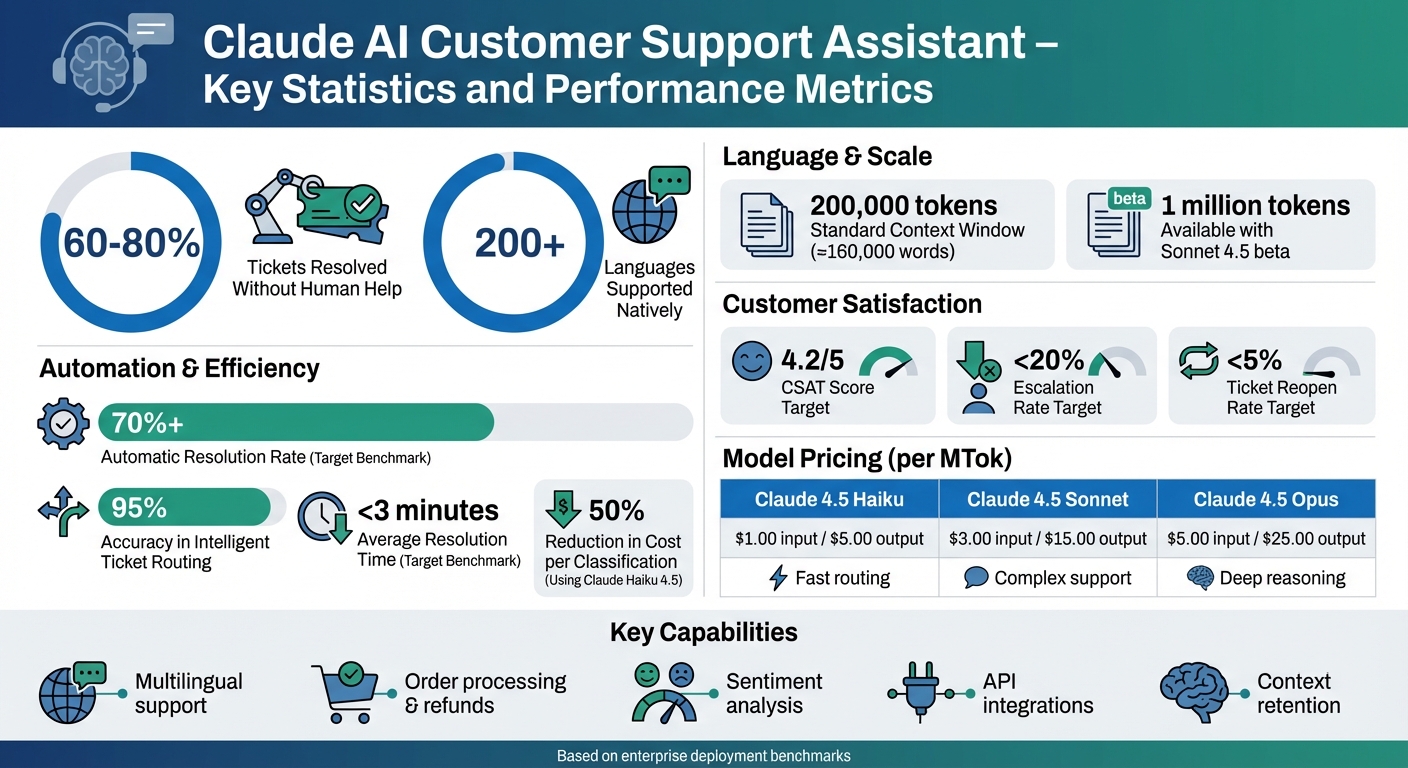
Claude AI Customer Support Performance Metrics and ROI Statistics
How to build a customer support assistant in 15 minutes (Claude + Tools)
sbb-itb-97114f1
Core Features of Claude for Customer Support
Claude brings a set of powerful tools to the table, making it a standout choice for customer support. It doesn’t just answer questions - it understands the bigger picture, handles complex issues, and takes meaningful actions that go beyond the capabilities of traditional chatbots.
Handling Complex Conversations
Claude excels at managing long, multi-step conversations. Using a sliding window technique, it condenses earlier messages while retaining critical details. This ensures a smooth flow of dialogue without customers needing to repeat themselves, even during extended support sessions.
The Claude 4.5 models include an internal reasoning channel that mimics step-by-step problem-solving. This feature is especially helpful for tasks like troubleshooting technical issues or analyzing policies. You can even instruct Claude to display its reasoning in <reasoning> tags, which can improve accuracy and simplify debugging.
Another standout feature is real-time sentiment analysis. Claude can detect frustration or abusive language based on sentiment scores. If the score drops below a set threshold (e.g., -0.5), the system automatically escalates the issue to a human agent - often before the customer explicitly asks for help. This proactive approach helps prevent situations from escalating and keeps customers satisfied.
"Claude is uniquely skilled at understanding and following intricate, multi-step processes with high accuracy. It can navigate the nuanced business logic of each company's support processes, while catching potential errors before they happen." - Ashwin Sreenivas, CTO and Co-founder
Key takeaway: Combining the sliding context approach with internal reasoning ensures Claude can tackle even lengthy, technical discussions without losing track of vital information.
Connecting with Your Support Tools
Claude integrates seamlessly with popular ticketing platforms like Zendesk, Intercom, and Richpanel. It also works with Shopify APIs, enabling it to perform tasks like looking up orders, issuing refunds, or arranging replacements - all without needing human intervention.
A standardized integration protocol (MCP) simplifies connecting Claude to various tools and workflows. Whether it’s retrieving Standard Operating Procedures from Notion or accessing FAQ content from company wikis, Claude ensures your support team has everything they need at their fingertips.
For businesses using cloud infrastructure, Claude is available through Amazon Bedrock (integrating with Amazon Q in Connect), Google Cloud's Vertex AI, and Microsoft Foundry. These platforms handle scaling, security, and model management so you don’t have to.
When implementing action-based tools like refund processing, it’s wise to start with a human-in-the-loop approach. This means having Claude draft actions for human approval before granting full autonomy. It’s a great way to build trust in the system while minimizing risks.
The big picture: Claude knows when to call external APIs and integrates results into natural, conversational responses - no rigid scripting required.
Automating Support Workflows
Claude simplifies ticket management by categorizing incoming requests into groups like billing, technical support, shipping, or refunds. For systems with over 20 categories, hierarchical routing using a taxonomic tree can streamline the process. A fast model like Haiku 4.5 handles initial routing, directing queries to specialized classifiers. This approach keeps costs low without sacrificing accuracy.
| Model | Input (per MTok) | Output (per MTok) | Best Use Case |
|---|---|---|---|
| Claude 4.5 Haiku | $1.00 | $5.00 | Fast routing and classification |
| Claude 4.5 Sonnet | $3.00 | $15.00 | Complex support agents |
| Claude 4.5 Opus | $5.00 | $25.00 | Deep reasoning tasks |
To reduce costs and speed up responses, prompt caching reuses stable prompts, like knowledge base elements, across multiple requests. The Anthropic Streaming API further improves the user experience by displaying text as it’s generated, reducing perceived wait times. For dynamic knowledge bases, Retrieval Augmented Generation (RAG) converts documentation into vector formats, allowing Claude to query vast repositories efficiently without exceeding token limits.
These workflow enhancements help Claude resolve a large portion of tickets without human input.
Pro tip: Use XML tags and system prompts to enforce your brand’s tone, prevent sensitive data leaks, and keep Claude focused on approved topics - like avoiding discussions about competitors or unauthorized areas.
How to Build a Claude AI Customer Support Assistant
Creating a Claude AI-powered customer support assistant doesn't have to be a daunting task. By following a structured approach, support managers and IT teams can get a functional assistant up and running in no time. The process involves three key steps: setting up API access, designing prompts to guide Claude's behavior, and conducting thorough testing before deployment.
Initial Setup and Configuration
The first step is securing API access and choosing the right model for your needs:
- Get your API key from the Anthropic Console (navigate to Settings > API Keys).
-
Secure the key by storing it in a
.envfile with environment variables to prevent unauthorized use. - Test connectivity by running a simple query to ensure the setup is working.
When selecting a model, consider the complexity of the tasks your assistant will handle. Use the Haiku model for straightforward queries and the Opus model for more detailed interactions. Claude offers a robust context window of up to 200,000 tokens (around 160,000 words), enabling you to include extensive knowledge base content, conversation history, and detailed instructions. With a properly configured assistant, you can expect it to handle 60% to 80% of customer tickets without human intervention.
Once your API connection is working, you can move on to designing prompts that define how the assistant behaves.
Creating Prompts and Defining Assistant Behavior
The way you structure your prompts plays a huge role in shaping Claude's behavior. Focus on four main components:
- Identity: Define the assistant’s role and tone.
- Static Context: Include relevant knowledge base content.
- Examples: Provide sample interactions for training.
- Guardrails: Set clear safety rules and boundaries.
Using XML-style tags like <identity>, <rules>, and <capabilities> can help Claude distinguish between different instruction types. For example, you might define the assistant’s persona as: "You are Alex, a professional support assistant who is empathetic and solution-oriented." Clearly outline what the assistant can handle - like order tracking, refunds, and product information - and what it cannot, such as medical or legal advice. This ensures responses stay accurate and on-topic.
To guide Claude’s tone and response style, include 4–5 example interactions, also known as "gold standard" samples. Place the majority of instructions in the first User turn instead of the System prompt, as Claude tends to perform better with this structure.
If your assistant needs to perform external actions, define JSON schemas for tasks like lookup_order or process_refund. Set up escalation rules to flag high-frustration sentiment or specific trigger words (e.g., "refund" or "manager"), so conversations can be routed to a human agent when necessary.
"Claude is uniquely skilled at understanding and following intricate, multi-step processes with high accuracy. It can navigate the nuanced business logic of each company's support processes, while catching potential errors before they happen." - Ashwin Sreenivas, CTO and co-founder
Pro tip: Keep responses concise - under 100 words - and offer escalation if an issue isn’t resolved within three exchanges.
With prompts in place, the next step is rigorous testing to fine-tune the assistant’s performance.
Testing and Refining Your Assistant
Thorough testing ensures your assistant performs reliably across various scenarios. Use 30–50 real-world conversation samples, including routine queries, edge cases, and adversarial prompts (like requests for personal information). Tools like the Claude Console’s Evaluation feature or Workbench can help you test prompts in different situations and measure performance.
Start with a human-in-the-loop process, where Claude drafts responses for human review. This approach builds trust in the system while reducing risks. Track key metrics such as trace_id, latency, token usage, and stop_reason to identify and resolve issues.
Set clear benchmarks for success before launching. Aim for:
- A CSAT score above 4.2/5.
- An automatic resolution rate exceeding 70%.
- An escalation rate below 20%.
- An average resolution time under 3 minutes.
- A ticket reopen rate below 5%.
Conduct weekly quality assurance checks by reviewing at least 20 recent conversations. Evaluate these interactions for accuracy, adherence to policies, task completion, tone, and handoff quality. Address recurring issues by updating your knowledge base or tweaking prompts. Use A/B testing to compare prompt variations and identify the most effective phrasing for resolving customer issues.
Key takeaway: Testing is not a one-time task. Continuous refinement improves your assistant’s accuracy and keeps customer satisfaction high over time.
Connecting Claude to Your Support Infrastructure
Integrating Claude into your support tools can streamline customer query handling while ensuring secure data management. The process focuses on two key elements: webhook-driven data ingestion and orchestration layers that connect Claude with your help desk system.
Integration with Ticketing and Messaging Platforms
Start by setting up a webhook in your ticketing system. For instance, when a new ticket is created in platforms such as Zendesk, Intercom, or Richpanel, the webhook triggers an orchestrator that sends the ticket data to Claude. Orchestrators such as n8n, OpenClaw, or LangGraph manage workflow logic and API calls, ensuring smooth communication between systems.
Claude uses function calling to perform actions within your support infrastructure. These JSON-defined functions allow it to execute tasks like lookup_order, create_ticket, or process_refund. For messaging platforms, you can integrate tools like the WhatsApp Cloud API or Slack Web API to enable real-time customer interactions.
| Component | Tools/APIs | Purpose |
|---|---|---|
| LLM Reasoning | Claude 3.5 Sonnet / Opus | Intent classification and response drafting |
| Orchestration | n8n, OpenClaw, LangGraph | Workflow management and API handling |
| Ticketing | Zendesk API, Intercom, Richpanel | Ticket processing and updates |
| Messaging | WhatsApp Cloud API, Slack Web API | Customer communication channels |
| Knowledge Base | Notion, Google Sheets, Airtable | Storage and retrieval of support procedures |
Claude can categorize incoming queries - like billing, technical issues, or shipping concerns - and direct them to specialized agents or teams. To handle high traffic, use Redis in queue mode to prevent timeouts. Additionally, set up fallback logic to escalate cases when sentiment scores drop below -0.5.
"Claude fundamentally changes what's possible in automated customer care. The ability to have nuanced, context-aware conversations through secure enterprise channels opens up entirely new possibilities for how companies and customers interact." - Michael Griffiths, Senior Director of Data Science
This webhook-based integration creates a seamless connection between Claude and your existing support tools, ensuring secure, efficient operations.
Key takeaway: Use webhooks for ticket ingestion, orchestration platforms for API management, and sentiment analysis to escalate frustrated customers to human agents.
Managing Security and Compliance
Security is a top priority when integrating Claude into your support infrastructure. Protect Personally Identifiable Information (PII) by masking sensitive data before logging or sending it to the model. For example, redact emails (e.g., j***@email.com) and credit card numbers (e.g., --****-1234) using regex patterns.
Store API keys securely in environment variables or credential managers - never hardcode them. Use Role-Based Access Control (RBAC) and Multi-Factor Authentication (MFA) to manage access. Whenever possible, opt for OAuth for platform integrations and rotate API keys regularly.
Run orchestrators in sandboxed environments with limited permissions and API scopes. Configure Claude's system prompt to require identity verification, such as an email address or order number, before accessing sensitive customer data.
| Security Layer | Best Practice | Implementation Method |
|---|---|---|
| Authentication | OAuth & RBAC | Use n8n Credentials UI or environment variables |
| Data Privacy | PII Redaction | Mask emails and phone numbers with regex |
| Infrastructure | Sandboxing | Isolate orchestrators with restricted API access |
| Compliance | Audit Logging | Track trace_id, latency, and token usage |
| Safety | Human-in-the-Loop (HITL) | Route low-sentiment cases to human managers |
Maintain an audit log for every interaction, recording details like trace_id, request_id, and token usage. This ensures transparency and helps troubleshoot any issues. Implement rate limiting to control costs and prevent misuse.
For sensitive actions like refunds, cancellations, or legal matters, use a human-in-the-loop process. Claude can draft responses for human review to ensure accuracy and compliance. Additionally, prepare an incident response plan to address AI-related challenges, including policy violations and unexpected costs.
"Claude Sonnet delivers the best accuracy, which is crucial for our highly sensitive use cases like refunds and cancellations." - Chyngyz Dzhumanazarov, Co-founder and CEO
Key takeaway: Secure customer data by masking PII, use OAuth and RBAC for authentication, run orchestrators in isolated environments, and keep detailed audit logs for accountability.
Practical Use Cases and Examples
Automating Routine Support Tasks
Claude takes on repetitive support tasks, freeing up time for teams to focus on complex issues. One standout feature is its ability to handle intelligent ticket routing. By analyzing incoming requests, it classifies them by intent, urgency, and required expertise, achieving an impressive 95% accuracy. This eliminates manual sorting and ensures customers are quickly connected to the right specialist.
Another game-changer? Automated first responses. Claude can greet customers, guide them, and address common questions while maintaining your brand's tone. For frequent issues like order status updates, shipping delays, returns, damaged products, or refunds, Claude can resolve tickets automatically.
Through API integrations, Claude goes beyond just responding - it can take action. For example, it can look up order details or process refunds directly. Businesses using Claude Haiku 4.5 for classification and routing have reported a 50% reduction in per-classification cost compared to traditional methods.
Key takeaway: Start with Claude Haiku 4.5 for high-volume tasks like ticket routing and classification, and use Sonnet 4.5 for more complex, nuanced conversations.
Enhancing Customer Interactions
Claude doesn’t just solve problems - it elevates the entire customer experience. Its sentiment analysis feature identifies real-time frustration, flagging cases where sentiment scores fall below -0.5. This allows teams to step in before issues escalate, ensuring customers feel heard and valued.
"Claude fundamentally changes what's possible in automated customer care. The ability to have nuanced, context-aware conversations through secure enterprise channels opens up entirely new possibilities." - Michael Griffiths, Senior Director of Data Science
Companies using Claude aim for a CSAT score above 4.2/5, with automatic resolution rates topping 70% and escalation rates staying below 20%. These results are largely thanks to Claude’s extended context window - 200,000 tokens standard, with Sonnet 4.5 beta offering up to 1 million tokens. This allows it to process vast amounts of support documentation while keeping conversations on track.
What sets Claude apart is its ability to handle complex reasoning. Unlike traditional chatbots that rely on rigid scripts, Claude can navigate ambiguous queries, cross-check policies, and deliver tailored responses. This dynamic approach makes interactions feel more natural, leaving customers with a positive impression of your support team.
Key takeaway: Keep an eye on CSAT scores, resolution rates, and escalations to ensure Claude continues to meet performance goals while lightening the load for your support staff.
Deployment and Scaling Strategies
Starting Small and Expanding Gradually
Rolling out your Claude AI customer support assistant works best when done in phases:
- Phase 1 - Human-in-the-loop: Start by having Claude draft responses, and have your team review and approve them before they’re sent to customers.
- Phase 2 - Auto-resolution: Allow Claude to handle straightforward tasks and automated resolution, like checking order statuses or answering basic FAQs. At the same time, your team focuses on more sensitive tasks such as processing refunds.
- Phase 3 - Full autonomy: Once workflows are proven, grant Claude full control within strict policy guidelines.
For efficiency, use Claude 4.5 Haiku for fast, low-cost routing of simpler tasks and Claude Sonnet for more complex scenarios that require higher accuracy.
Before going live, prepare a Ground Truth evaluation set with 30–50 real conversations from past interactions. Include a mix of routine inquiries, edge cases, and even tricky or adversarial prompts. This set will help you gauge Claude’s accuracy - aim for a target above 90% - to ensure it’s ready for real customer interactions.
"Success isn't about building the most sophisticated system - it's about building the right system for your needs." - Anthropic Engineering Practices
By starting small and gradually expanding, you can build confidence in the system while optimizing its capabilities.
Key takeaway: Use a phased approach, starting with supervised drafting and gradually moving to full autonomy. Match simpler tasks with cost-effective models and reserve advanced models for complex challenges.
Tracking Performance and Making Adjustments
Once deployed, keeping a close eye on performance metrics is essential. Monitor key indicators like customer satisfaction (CSAT), resolution rates, and escalation rates from day one. Aim for:
- CSAT score: Above 4.2/5
- Automatic resolution rate: Over 70%
- Escalation rate: Below 20%
Weekly quality assurance (QA) reviews are a must. Review at least 20 conversations each week and evaluate them using a weighted rubric that includes:
- Factuality: 30%
- Policy adherence: 20%
- Task completion: 20%
- Handoff quality: 10%
- Tone and clarity: 10%
- Latency: 10%
Identify the top five recurring issues during these reviews, then refine Claude's prompts or update your knowledge base to address them.
Detailed trace logging is critical for debugging and cost management. Each interaction should log a trace ID, input and output token counts, latency, and cost estimates. This data helps you pinpoint bottlenecks and avoid unexpected spending spikes, particularly when using extended context windows.
To further enhance customer experience, implement sentiment-based escalation. If Claude detects persistently negative sentiment - scores below -0.5 over multiple exchanges - it should automatically escalate the conversation to a human agent. This proactive step can prevent customer frustration from escalating further.
Key takeaway: Set clear benchmarks, conduct weekly QA reviews, and use detailed logs to refine Claude’s performance while keeping costs in check. Proactive sentiment monitoring ensures timely human intervention when needed.
Conclusion
A Claude AI customer support assistant can completely transform how businesses handle support operations. By understanding conversations with a human-like touch, performing real actions through API integrations, and supporting over 200 languages without needing extra translation tools, it offers a powerful solution for scaling customer service.
The integration process is straightforward if approached methodically. Start with clear prompts and a well-structured knowledge base. Deploy in phases - beginning with human oversight to monitor performance and gradually shifting to greater autonomy for routine tasks. Use cost-efficient models for simpler issues and advanced ones for complex scenarios.
When set up effectively, Claude agents can handle most tickets without human involvement while maintaining excellent customer satisfaction. This phased approach ensures accuracy and efficiency. Response times can drop from hours to under 3 minutes, allowing your team to focus on cases that require human expertise.
To keep improving, monitor ROI and performance metrics weekly, review the quality of conversations, and refine prompts based on actual customer interactions. Sentiment-based escalation can help identify and address frustrated customers early.
From automating FAQs to managing sensitive tasks such as refunds and cancellations, Claude combines reasoning capabilities with robust security measures to deliver enterprise-grade customer support automation. The tools are ready - now it’s time to implement them and empower your team.
.png&w=128&q=75)



.png&w=96&q=75)
.png&w=3840&q=75)
