.png&w=96&q=75)

Customer support teams are under pressure to do more with the same resources. Ticket volumes continue to grow, customer expectations are higher, and support leaders are expected to improve response times without constantly expanding headcount. As a result, many companies are evaluating AI customer support tools to automate repetitive work, improve efficiency, and reduce operational costs.
At the same time, the market has become crowded with platforms that promise automation, faster resolutions, and better customer experiences. Some tools focus on chatbots, others on agent assistance or analytics, while many offer overlapping features with very different levels of accuracy and reliability. For Heads of CX, choosing the right solution is no longer just a technical decision. It directly affects customer satisfaction, team workload, and support scalability.
- Integration Matters: Look for tools with native connectors (e.g., Zendesk, Freshdesk) to speed setup and enable two-way data sync, automating processes efficiently.
- Key Metrics to Track: Focus on autonomous resolution rates (aim for 60–75%), accuracy (above 90% is ideal), and scalability under high ticket volumes.
- Security & Compliance: Ensure certifications like SOC 2 Type II, ISO 27001, and adherence to GDPR for data safety.
- Pricing Models: Compare resolution-based, response-based, and fixed monthly plans to find the best fit for your ticket volume and resolution rates.
- Test Before Committing: Run pilots with real tickets to measure performance, accuracy, and cost-effectiveness.
A disciplined evaluation process ensures you choose a solution that delivers measurable ROI and aligns with your customer support needs.
Check Integration Compatibility
Integrating directly with your helpdesk can drastically reduce deployment time - from weeks to just hours. Tools that offer native connections to platforms like Zendesk or Freshdesk eliminate the need for custom development. For instance, a native connector can be up and running in as little as 30 minutes, while custom integrations may require weeks of engineering work.
Native Zendesk and Freshdesk Connectors
Native connectors make it possible to deploy AI support tools in under 10 minutes, no coding or developer involvement needed. These pre-built integrations are readily available in official app marketplaces - Zendesk features over 1,900 apps, while Freshdesk offers more than 1,000. Once authenticated, the tool begins training on your ticket history and content.
Take Shelterluv as an example: managing 2,000 monthly tickets on Zendesk, they implemented their AI tool and went live on the very first day. This speed means you can start seeing results as early as your first billing cycle.
But it’s not just about quick setup. Smooth data sharing is key to fully automating your support processes.
Two-Way Data Sync and API Access
Two-way synchronization allows the AI to both read and update ticket data, enabling automation that can cut call handling times by up to 38%. The AI pulls critical information such as ticket fields, customer history, and order details while also updating ticket statuses, adding tags, and triggering macros. Without this functionality, the AI remains limited to reading data, leaving agents to manually resolve tickets.
With full API access, teams can achieve 70–80% autonomous resolution on high-volume, low-complexity tickets. This directly boosts resolution speed and reduces the cost per ticket, making a noticeable impact on your support metrics.
SSO and Security Authentication
Strong security measures, like SSO with SAML authentication, ensure controlled access to your AI tool. Session token mapping validates every action - whether issuing refunds or updating subscriptions - while maintaining detailed audit trails for compliance.
For U.S. businesses, SOC 2 Type II certification is a must-have, while ISO 27001 is often required for global enterprise operations. Secure access not only safeguards your system but also strengthens your overall integration strategy, helping you achieve reliable and fast ROI with your AI customer support tool.
sbb-itb-97114f1
Measure Resolution and Performance
When evaluating AI tools for customer support, three key metrics stand out: autonomous resolution rate, accuracy, and performance under varying ticket volumes. Together, these metrics reveal how effectively the AI can handle customer queries, reduce costs, and speed up response times.
Autonomous Resolution Rate
The autonomous resolution rate measures the percentage of tickets the AI resolves completely without human involvement. Industry leaders achieve rates of 80–90%, while the average hovers between 50% and 66%. However, definitions of "resolved" vary - some systems require explicit customer confirmation, while others count non-responses as resolved. This difference can skew results by over 20 percentage points, so it's essential to ask vendors how they define "resolution."
Real-world examples, like Klarna’s AI cost savings, highlight the impact of AI on resolution rates:
- Substack achieved a 90% autonomous resolution rate by training AI on historical tickets.
- Chime reported a 70% rate across both chat and voice channels.
- NG.CASH boosted its rate from 13% to 70% by moving from rules-based automation to a trained AI model.
AI tools trained on your own ticket history consistently outperform generic models because they better understand your customers' specific needs and policies.
Accuracy and Context Recognition
Resolution alone isn’t enough - accuracy is just as critical. This metric reflects the AI’s ability to truly understand customer requests, not just match keywords. For instance, a well-trained AI should know the difference between "cancel my order" for a pending shipment and a request for a subscription refund.
Top-performing AI systems achieve semantic accuracy rates above 90%, enabling them to act autonomously with confidence. Still, even the best tools can get it wrong 3% to 12% of the time. To address this, many systems use confidence scoring, where uncertain responses are flagged for human review. This approach can cut errors in customer complaints by up to 74%.
Performance Across Different Volumes
Scalability is another critical factor. AI tools must maintain consistent resolution rates, whether you're handling 500 tickets a month or 10,000. Scalability ensures that support capacity doesn’t become a bottleneck during high-traffic periods. In fact, 92% of customer service leaders say AI has improved response times by eliminating these bottlenecks.
Here’s how resolution rates compare across different pricing tiers:
- Budget tools ($29–$79/month): Average 31% resolution rate.
- Mid-tier tools ($150–$500/month): Average 52% resolution rate.
- Enterprise-grade tools ($500+/month): Average 61% resolution rate.
For example, CoSupport AI delivers up to 90% resolution by training on your ticket history and help center content, maintaining high performance even during volume spikes.
These three metrics - resolution rate, accuracy, and scalability - work together to determine the overall effectiveness of your AI tool. Strong results across all three not only improve operational efficiency but also drive measurable cost savings and faster response times. These factors also tie directly into pricing models and the total cost of ownership, which will be explored in the next section.
Confirm Security and Compliance
AI customer support tools handle sensitive information such as customer names, email addresses, and order details. It’s crucial to ensure that the AI tool you choose adheres to enterprise security standards and regulatory requirements. Certifications like SOC 2 Type II (for the U.S.) and ISO 27001 (global) are essential. While integration and performance are important, security and compliance are absolutely non-negotiable when it comes to dependable AI-powered customer support. Below, we’ll explore the key security features, GDPR requirements, and encryption protocols that protect your data.
Security Features for Enterprise Use
For enterprise-level use, AI tools must include safeguards like multi-factor authentication (MFA), role-based access control (RBAC), and audit logs:
- MFA: Adds an extra layer of security by requiring multiple verification steps, ensuring that even if login credentials are stolen, access remains blocked.
- RBAC: Limits access so team members only see the data they need. For example, support agents can view tickets but won’t have access to billing information.
- Audit Logs: Keep a detailed record of logins, permission changes, and AI actions. These logs serve as a compliance trail, useful for audits or regulatory inquiries.
These measures don’t just protect customer experience (CX) data from potential threats - they also ensure smooth operations. For instance, when a support agent leaves, RBAC can immediately revoke their access without disrupting the AI system.
GDPR and Regulatory Requirements
For companies operating in the EU, GDPR compliance is non-negotiable. This includes meeting three key requirements:
- Data Residency: Ensures EU customer data is stored within the EU.
- Right-to-Erasure: Allows customers to request the deletion of their data.
- Processing Records: Maintains detailed logs of how customer data is handled.
Take Nordic Knots, for example. Handling 5,000 Zendesk tickets every month, they must comply with stringent GDPR rules. Their AI tools automatically support these requirements, streamlining compliance.
It’s also vital to confirm whether your customer data is being used to train the vendor’s general AI models. If it is, that could pose a GDPR risk. Tools like CoSupport AI avoid this issue by training only on your specific tickets and help center content, ensuring customer data remains isolated.
Once regulatory measures are in place, encryption adds another layer of protection.
Encryption and Privacy Controls
Encryption safeguards customer data both in transit and at rest:
- In Transit: Protects data as it moves between your browser and the AI platform, requiring TLS 1.2 or higher.
- At Rest: Secures stored data in databases, caches, and other storage locations with robust encryption.
Make sure to check vendor documentation to confirm that intercepted API traffic is protected by TLS certificates and encrypted payloads. Additionally, API keys should be stored in secure secrets managers rather than hardcoded into environment variables, which could lead to leaks. A single coding error or weak access control could put your entire customer database at risk.
| Security Feature | Requirement | Why It Matters |
|---|---|---|
| SOC 2 Type II | Mandatory | Ensures operational security for U.S. enterprises |
| ISO 27001 | Mandatory | Sets a global standard for managing information security |
| GDPR Compliance | Mandatory (EU) | Covers data residency, erasure rights, and processing logs |
| MFA | Mandatory | Prevents unauthorized access to sensitive data |
| TLS 1.2+ | Mandatory | Encrypts data during system communication |
| Data Encryption (At Rest) | Mandatory | Protects stored data from breaches |
Compare Pricing and Total Cost
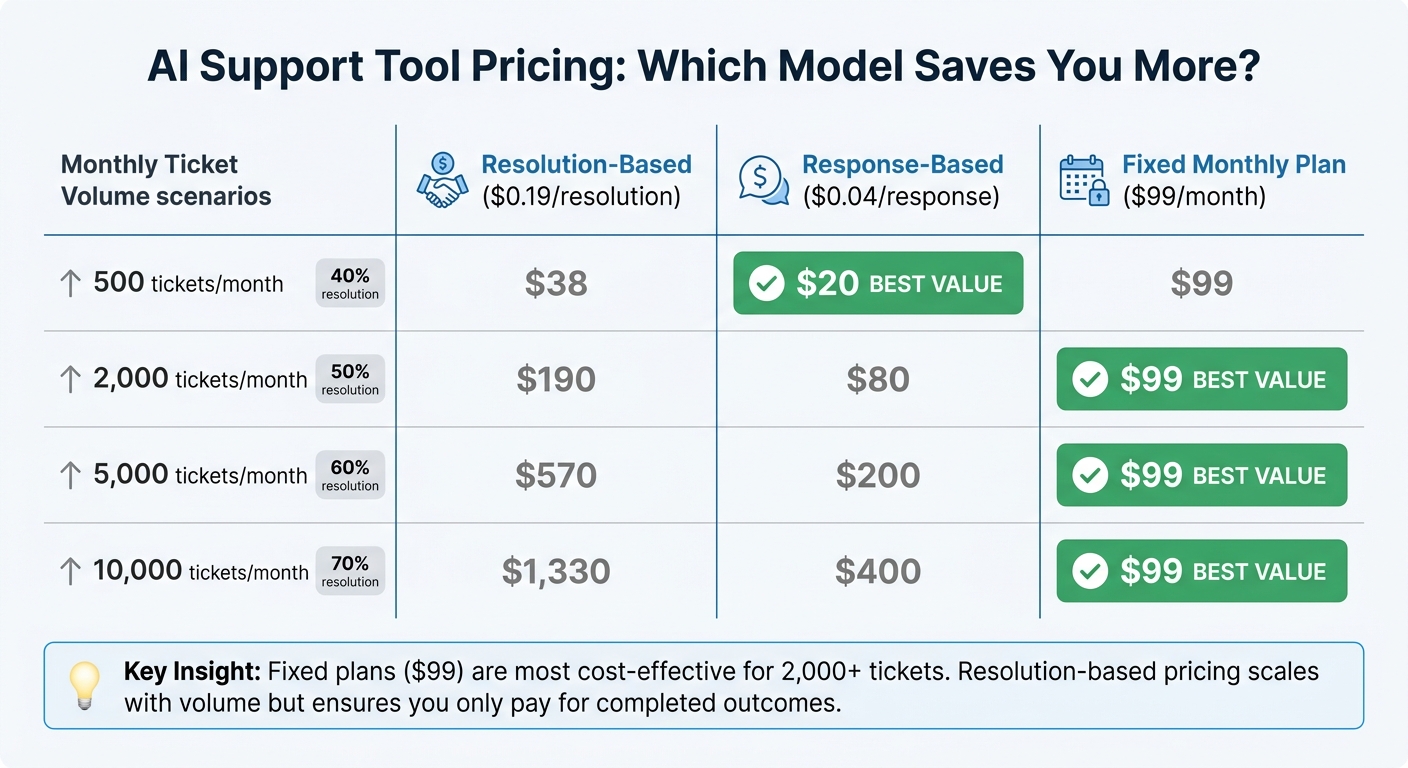
AI Customer Support Tool Pricing Models Comparison by Ticket Volume
AI support tools come with different pricing models - resolution-based, response-based, and fixed monthly plans - that impact your total cost depending on ticket volume and resolution rates.
Resolution-Based Pricing
With resolution-based pricing, you’re charged only for tickets fully resolved by AI. CoSupport AI uses this model at $0.19 per resolution, meaning unresolved tickets don’t cost you anything. This ensures you only pay for completed outcomes.
Take Silencerco, for example. As a Freshdesk customer managing 3,500 tickets per month, they achieved a 60% resolution rate and cut their backlog by 60%. With 2,100 tickets resolved (3,500 × 60%), their monthly cost came out to about $399. While costs grow with ticket volume, the direct link to resolved outcomes makes this pricing model a solid investment.
Next, let’s look at how response-based and fixed monthly plans differ.
Response-Based and Fixed Monthly Plans
Response-based pricing charges for every AI-generated interaction, whether or not the issue is fully resolved. CoSupport AI offers this at $0.04 per response. For instance, if your AI produces 5,000 responses in a month, the cost would be $200.
Fixed monthly plans, like CoSupport AI’s $99 server-based plan, provide unlimited AI responses for a flat fee. This option works well for teams handling 500 to 2,000 tickets per month, where per-interaction costs could quickly exceed the flat rate.
Calculate TCO by Ticket Volume
When evaluating the total cost of ownership (TCO), remember to include setup and maintenance efforts alongside the pricing model. Initial setup generally takes 30–60 hours to reach a 50% resolution rate, while ongoing maintenance requires about 2–4 hours per month for retraining and updates.
Here’s a breakdown of estimated monthly costs for different ticket volumes:
| Monthly Tickets | Resolution Rate | Resolution-Based ($0.19/resolution) | Response-Based ($0.04/response) | Fixed Plan ($99/month) |
|---|---|---|---|---|
| 500 | 40% | $38 | $20 | $99 |
| 2,000 | 50% | $190 | $80 | $99 |
| 5,000 | 60% | $570 | $200 | $99 |
| 10,000 | 70% | $1,330 | $400 | $99 |
For teams handling fewer than 2,000 tickets monthly, response-based or fixed plans often result in lower costs. On the other hand, resolution-based pricing becomes more appealing as ticket volumes grow, especially when compared to the expense of human resolution. To make the best choice, assess your ticket volume, resolution rates, and the time investment for setup and maintenance. This will help you select the pricing model that delivers the best return on investment for your support operations.
Test AI Accuracy and Agent Support
After evaluating pricing, the next step is to test AI accuracy. This ensures responses are correct and supports both routine and more complex customer issues. Accurate AI and effective agent collaboration are key to reducing manual work and maintaining strong CSAT scores.
Verified Knowledge Base Responses
For AI to provide reliable answers, it must rely solely on approved knowledge bases. CoSupport AI takes this seriously with its zero hallucination design, meaning it only generates responses based on your trained knowledge base - such as past tickets, macros, and help center articles. If it can’t find a verified answer, it escalates the query to a human agent instead of making an educated guess.
That said, outdated documentation can lead to errors. Expect a 3–12% error rate if your knowledge base isn’t up-to-date. Platforms that require structured knowledge input - rather than simply pulling from FAQs - perform 2.3x better within 90 days. To maximize accuracy, audit and clean your documentation before implementation. The quality of your input data directly impacts the AI’s performance.
Run Pilots with Real Tickets
Testing AI with real-world scenarios is essential. Start with 200 anonymized tickets to compare AI resolutions against known human outcomes. This provides a realistic benchmark since demo results are often 30–40% higher than real-world performance.
Follow this with a 30-day pilot using live tickets. Track metrics like ticket volume, handle time, and cost per ticket. Conversation audits during this phase can uncover areas that need immediate refinement. CoSupport AI simplifies this process by training on your own tickets and help center content in under 10 minutes, making it easy to integrate with platforms like Zendesk or Freshdesk.
This testing phase not only helps measure performance but also ensures a smooth transition between AI and human agents.
AI-Agent Collaboration on Complex Cases
While AI can handle routine tickets independently, complex cases need human expertise. CoSupport AI uses confidence scoring to evaluate its certainty. If the confidence falls below a set threshold, the query is flagged for human review instead of being sent to the customer. This approach avoids the risk of incorrect responses.
When escalating a case, the AI provides a structured summary, including intent flags and conversation context. This saves agents from having to ask customers to repeat details. For example, iubenda, a Freshdesk user managing 5,000 tickets monthly, leverages CoSupport AI to automatically resolve routine queries. This allows agents to focus on more critical issues. By balancing automation with human input, you ensure that complex cases are handled with the care they require.
Conclusion
When evaluating AI support tools, focus on five key factors: integration, resolution rates, security, cost, and accuracy. Look for features like native connectors for platforms like Zendesk or Freshdesk, an autonomous resolution rate of 60–75%, SOC 2 certification for security, and resolution-based pricing models to ensure a solid return on investment.
To truly measure effectiveness, consider running a 30-day pilot with real tickets, as demo results often outperform live scenarios by 30–40%. CoSupport AI, for example, can train on your ticket data in under 10 minutes, achieving up to 90% autonomous resolution for just $0.19 per resolution.
Ready to see it in action? Test your AI agent with your own support data.
.png)



