.png&w=96&q=75)


 395
395
AI-powered search makes it easier for global teams to find answers across multiple languages. Traditional systems often fail because they rely on exact keyword matches, which don’t account for language differences, regional terms, or user intent. For example, a Spanish query like "no puedo iniciar sesión" might not match an article titled "Solución de problemas de autenticación", leaving users frustrated.
AI solves this by understanding the meaning behind queries, not just the words. It uses cross-language semantic search to match questions in one language with answers in another. For instance, if a French user asks, "Comment annuler mon abonnement?" the AI can locate an English article about canceling subscriptions and return the answer in French.
Key Benefits:
- Language-neutral intent matching: Queries and articles are compared based on meaning, not exact words.
- Cross-language retrieval: Answers can come from content in any language, reducing the need for full translations.
- Localization: Responses are adapted for regional formats like dates, currency, and units.
How to Prepare Your Knowledge Base:
- Use clear, descriptive titles to align with common queries.
- Tag content by language and locale for better AI routing.
- Prioritize high-impact articles for indexing and translation.
- Test and refine: Monitor failed searches and adjust content to fill gaps.
AI search improves accuracy, reduces support tickets, and ensures users worldwide get the help they need in their preferred language.
The Magic of Multilingual Search with Pinecone Serverless and Inference
What AI Multilingual Knowledge Base Search Is
Let’s dive into what AI multilingual knowledge base search actually means and how it works.
This technology enables customers to ask questions in any language and receive answers drawn from content written in any other language. The system doesn’t just translate - it understands the intent behind the query and finds the most relevant answer, regardless of the language it was originally written in. For example, if a customer asks, "¿Cómo cancelar mi suscripción?" in Spanish, the system might locate an English article about canceling subscriptions and then present the answer back in Spanish.
What makes this approach stand out is that it doesn’t require you to translate every single article in advance. Instead, the AI scans through all available content, regardless of the language, and delivers the right answer seamlessly.
How Cross-Language Semantic Search Works
Cross-language semantic search operates on a fascinating principle: it translates both user queries and articles into numerical representations that capture their meaning. These numbers don’t just reflect the words used - they represent the intent behind them.
Here’s an example: A German customer types "Passwort vergessen" (forgot password). The system generates a numerical “meaning” for this query and compares it to the meanings of all available content. An English article titled "How to Reset Your Password" might have a similar representation, allowing the system to recognize it as the best match - even though the languages are different.
The system also accounts for regional nuances. For instance, the word “football” might mean soccer in Europe but refer to American football in the United States. Regional models help the AI navigate these subtle differences.
Language Detection and Answer Localization
Now, let’s look at how the system identifies languages and tailors answers for different audiences.
The AI automatically detects the language of a query and directs it to the right model to find the most relevant content. Once the best match is identified, the system localizes the response to fit the customer’s region. For example, a U.S. customer might see a date formatted as 12/17/2025 and a price as $99.99, while a European customer would see the same information as 17/12/2025 and €99,99.
Localization goes beyond formatting - it adapts the tone, units of measurement, and even cultural references to ensure the response feels natural and intuitive. This is critical because nearly 75% of people search online in their native language, and over 50% of Google searches happen in languages other than English. If your knowledge base only works effectively in English, it could alienate a significant portion of your global audience.
With CoSupport AI, language detection and localization are automated, allowing your team to focus on creating high-quality content once, while the AI ensures it’s accessible to everyone, everywhere.
How to Prepare Your Knowledge Base for AI Multilingual Search
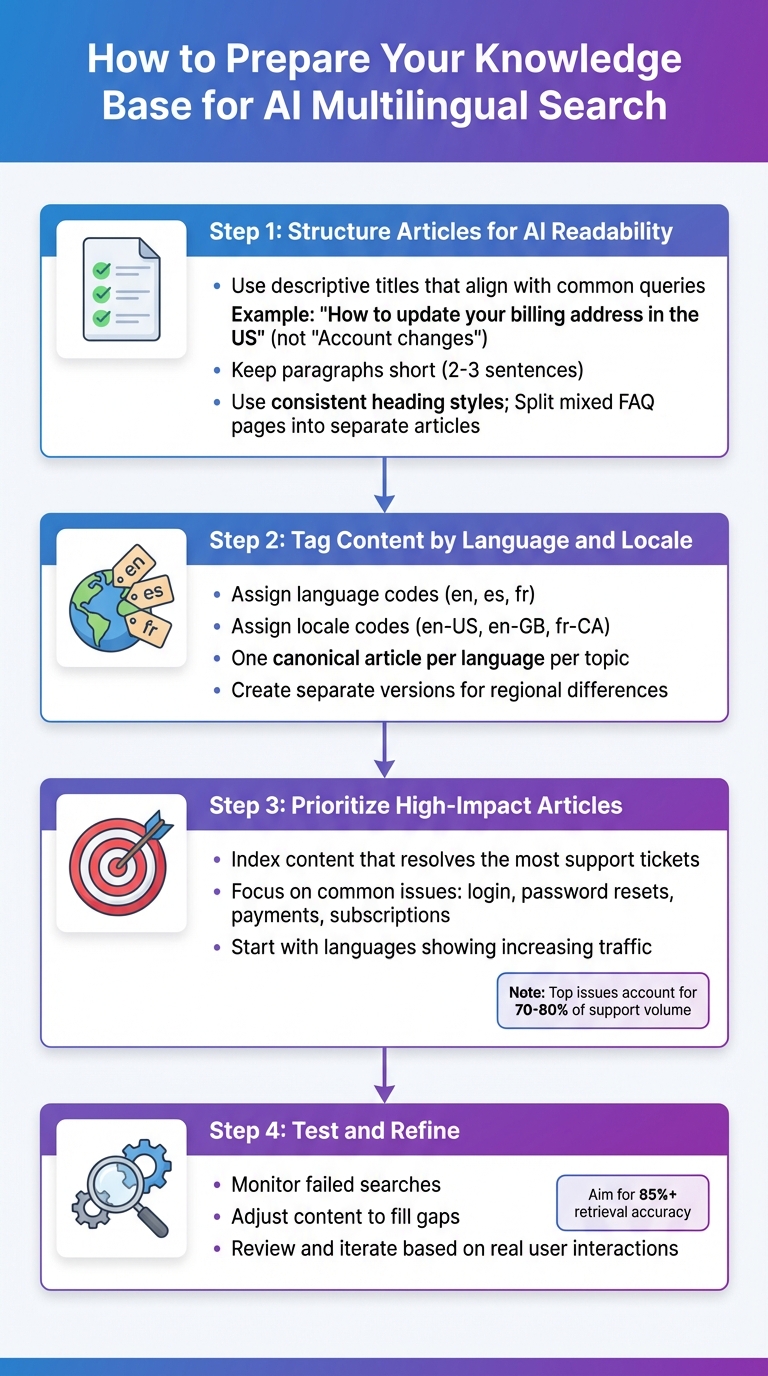
4-Step Guide to Preparing Your Knowledge Base for AI Multilingual Search
To ensure AI delivers accurate answers across multiple languages, your knowledge base needs to be properly set up. A few focused updates can make a big difference. Here’s how to get started.
Structure Articles for AI Readability
AI processes content differently than humans - it looks for clear signals about what each article is about and where specific answers can be found.
Start by using descriptive titles that align with common user queries. For example, instead of a vague title like "Account changes", use something like "How to update your billing address in the US." This helps AI quickly match the content to user intent. Include direct answers or concise step-by-step instructions at the very beginning of the article.
Keep paragraphs short - 2 to 3 sentences work best - and use consistent heading styles to organize content. This makes it easier for models like mBERT to process small, focused sections of information. If you have mixed FAQ pages covering multiple topics (e.g., billing, password resets, and shipping), split them into separate articles. This prevents AI from pulling the wrong information when answering a specific query about, say, payment issues.
Once your articles are well-structured, the next step is t65%^%agging content to guide AI in routing queries correctly.
Tag Content by Language and Locale
Language tags are essential for ensuring queries are directed to the right content. Assign each article the appropriate language codes (e.g., en, es, fr) and locale codes (e.g., en-US, en-GB, fr-CA) in your content management system. This ensures AI serves the correct regional content.
Stick to one canonical article per language for each topic to avoid confusing the AI. If pricing or policies vary by region, create separate localized versions - such as en-US for U.S. billing terms and en-GB for U.K. terms - and configure AI to deliver the right version based on the user's location or profile.
Choose Which Content to Index First
Once your articles are structured and tagged, focus on indexing the content that has the biggest impact. You don’t need to index everything immediately - start with the articles that resolve the most support tickets.
Use helpdesk analytics to identify top search queries and high-volume ticket topics. Prioritize content addressing common issues like login problems, password resets, payment failures, and subscription changes. These topics often account for 70–80% of support volume. Platforms like CoSupport AI can handle up to 90% of repetitive requests, but only if the right content is indexed first.
Begin with languages where you see increasing traffic or low self-service success rates. For example, focus on English, Spanish, and French if those translations are already strong. Skip outdated articles tied to legacy features or rare edge cases, as these can reduce AI accuracy. By starting small and expanding strategically, you can improve AI-driven support over time.
Step-by-Step: Setting Up AI Multilingual Knowledge Base Search
Once your content is ready, the next step is connecting AI to your knowledge base. Thanks to no-code platforms, the technical side of this process is streamlined, allowing you to focus on fine-tuning the configuration.
Connect AI to Our Knowledge Sources
The first step involves linking AI to your existing content repositories. Platforms like CoSupport AI make this process straightforward by integrating directly with helpdesk systems such as Zendesk, Freshdesk, Zoho Desk, and Intercom. With just an API key or OAuth authorization, the platform starts indexing your documentation, FAQs, and historical ticket data automatically.
If your content lives in external systems like Google Drive, Slack, or internal wikis, API connectors can pull that data into the AI system. The AI then converts this information into numeric representations to understand intent. This enables the AI to match user queries with the most relevant content, regardless of the language.
"Setup took one API key. In three months, resolution rates grew from 69 to 82 percent. We tested six other tools before. Nothing performed as well as CoSupport AI." - Josh Brown, CEO, Softorino.
Once the connection is established, the next step is configuring language detection and response settings for precise results.
When to Use AI Translation vs. Cross-Language Search
For customer-facing content - like billing terms, legal disclaimers, or product instructions - it’s best to translate high-priority articles. Start with the top 10% of articles by search volume, focusing on the languages that generate the most s traffic.
For everything else, cross-language semantic search is a practical alternative. This method is ideal for internal documentation, low-traffic languages, or dynamic queries where speed is more critical than perfect localization. Tools like mBERT and XLM-R excel at understanding intent across multiple languages, ensuring users receive accurate answers even if the source content isn’t in their native language. This approach balances cost and efficiency while maintaining search accuracy above 70% in most cases.
After determining the best strategy for each content type, the next step is setting up language detection to ensure accurate and localized responses.
Set Up Language Detection and Answer Preferences
Automatic language detection is essential for identifying the user’s input language and routing queries to the appropriate model. Most platforms support this feature for major languages like English, Spanish, French, German, and Portuguese. To handle edge cases, configure fallback rules - such as responding in English or escalating to a human agent if no match is found in the user’s language.
Locale tags (e.g., en-US vs. en-GB) allow the AI to deliver region-specific content, such as localized pricing or metric versus imperial units. Testing sample queries in each target language ensures the system detects languages correctly and provides accurate, localized responses. The goal is to achieve retrieval accuracy above 85%, refining the setup based on real user interactions.
sbb-itb-97114f1
3 Mistakes Teams Make with AI Multilingual Search
Thinking Translation Alone Fixes Search
Just translating articles isn’t enough to fix search issues. Why? Because translation alone doesn’t address the structural clarity needed for effective semantic search.
AI models thrive on clear, intent-driven titles and consistent terminology to connect user queries with the right answers. When translated content carries over vague or unclear headings, problems arise. For example, Spanish-speaking users searching with English product terms might still struggle to find what they need - even if the translations are technically accurate.
The solution starts before translation. Standardize article templates, create titles that directly address user questions, and break content into sections instead of indexing entire pages. This way, AI can pinpoint the exact answer users need, rather than serving up an entire guide. Building content with clarity and intent, as mentioned earlier, is essential for effective AI-powered search. Without this foundation, translation alone won’t bridge the gap.
Translating Low-Value Content
Not all content is worth translating. Focus on high-impact articles that address common support issues. Low-traffic pages - like those covering outdated features or internal processes - can remain in English and still perform well with cross-language semantic search.
Start by ranking your articles based on metrics like ticket volume, search impressions, and deflection rates. Prioritize translating content that significantly reduces support tickets, such as topics on signups, billing, outages, or essential workflows. For more specialized content, like niche developer documentation or rarely used settings, keep it in English. AI can still process queries in one language, retrieve the best source material, and deliver an answer in the user’s language.
But translation isn’t the only challenge - overlooking regional differences can also hurt search performance.
Ignoring Regional Differences
Terminology and expectations vary widely across regions. For instance, someone in the U.S. might search for a "cell phone plan", while someone in the U.K. might use "mobile tariff." Users also expect localized details, such as currency formats, date styles, and measurement units. A phrase like "5 miles" could easily confuse users who are accustomed to kilometers.
To address this, add locale-specific synonyms to your search setup so different terms point to the same intent. For key articles, create lightweight regional versions by tweaking units, examples, or screenshots while keeping the core technical instructions the same. Additionally, guide AI models with prompts that account for local currencies and formats, even when pulling information from shared global documentation. This approach ensures users get accurate, regionally relevant answers without unnecessary confusion.
How to Measure Multilingual Search Performance
Tracking the right metrics is essential for evaluating the success of multilingual search. Here’s how we monitor performance, refine content, and reduce the need for support tickets.
Track Search Success Rate by Language
The search success rate measures how often a query leads to a clicked article, positive feedback, or no follow-up ticket. To calculate it, divide the number of successful sessions by the total sessions for each language. Most teams aim for a 70–85% success rate in their primary language, while newer language sets often start at 40–60%. Comparing non-English languages against the best-performing language helps identify areas for improvement. Weekly AI log metrics, filtered by detected language, make it easier to catch regressions early and address problems before ticket volumes increase.
Once these metrics are in place, the next step is to identify and fix content gaps.
Find and Fix Content Gaps
Export queries where the AI returned no results, users rephrased questions, or marked answers as unhelpful. Organize these queries by language and review the top 20–50 failed queries for each language every month. This helps reveal missing topics, unclear terms, or poor translations.
For clusters of similar failed queries, check if there’s a relevant English article that hasn’t been translated. If one exists, prioritize translating it. If the topic isn’t covered in any language, flag it for new content creation. When existing content isn’t connecting because users use local slang, product nicknames, or regional terms, update titles and headings to align with these variations. Issues are ranked based on query volume, business impact (like billing or cancellations), and success rates. For example, if Portuguese users frequently fail to find answers about "billing address changes", and it drives ticket volume, this signals an area needing immediate attention.
With gaps addressed, the next focus is on deflection and resolution metrics to evaluate overall effectiveness.
Measure Deflection and Resolution by Language
Deflection measures how often users find answers without submitting a ticket. Calculate it by dividing the sessions where an AI answer was viewed, but no ticket was created, by the total sessions with an answer. Resolution, on the other hand, tracks cases resolved without human intervention, indicated by positive feedback or no reopened cases. Breaking these metrics down by language reveals where content effectively reduces escalations and where users still need extra help.
"Setup took one API key. In three months, resolution rates grew from 69 to 82 percent. We tested six other tools before. Nothing performed as well as CoSupport AI." - Josh Brown, CEO, Softorino.
To estimate cost savings, multiply the number of deflected tickets per language by the average $6 support cost. For example, deflecting 500 Spanish tickets per month would save around $3,000. These metrics are reviewed monthly with support leads, content owners, and localization managers to decide on new articles, translation updates, and AI adjustments.
Conclusion
AI-powered multilingual knowledge base search solves problems that traditional keyword systems often overlook. Consider this: nearly 75% of searches happen in native languages, and over half of all Google searches are non-English. If your knowledge base only supports English, you could lose customers before they even reach out for help. The advantages of AI search align with the challenges discussed earlier, offering clear improvements in how support teams operate.
The financial benefits are clear, too. Metrics show that AI-driven search reduces ticket volume, eases the workload on agents, and speeds up resolutions - without requiring every article to be translated. For example, one project cut resolution times from 2 hours to just 6 minutes, while dramatically improving success rates.
Cross-language semantic search goes beyond basic translation. It understands subtle differences in terms like "soccer" versus "football" depending on the region, identifies the intent behind full questions, and gets smarter with user feedback. You don’t need perfect translations - AI bridges the language gap by retrieving the right information based on context.
To get started, monitor search success rates, ticket deflection, and resolution times for each language. Analyze failed queries to uncover content gaps, then prioritize translating high-impact topics like billing and onboarding. For less frequent, long-tail queries, let AI handle them through cross-language retrieval. This strategy broadens your support capabilities without adding to your team’s workload. Tracking these metrics ensures ongoing improvements in your support system, reinforcing the importance of integrating intelligent search with your content strategy.
Try CoSupport for free - no code required, no hidden surprises.
FAQs
How does AI process queries in multiple languages without translating them word-for-word?
AI leverages multilingual models that are trained on a variety of language data to handle queries effectively. These models analyze patterns, context, and connections across different languages, allowing the AI to grasp the intent behind a query without relying on a word-for-word translation.
By prioritizing the overall meaning instead of direct translation, AI can accurately interpret and respond to queries - even when the language of the query differs from the language of the knowledge base.
How can I prepare my knowledge base for AI-powered multilingual search?
To get your knowledge base ready for AI-powered multilingual search, begin by collecting all the necessary content - this might include FAQs, helpdesk articles, documentation, and internal resources. Then, tidy up the data by removing outdated or irrelevant pieces, standardizing the formatting, and organizing topics in a clear, logical way. Once your content is polished, connect it to the AI platform, giving it access to the full range of information. Finally, run real-world queries to test the system, pinpoint any gaps or inaccuracies, and fine-tune it to improve both accuracy and coverage.
How does AI-based cross-language search improve the customer experience?
AI-powered cross-language search transforms the customer experience by interpreting the intent behind a query instead of depending solely on exact keyword matches. This allows users to access relevant answers in their preferred language, even when the support content is written in another language.
By prioritizing context and meaning, semantic search minimizes confusion and frustration, particularly for global audiences. The result? Faster, more accurate responses that save time and leave customers feeling more satisfied.
.png&w=128&q=75)



.png&w=96&q=75)
.png&w=3840&q=75)
