.png&w=96&q=75)

Yes, AI can significantly improve support for small teams managing 200–300 tickets per month. Even with low ticket volumes, AI helps automate repetitive tasks, improve response times, and maintain consistency - all while keeping costs low. Here's why it works:
- Automates Routine Tasks: AI can handle up to 80% of common queries like password resets or shipping updates, freeing agents for complex issues.
- Improves Efficiency: Features like Zendesk AI ticketing for automatic sorting and AI-generated summaries save time and reduce agent workload.
- Cost-Effective: AI tools cost $200–$1,500 per month, far less than hiring additional staff.
- 24/7 Availability: AI ensures round-the-clock support without requiring overtime pay.
- Boosts Customer Satisfaction: Teams using AI report higher CSAT scores (89%) compared to those relying solely on manual processes.
For small teams, AI isn’t just about scaling - it’s about working smarter. It reduces repetitive work, ensures faster resolutions, and helps deliver consistent, high-quality support without adding extra resources.
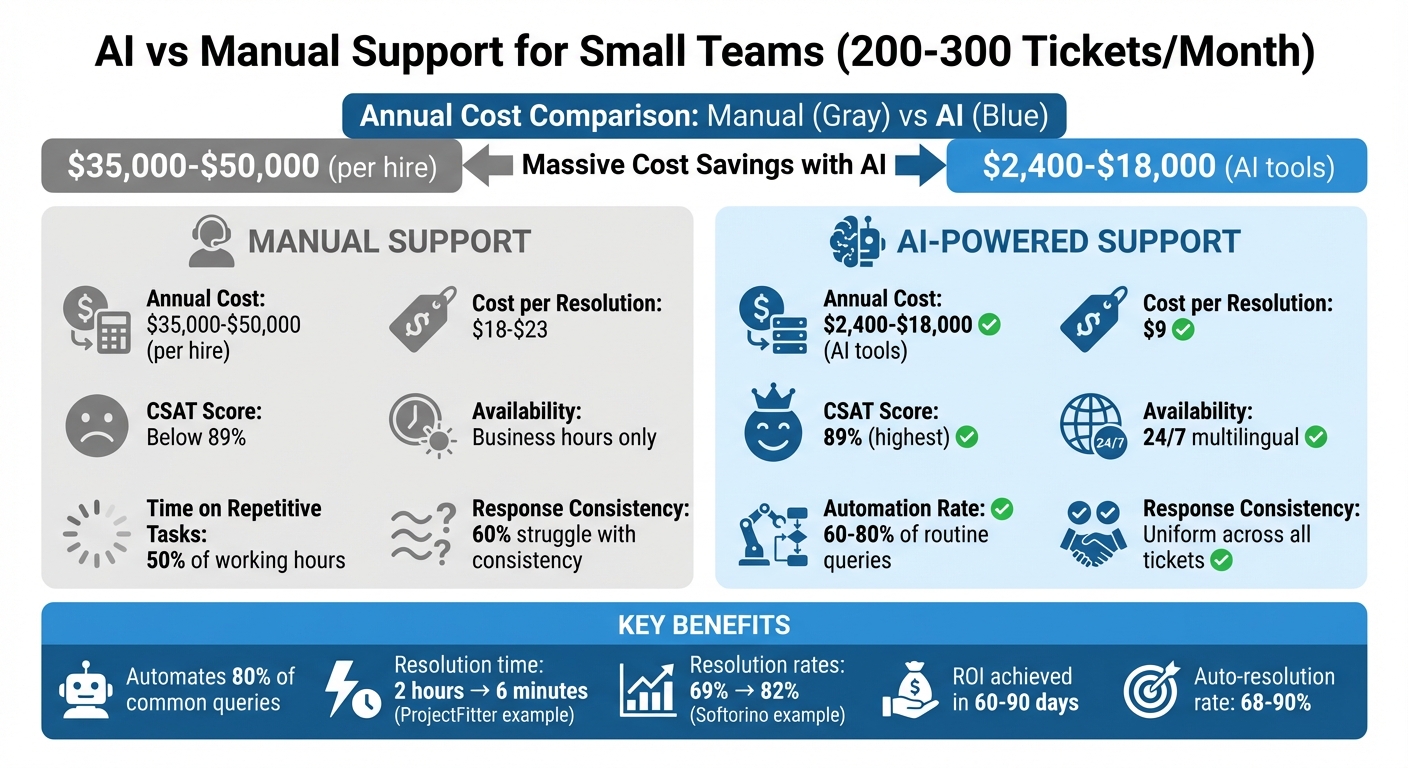
AI vs Manual Support: Cost and Performance Comparison for Small Teams
We Automated 80% of Customer Support With One AI Agent (No Code)
sbb-itb-97114f1
Common Problems for Small Teams Managing 200-300 Tickets Monthly
Handling 200 to 300 tickets a month might seem manageable at first glance, but for small teams, it can quickly become overwhelming. Unlike larger teams with more resources, smaller operations often face hurdles that sap productivity and lead to inconsistent customer experiences.
Here are the main challenges:
- Repetitive tasks eat up valuable time.
- Inconsistent responses can damage customer trust.
- Missed insights from ticket data hinder growth opportunities.
To understand how these issues can be addressed, let’s dive into the three biggest pain points small teams encounter.
Time Wasted on Repetitive Tasks
Everyday tasks like resetting passwords or checking shipping statuses might only take a few minutes each, but they add up fast. When these requests trickle in all day, they can consume as much as half of your team’s working hours.
"A handful of 'quick questions' can quietly eat half a day." - AI Help Desk Automation Playbook
Beyond answering basic queries, agents often spend extra time tagging tickets, pulling out details, or routing them to the right person. For startups, this is especially tough - founders frequently find themselves stuck in support roles instead of focusing on growing their product.
Take Softorino, for example. Before adopting automation in 2024, their team struggled with manually sorting tickets across several product lines. After experimenting with six different tools, they finally found a solution that boosted their resolution rates from 69% to 82% in just three months.
Uneven Response Quality Across Tickets
Small teams often juggle multiple responsibilities. A support agent might also be updating documentation, creating marketing content, or handling other tasks. This constant context switching leads to inconsistent responses. One customer might get a well-thought-out answer, while another receives a rushed reply that lacks detail.
The core issue? Knowledge is scattered. Agents rely on Slack messages, Google Docs, or outdated wikis to find answers. When they can’t locate the right information quickly, they either guess or waste time searching, which results in conflicting responses. This inconsistency frustrates customers and weakens trust in your brand.
In fact, more than 60% of small and medium businesses struggle to maintain consistent communication across channels. When customers receive different answers depending on which agent responds, it’s not just frustrating - it can harm your reputation.
This lack of uniformity also obscures valuable trends hidden in support data, making it harder to improve processes or address recurring issues.
Lost Opportunities in Customer Data
For many small teams, tickets are treated as tasks to complete, not as a source of valuable insights. But those 250 monthly conversations hold critical information about product challenges, pricing concerns, and feature requests - insights that could drive meaningful business decisions.
"The chat interactions turned out to be a goldmine of information that helped guide product development, pricing and other SaaS aspects." - Alden Do Rosario, CEO, CustomGPT.ai
Without analyzing this data, important patterns go unnoticed. For instance, you might answer the same billing question 40 times without realizing there’s an issue with your checkout process. Or you could miss that multiple customers requested the same new feature last week. When ticket handling is entirely manual, spotting these trends becomes nearly impossible.
Overlooking these insights means teams miss chances to make informed, strategic changes. Instead of solving root problems, they’re stuck addressing surface-level issues, which keeps inefficiencies in the workflow.
The Takeaway: Even with a smaller ticket volume, small teams face big challenges. From repetitive work to inconsistent answers and overlooked data, these problems make it harder to deliver the quick, reliable support customers expect - no matter the size of your business.
How AI Customer Support for Small Ticket Volume Helps Your Team
AI can bring noticeable improvements in speed, consistency, and cost efficiency for teams managing between 200 and 300 tickets a month. By focusing on automating key processes, small teams can see results quickly.
Here’s how AI can transform your team’s daily operations:
- Automated sorting removes the need for manual ticket triage.
- AI-generated responses save time while maintaining high-quality interactions.
- Flexible pricing ensures accessibility for teams with limited budgets.
Let’s dive into how these features work and why they matter for small teams.
Automatic Ticket Sorting and Priority Assignment
Sorting incoming tickets manually is time-consuming and inefficient. AI can take over this task, reading requests, categorizing them by intent, and routing them to the right place. Urgent issues are prioritized for immediate attention, while routine questions are handled more efficiently.
AI evaluates tickets based on three key factors: urgency (how time-sensitive the issue is), sentiment (the emotional tone of the message), and business importance (the customer’s value to your company). For example, if a high-value customer expresses frustration over a seemingly minor issue, AI can automatically escalate it to "Critical" priority.
Advanced systems even analyze customer sentiment in real time. If they detect negative phrases like "frustrated", "disappointed", or "unacceptable", they upgrade the ticket’s priority. Similarly, keyword-based routing identifies terms like "locked out", "billing error", or "refund", tagging and assigning those tickets to the appropriate queue.
For teams managing 200–300 tickets a month, AI can cut triage time by 60% in just six weeks. Instead of spending hours reviewing each request, agents can focus on solving problems.
"A support inbox treated as first-in-first-out handles none of this correctly... Helpdesk triage - automatic sorting by urgency, sentiment, and business priority - is what turns a queue into a system." - AI Shortcut Lab Editorial Team
To make AI sorting even more effective, consider using a standardized ticket form. Fields like product category, urgency level, and issue type provide clean data for accurate AI routing from the start.
Once tickets are sorted, AI can further improve efficiency by generating responses and summaries.
AI-Generated Responses and Ticket Summaries
AI doesn’t just sort tickets - it can also handle many of them. By training on your knowledge base, help center articles, and historical tickets, AI can generate accurate, on-brand responses. This allows small teams to provide instant, 24/7 support without hiring additional staff.
When a ticket does require human attention, AI prepares a summary. These summaries condense long conversations into a short paragraph that outlines the issue, any actions already taken, and the customer’s needs. Agents can quickly understand the situation without digging through multiple messages.
Take ProjectFitter, for example. They reduced their average resolution time from 2 hours to just 6 minutes using AI automation. Similarly, Cocoatech automated 81% of its support requests, freeing its team to focus on more complex cases.
Accuracy is key. To achieve it, train the AI with your own data - your website URLs, product documentation, and internal guides. Set a confidence threshold so the AI only sends auto-replies when it’s over 80% certain. For anything less, it drafts a response for human review.
"My quickest win is almost always 'triage plus summary.' Even when the AI can't solve the ticket, it can cut handling time." - AI Flow Review
For teams managing around 250 tickets a month, this approach can resolve 60% of tickets automatically within 60 days. The rest still benefit from AI summaries, which speed up the work for human agents.
Affordable AI Solutions for Small Budgets
AI tools aren’t just efficient - they’re also cost-effective. Modern pricing models make them accessible for small teams. Compared to hiring a customer service agent at $35,000 to $50,000 per year, most AI tools cost between $2,400 and $18,000 annually.
For example, CoSupport AI offers various pricing options. With pay-per-resolution pricing, you pay only for tickets the AI resolves - at $0.59 per resolution. Alternatively, response-based pricing costs about $0.10 per AI-generated reply. For predictable costs, a fixed monthly plan offers unlimited responses.
Small teams using AI often see their cost per resolution drop to around $9, compared to $18–$23 for teams without automation. They also achieve higher Customer Satisfaction scores, averaging 89%, proving that efficiency doesn’t have to come at the expense of quality.
"The average small business spends $35,000–$50,000 per year on a single customer service hire... Most AI tools cost $200–$1,500 per month. That math alone makes the case." - Iliyan Ivanov, Founder of AIessentials
Here’s a real-world example: A recruiting SaaS company with 800 users and $40,000 in monthly recurring revenue implemented an automation stack costing just $128 per month. Before automation, the founder spent 12 hours a week managing 350 tickets. After implementation, support time dropped to 3.5 hours per week - a 70% reduction - with a 68% auto-resolution rate. The monthly gain, based on the value of the founder’s time, was calculated at $5,312.
For teams handling 200–300 tickets monthly, the return on investment is clear. AI quickly pays for itself by freeing up valuable time and resources, enabling small teams to operate as efficiently as larger ones.
The Takeaway: AI customer support for small ticket volumes offers immediate benefits. Automated sorting ensures urgent issues get prompt attention, AI-generated responses provide consistent 24/7 support, and affordable pricing makes these tools accessible - even for startups.
Case Study: How CoSupport AI Helped a Small Team Handle 250 Monthly Tickets
Outstaff Your Team, a U.S.-based recruiting SaaS company, was dealing with a familiar challenge - managing about 250 support tickets each month. These tickets mostly revolved around routine issues like password resets, account inquiries, and order tracking. Handling these manually consumed valuable time and hampered their overall productivity.
To address this, they turned to CoSupport AI to automate their support workflow. The setup process was incredibly quick, taking just three days. By training the AI using their help center content and historical ticket data, the system became adept at identifying and responding to common requests with consistent, reliable answers. CoSupport AI's USPTO-approved architecture ensured responses were accurate and avoided common pitfalls like hallucinations. This swift implementation paved the way for remarkable improvements in efficiency.
Once deployed, the results were immediate. CoSupport AI managed to handle up to 90% of routine inquiries automatically, significantly reducing the need for human intervention. This allowed the team to dedicate more time to complex customer issues and focus on strategic goals.
Cutting Resolution Time in Half with Automation
The automation features of CoSupport AI delivered measurable results right out of the gate. By providing instant responses to routine questions, the system dramatically reduced resolution times and improved overall support efficiency.
Key Takeaway: Automating repetitive tasks with CoSupport AI can drastically cut resolution times, helping small teams provide faster and more efficient support.
Freeing Agents to Handle Complex Issues
With CoSupport AI taking care of 71% of repetitive inquiries, most routine tickets never even reached the human support team. For the tickets that did require a human touch, the AI provided concise summaries with key details, reducing the time agents spent switching between tasks. This allowed the support team to focus on solving complex problems and working on higher-value initiatives. The results demonstrate how AI-driven tools can help small teams work smarter without increasing operational costs.
Key Takeaway: Using AI for routine tasks not only improves efficiency but also enables agents to focus on strategic, high-value customer interactions.
How to Set Up AI for Your Small Support Team: Step-by-Step
If you're ready to streamline your support team's workload with AI, this guide will walk you through the setup process. By following a structured approach, you can integrate AI into your helpdesk with minimal disruption and see results quickly.
Connect AI to Your Helpdesk Platform
Modern AI tools, like CoSupport AI, integrate smoothly with platforms such as Zendesk, Freshdesk, Zoho Desk, and Intercom. Using API keys, the setup can be completed in under an hour without interrupting your team's workflow.
Start by enabling the "Assist" and "Route" features. These allow the AI to summarize tickets and assign them to the appropriate team member. This phased approach helps your team adapt before moving on to more advanced features like "Deflect" or "Auto-resolve."
"Setup took one API key. In three months, resolution rates grew from 69 to 82 percent." - Josh Brown, CEO of Softorino
For teams managing 200 to 300 tickets per month, a hybrid model works well. Use AI to handle Tier 1 tasks - like password resets or order tracking - while reserving complex or sensitive issues for human agents. Set confidence thresholds to ensure the AI only responds when it's certain about its answers.
Integrate Your Support Documentation into the AI System
To train your AI, connect it to your existing support documentation, solved tickets, and FAQs. Using Retrieval-Augmented Generation (RAG), the AI builds a knowledge graph tailored to your policies, ensuring accurate and relevant responses.
Before training, clean up your data. Inconsistent or scattered information - like conflicting policies or unstructured Slack threads - can lead to inaccurate answers. Use structured forms with fields like product, urgency, and category to provide the AI with clear, standardized inputs.
Analyze the past 90 days of tickets to identify your top 10 to 20 repetitive questions. These should be your first targets for automation.
Test the AI internally for two weeks before rolling it out to customers. During this phase, let the AI "shadow" human agents to identify inaccuracies or tone issues. This trial period is critical for fine-tuning responses and ensuring the system functions as expected.
Track Results and Adjust AI Settings
Once the AI is live, monitor its performance by tracking key metrics. Establish baselines for First-Response Time (FRT), Median Time to Resolution (MTTR), and CSAT scores for automated interactions. Review these metrics weekly for the first month, then shift to monthly reviews as the system stabilizes.
Watch for high escalation or reopen rates - these can signal incomplete or incorrect answers. Use this feedback to identify gaps in your knowledge base and refine the AI's logic. For example, ProjectFitter reduced its average ticket resolution time from two hours to six minutes by continuously improving its AI settings.
Set up hard escalation triggers to ensure the AI hands off to a human agent when necessary. Keywords related to frustration, billing disputes, or manager requests should automatically trigger an escalation. Clear escalation paths are essential to maintaining customer trust.
| Metric | Importance | Action |
|---|---|---|
| Deflection Rate | Tracks how many tickets the AI resolves independently | Update the knowledge base if this rate is low |
| Escalation Rate | Measures how often the AI fails to resolve issues | Analyze logs to improve the AI's logic |
| Reopen Rate | Indicates user satisfaction with AI resolutions | Refine response logic for specific categories |
| Agent Handle Time | Shows if AI summaries and drafts are helping agents | Adjust summary prompts if agents find them unhelpful |
By focusing on these metrics and making adjustments based on performance data, you can optimize your AI to improve both efficiency and customer satisfaction.
Key Takeaway: Start with basic AI features like assistance and routing, test thoroughly before going live, and use performance metrics to refine the system for better results.
Conclusion
How AI Improves Efficiency for Small Teams
AI-powered customer support can be a game-changer for small teams managing limited ticket volumes. For teams handling 200–300 tickets per month, automation ensures quicker responses and greater consistency, leading to happier customers. In fact, small teams leveraging AI report impressive CSAT scores of 89% - the highest among all groups. They also significantly reduce their cost per resolution to around $9, compared to the $18–$23 range for teams without automation.
By automating repetitive tasks like password resets, order tracking, and basic FAQs - which typically make up 60%–80% of support requests - AI frees up agents to tackle more complex issues. This shift not only saves time but also enhances the quality of responses that require human insight and empathy.
"AI customer service software is the better first move for most small businesses - it's cheaper, faster, and handles the bulk of routine questions that eat up your team's time." - Iliyan Ivanov, Founder of AIessentials
AI also brings around-the-clock, multilingual support without the need for additional staffing. For startups and small businesses competing with larger corporations, this levels the playing field. You can deliver premium service at any time, in any language, without the overhead costs your competitors face.
Key Takeaway: AI customer support boosts efficiency for small teams by delivering faster responses, higher CSAT scores, and lower resolution costs, all while freeing agents to focus on more critical tasks.
Affordable Options That Grow with Your Team
Once you've streamlined your support processes, AI tools also prove to be cost-effective. They offer flexible pricing that adjusts to your business's size and needs. Subscriptions typically range from $200 to $1,500 per month, making them a much more affordable alternative to hiring full-time support staff. For example, CoSupport AI offers three pricing models: $0.59 per resolved ticket, $190 per month for unlimited server-based responses, or $0.10 per AI-generated reply.
These pricing structures ensure you’re not overpaying when your ticket volume is modest. As your business expands and ticket volume increases, the AI seamlessly scales to handle the growth - without requiring a matching increase in budget. Most small businesses see a positive return on investment within 60–90 days of implementing AI, making it a practical and predictable solution.
Key Takeaway: Flexible, scalable pricing models allow AI tools to grow with your business, delivering cost-effective support without enterprise-level expenses.
Together, these advantages highlight how AI adapts to meet your business’s evolving needs while keeping costs manageable.
.png)



