.png&w=96&q=75)
AI agents are transforming how teams manage repetitive tasks, especially in customer support. Unlike basic chatbots, these agents can handle entire workflows autonomously, saving teams 2.5 hours daily and reducing admin time by 40-60%. They connect directly to tools like CRMs, email, and help desks, ensuring 24/7 operation. Here's what you need to know:
- What They Do: AI agents sort emails, draft replies, and escalate complex cases.
- Getting Started: Integration takes minutes - no coding required. Start with suggestion mode to review drafts.
- Training: Upload FAQs, macros, and templates to teach the AI your brand's tone and style.
- Automation: Automate ticket routing, FAQs, and multilingual replies while keeping human oversight for sensitive tasks.
- Pricing Options: Pay per resolved ticket, monthly, or per response, with plans starting at $190/month.
AI agents like CoSupport AI help teams focus on high-priority tasks while maintaining efficient, accurate support. Ready to improve your workflow? Start with a free trial and see the difference.
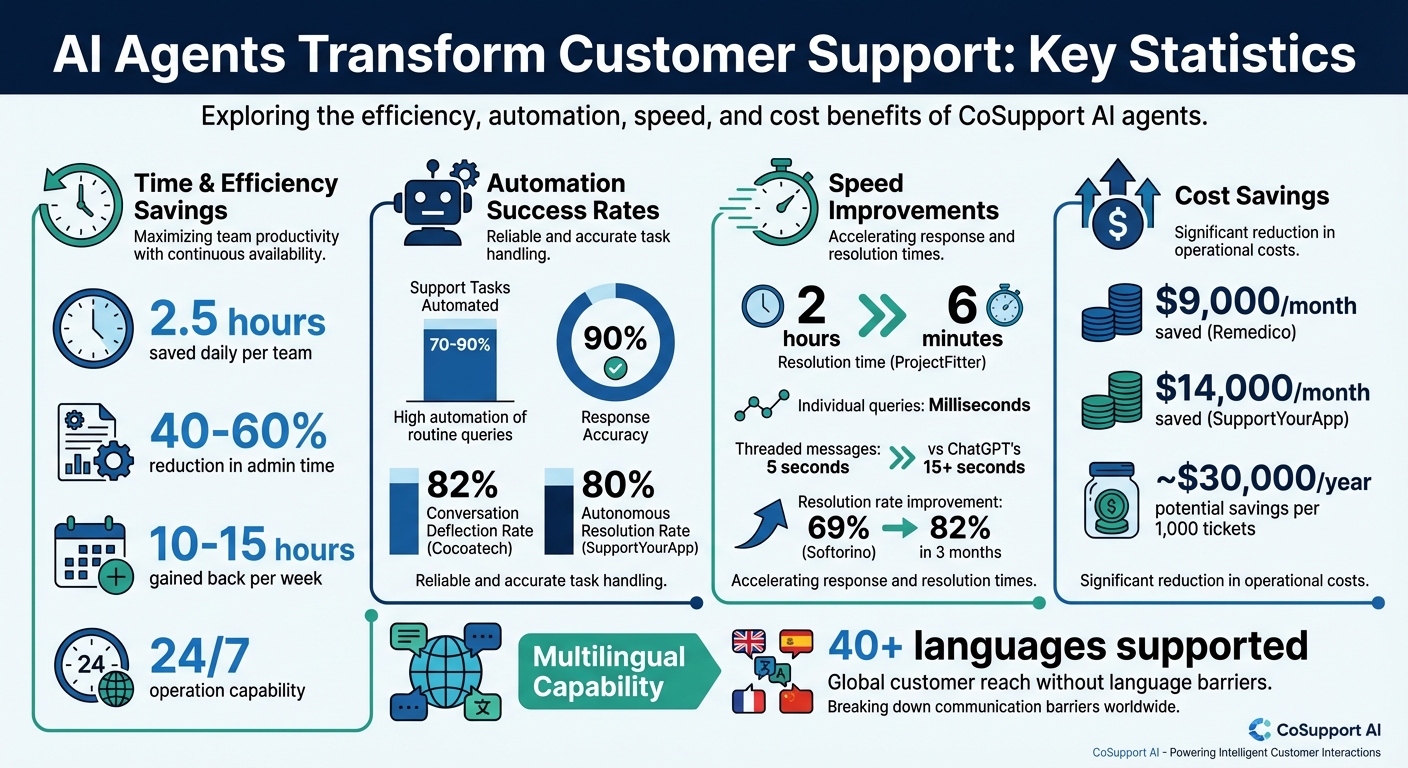
CoSupport AI Impact: Time Savings, Cost Reduction, and Automation Statistics
We Automated 80% of Customer Support With One AI Agent (No Code)
sbb-itb-97114f1
How to Integrate CoSupport AI with Your Help Desk Tools
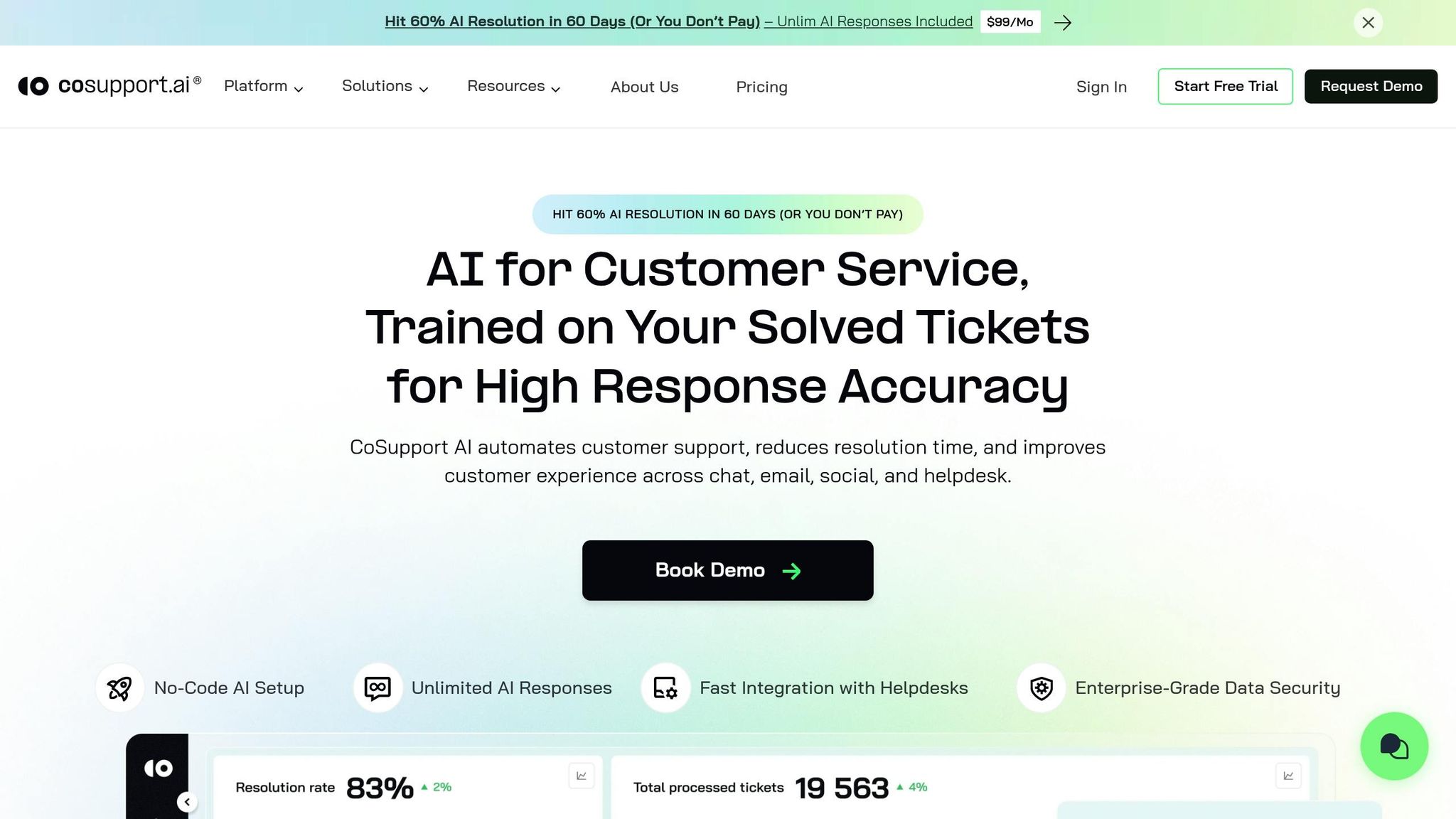
Many support teams worry that introducing AI might disrupt their current systems. But CoSupport AI is designed to fit seamlessly into platforms like Zendesk, Intercom, Salesforce, and Slack, allowing your team to stick with familiar workflows.
The setup is quick and straightforward. Softorino, a software company, tested six AI tools before settling on CoSupport AI. According to Josh Brown, CEO of Softorino:
"Setup took one API key. In three months, resolution rates grew from 69 to 82 percent. We tested six other tools before. Nothing performed as well as CoSupport AI."
Once connected, CoSupport AI pulls in data from your help center, past tickets, macros, and FAQs. It then learns your brand's tone and drafts responses directly within your existing CRM. For Zendesk users, it even syncs with Google Drive to update your knowledge base automatically. ProjectFitter, for example, integrated CoSupport AI with Freshdesk and Freshchat in under a month, automating 70% of support requests and cutting average resolution times from 2 hours to just 6 minutes.
The Slack integration focuses on improving internal workflows. Teams use it to handle HR queries, share policies, and reduce repetitive IT questions. Karyna Naminas, CEO of Label Your Data, shared:
"Our decision making processes have been transformed with CoSupport AI Business Intelligence. It gives our team easy access to insights directly in Slack."
Here’s how you can connect CoSupport AI to your help desk.
Step-by-Step Integration Process
Setting up CoSupport AI is quick and doesn’t require coding skills or IT assistance. You can be up and running in under 10 minutes.
Steps to integrate:
- Log in to your CoSupport AI dashboard and choose your help desk platform from the integrations menu.
- Generate an API key from your help desk's admin panel (e.g., Zendesk, Intercom, or Salesforce).
- Paste the API key into CoSupport AI's integration settings.
- The system will start syncing your tickets, macros, and knowledge base articles immediately.
- Initially, set the AI to suggestion mode, where it drafts replies for your team to review.
This approach ensures the AI aligns with your brand’s tone and accuracy while it learns.
For custom-built or legacy platforms, CoSupport AI provides an API-based architecture with full technical support. Cocoatech, for instance, integrated CoSupport AI with Zendesk and automated 81% of support requests without disrupting their existing processes. The AI handled FAQs, order tracking, and ticket routing seamlessly.
CoSupport AI doesn’t just integrate with your help desk - it also connects to your CRM, email client, and internal chat platforms. For example, it can pull customer history from Salesforce, draft a reply in Zendesk, and notify your team in Slack when issues need escalation. SupportYourApp, a BPO firm, now saves $14,000 monthly by automating 80% of internal requests and support chats.
Data Security During Integration
While integration is simple, protecting your data is critical. CoSupport AI ensures security with enterprise-grade encryption and protection. The platform is ISO 27001 certified and complies with GDPR and CCPA, meeting strict global privacy standards.
CoSupport AI uses a one-client, one-server model, meaning each customer operates in an isolated environment. This eliminates cross-tenant data risks and ensures your tickets, customer details, and training data remain secure.
Additionally, the platform applies data anonymization, stripping personally identifiable information before processing. Its USPTO-approved architecture minimizes AI errors, delivering responses with 99% accuracy and automated escalation. For added security, always store API keys in a secure key manager and avoid sharing them in chat or documents.
Key Takeaway: CoSupport AI integrates with your help desk in minutes, syncs your knowledge base automatically, and protects your data with top-tier security protocols and dedicated server infrastructure.
Training AI Agents on Your Support Content
When it comes to training an AI agent for customer service, the key is starting with well-organized support content. This ensures responses that are accurate, consistent, and aligned with your brand's voice. CoSupport AI simplifies the process by learning from your existing resources - like FAQs, past tickets, macros, and knowledge base articles - without requiring any technical know-how.
The training process is straightforward: describe the task in plain terms, upload your files, and review the AI's output. As Cien Solon, CEO of LaunchLemonade, puts it:
"Training doesn't mean you need machine learning skills. It means: Share your files... Set the context... Give it your templates."
Before diving in, take a moment to audit your recurring support tasks. Look for repetitive, rule-based requests - like password resets - that follow predictable patterns. Once identified, organize your content for easy upload.
CoSupport AI uses Retrieval-Augmented Generation (RAG), which means it generates responses based on your actual data instead of making things up. You can upload support documents in various formats, such as PDFs, CSVs, or spreadsheets, and even connect directly to your knowledge base. This ensures the AI pulls accurate and relevant information when crafting responses.
How to Upload and Organize Your Content
Uploading content to CoSupport AI is simple, thanks to its user-friendly dashboard. You can link your knowledge base directly or upload individual documents in multiple formats.
To make the most of the AI's capabilities, structure your content thoughtfully:
- Group FAQs by topic (e.g., billing, shipping, technical support)
- Separate product guides from policy documents
- Keep troubleshooting steps distinct from general information
- Use short snippets for quick lookups (like shipping times or pricing)
- Reserve longer sections for more detailed topics (like feature walkthroughs or handling complaints)
This organization helps the AI quickly retrieve the right information when responding to customer inquiries.
For even better results, use the R-I-S-E Framework: define the AI's role, provide relevant documents, outline clear procedures, and set specific output expectations. This gives the AI a focused "job description" rather than vague instructions.
It’s also crucial to set boundaries. For example, you might specify tasks the AI shouldn’t perform, like "Never approve refunds over $100" or "Always escalate billing issues to a human." High-risk actions, like refund approvals or account cancellations, can include "pause for approval" steps to prevent costly errors.
To keep things organized, maintain a manifest file listing all uploaded resources. This helps the AI locate files quickly without unnecessary searching. Use version control to track changes and roll back if needed - label each version clearly (e.g., v1.0.0).
Once your content is organized, the next step is teaching the AI to match your brand's tone and style.
Customizing AI Responses to Match Your Brand
Generic AI responses won’t cut it if you want to maintain a strong brand presence. By training CoSupport AI with structured data and examples of your communication style, you can ensure its replies sound like they’re coming from your team - not a machine.
Start by uploading examples of approved email templates and successful customer interactions that showcase your brand voice. Whether your tone is formal and professional, friendly and casual, or somewhere in between, the AI learns best from real-world examples.
Assign your AI a persona, such as "Friendly Support Specialist" or "Technical Product Expert." This helps establish a consistent communication style. Use system instructions to set clear rules, like avoiding specific jargon, not making delivery promises, or always including a signature line. Nicole Replogle, Staff Writer at Zapier, advises:
"The most common mistake is asking your agent to do too much. Keep its scope tight. A good agent should have a clear job description."
Make sure your knowledge base reflects your desired tone. If your source materials are written in the right style, the AI will naturally adopt that tone when responding. Review and update your FAQs and documentation to ensure they align with how you want to communicate.
Initially, set CoSupport AI to suggestion mode. This allows the AI to draft replies for your team to review before sending them. It creates a feedback loop where you can verify the tone and make adjustments. Use a simple scorecard to evaluate drafts: Does it sound on-brand? Is the formatting correct? Would you send it to a customer as-is? If the AI’s drafts are at least 80% as good as a human’s, you’re on the right track - focus on refining rather than rewriting.
Key Takeaway: Training your AI agent starts with uploading well-organized materials, setting clear boundaries, and providing examples of your brand voice. Begin with suggestion mode to ensure quality, and as the AI improves, gradually allow it more independence.
Automating Customer Support Tasks with CoSupport AI
Once your AI agents are trained, they can take over repetitive tasks like sorting tickets and drafting responses. By automating these routine support processes, your team can focus on addressing more complex, high-priority issues.
CoSupport AI employs a smart system that detects new emails, understands their context, and determines the best course of action. This means the platform analyzes emails and chat interactions to decide on the most effective next steps.
Here’s a closer look at how CoSupport AI handles ticket routing and other support tasks.
Ticket Routing and Prioritization
CoSupport AI classifies incoming tickets by analyzing their content and urgency. It identifies the type of request - whether it’s about billing, bug reports, or feature suggestions - and routes it to the right team or department.
The system also uses sentiment analysis to detect frustrated or upset customers, flagging these tickets for faster attention. Instead of relying on agents to manually sort and tag tickets, CoSupport AI performs this task in a matter of milliseconds, significantly speeding up response times.
For instance, one client automated 70% of their support tickets, significantly reducing resolution times. Yaro Burgman, Project Manager at ProjectFitter, shared:
"CoSupport AI takes care of nearly 70 percent of our support tickets and turns tasks that once took hours into minutes."
Handling FAQs and Live Chat Responses
Answering repetitive questions can be a major time drain for support teams. CoSupport AI connects directly to your knowledge base to provide accurate, instant answers to these queries, freeing up agents to focus on more complex issues.
The platform offers two modes: CoSupport Agent and CoSupport Customer. These modes allow for assisted and fully autonomous responses. Many teams start with a suggestion mode, where AI drafts responses that agents review before sending, ensuring quality control.
A good benchmark is the "80% Rule": if the AI’s first draft is at least 80% as effective as a human-written response, the system is working efficiently. This approach means your team spends no more than 20% of the original task time on edits.
In 2024, Cocoatech used CoSupport AI to manage Zendesk chats, successfully deflecting 82% of incoming conversations. Matthew Brown, Director of Customer Solutions at Shelterluv, noted:
"The AI handles FAQs and complex questions really well. Even escalations are better than expected."
To maintain control, set clear boundaries on what the AI can handle independently and what requires human oversight. For example, establish rules for sensitive topics like refunds over a certain amount or account cancellations, ensuring decisions stay within the AI’s scope of authority.
Generating AI-Powered Replies and Case Summaries
CoSupport AI employs a USPTO-approved multi-model message generation system that minimizes errors and delivers highly accurate responses. By training on your company’s solved tickets and help center data, the AI ensures replies match your specific business needs.
The platform delivers responses with 90% accuracy in milliseconds, with complete threaded replies ready in seconds. Roman Lutsyshyn, CEO of CoSupport AI, highlighted:
"CoSupport Agent delivers immediate answers, outpacing ChatGPT with milliseconds for individual queries and 5 seconds for threaded messages, compared to ChatGPT's 15+ seconds."
The system can handle up to 90% of repetitive support tasks, such as order tracking, subscription issues, and basic troubleshooting. SupportYourApp, a BPO firm, implemented CoSupport AI in 2024 to manage internal and customer requests, achieving an 80% autonomous resolution rate and saving $14,000 monthly.
Beyond drafting replies, CoSupport AI generates concise case summaries, giving agents a quick overview of conversation history. This feature speeds up handoffs and ensures that critical details aren’t lost when tickets are escalated to specialists.
Key Takeaway: CoSupport AI streamlines ticket routing, FAQ management, and case summarization, helping teams achieve faster resolutions and greater efficiency. With over 90% accuracy, starting in agent-assisted mode allows for a smooth transition to increased automation.
CoSupport AI Pricing Plans Explained
CoSupport AI provides three pricing models designed to match your support needs. Each plan offers full platform access, unlimited seats, and multilingual support, ensuring flexibility for teams of all sizes.
The main difference between the plans lies in how you're billed: you can pay per resolved ticket, a fixed monthly fee, or per AI-generated response. This setup allows you to manage costs while aligning with your team's specific support patterns.
Breakdown of Available Pricing Plans
Here’s a closer look at the three pricing models offered by CoSupport AI:
- Resolution-Based: Priced at $0.59 per resolved ticket, this option ensures you only pay when the AI successfully resolves an issue.
- Server-Based: A fixed monthly rate of $190 provides unlimited AI responses within optimal performance limits. This plan is ideal for teams with consistent, high ticket volumes looking for predictable costs.
- Response-Based: At $0.10 per response, this model becomes increasingly cost-efficient as your response volume grows, making it a great fit for teams with scalable operations.
Every plan includes no-code setup, seamless integration with popular helpdesk tools like Zendesk and Intercom, and enterprise-level security standards (ISO 27001 and GDPR compliance).
For example, in 2025, software company Remedico adopted CoSupport AI and achieved an impressive 74% ticket resolution rate within two weeks, cutting support costs by $9,000 per month. Similarly, BPO firm SupportYourApp automated 80% of its internal requests, saving $14,000 monthly.
These flexible options allow you to manage costs effectively based on your support volume. Now, let’s explore how to select the most suitable plan for your team.
How to Choose the Right Plan for Your Team
Selecting the right plan depends on your team's ticket volume and budget. Matching the plan to your needs can significantly boost productivity by automating repetitive support tasks with AI agents in customer service.
Here’s how to decide:
- If your team handles fewer than 500 tickets monthly and wants to pay only for successful resolutions, the Resolution-Based plan is a smart choice.
- For teams managing 1,000+ tickets each month, the Server-Based plan offers fixed, predictable costs and could save approximately $30,000 annually for every 1,000 tickets.
- If your ticket volume is moderate but growing, the Response-Based plan provides the flexibility to scale while benefiting from lower costs as response volumes increase.
CoSupport AI also offers free trials for all three pricing models. This allows you to test each option and determine which one aligns best with your support needs before making a commitment.
Key Takeaway: CoSupport AI's flexible pricing - Resolution-Based, Server-Based, and Response-Based - caters to various ticket volumes and budgets. Take advantage of the free trial to find the best fit for your team.
Analytics and Multilingual Support Features
CoSupport AI offers two standout tools to elevate your support operations: performance analytics to pinpoint improvement areas and multilingual support to connect with customers worldwide. Together, these features streamline workflows and enhance your ability to serve diverse markets while keeping a close eye on performance metrics.
Using Analytics to Improve Support Performance
CoSupport AI provides detailed insights into how effectively your AI agents manage support tasks. With activity logs, you can review input data, AI decisions, and the specific steps taken to resolve tickets.
Here are the key metrics tracked:
- Resolution latency: Measures the time from task assignment to completion.
- Quality scorecards: Evaluates AI responses based on accuracy, groundedness, helpfulness, and alignment with your brand tone.
- Escalation frequency: Tracks how often AI requests human intervention.
- Acceptance rate: Indicates the percentage of AI responses approved without changes.
For example, resolution latency highlights conversations that take too long, enabling you to identify bottlenecks. Quality scorecards use a 0–2 scale to assess how well the AI bases its responses on accurate data, provides helpful answers, and stays in line with your brand's voice. Escalation frequency helps uncover gaps in your training materials, such as missing knowledge base content or unclear guidelines. Meanwhile, the acceptance rate reflects how well the AI meets brand and customer expectations.
By analyzing these metrics, you can fine-tune workflows, improve training, and address any recurring issues - whether it's tool misselection or unnecessary confirmation steps. These insights also extend to multilingual support, ensuring consistent performance across languages.
Key Takeaway: Leverage CoSupport AI's analytics to monitor response times, quality, and escalation trends. These metrics help you optimize AI training and eliminate inefficiencies in your support process.
Supporting Customers in 40+ Languages
CoSupport AI's multilingual capabilities allow you to serve customers in over 40 languages, making global support more accessible than ever. The AI ensures accurate, context-aware responses by grounding its answers in your knowledge base, avoiding fabricated or misleading information.
To maintain consistency, the system learns from your existing content - like email templates, past tickets, and documentation - in your target languages. This ensures the AI adopts your brand's tone and style, no matter the market. Plus, the multilingual feature integrates with the analytics dashboard, so you can track performance metrics for each language. This helps you identify where additional training or content updates might be needed.
For businesses looking to expand internationally, this feature removes the need for in-depth language expertise for every market. It allows you to test new regions and maintain high-quality support without compromising on brand consistency.
Key Takeaway: CoSupport AI's multilingual support empowers you to connect with customers worldwide. Grounding responses in your existing content, it delivers consistent, reliable service across languages and markets.
How AI Agents Can Transform Your Support Team
AI agents are game-changers when it comes to handling repetitive support tasks. By automating processes like ticket routing, answering FAQs, and managing multilingual inquiries, your team can focus on strategic efforts that actually move the needle for your business.
CoSupport AI makes this shift effortless. It works with your current help desk tools, learns from your existing support content, and operates around the clock. Teams using AI agents typically gain back 10 to 15 hours a week, time that can be redirected toward high-impact activities.
One of the biggest perks? You can scale your support operations without needing to hire more staff. Whether you're dealing with seasonal demand or expanding into new markets, CoSupport AI ensures consistent quality through multilingual support and detailed performance analytics. Plus, flexible pricing options allow you to align costs with your specific needs and volume.
Getting started is simple. Use the R-I-S-E framework to define the role, input sources, steps, and outputs for your AI agents. Start in suggestion mode to review AI responses and confirm they match your brand’s tone and accuracy before granting full autonomy.
Ready to streamline your workflows? CoSupport AI makes it easy to transition to AI-powered automation with just one step.
Key Takeaway: CoSupport AI helps your team save time, improve efficiency, and scale customer support without increasing headcount.
.png)



