.png&w=96&q=75)
.png&w=1920&q=75)
Managing multiple support tools is costly, inefficient, and frustrating. By 2026, businesses will be shifting to unified AI platforms to cut costs, save time, and improve customer experiences. Here's why:
- Fragmented tools waste time: Agents lose nearly 5 weeks annually switching between apps, with each tool switch taking over 23 minutes to refocus.
- Higher costs: Disconnected tools cost 3–5x more due to redundant features, integrations, and maintenance.
- Poor customer experience: Customers repeat issues across channels, leading to inconsistent resolutions and frustration.
- Unified platforms solve these problems: Combining email, chat, and phone support into one interface reduces costs, eliminates data silos, and speeds up responses.
Companies using unified AI platforms report faster ticket resolutions, lower costs, and improved productivity. The article explores the challenges of fragmented systems, the benefits of unified platforms, and steps to transition effectively.
Problems with Using Multiple Customer Support Tools
Relying on a patchwork of disconnected support tools creates what some call a "Frankenstack" - a chaotic mix of systems that don’t work well together. This setup drives up costs, delays responses, and complicates workflows. Support teams are left juggling multiple logins, interfaces, and processes, which slows down troubleshooting and drains resources.
The stats paint a clear picture: the average knowledge worker switches between 9.4 different applications daily. Each switch adds a mental burden that builds up over the day, creating inefficiencies that hurt speed, increase costs, and lower productivity.
Too Many Tools Slow Down Support Operations
Fragmented tools make it harder for agents to work efficiently. When customer data is scattered across disconnected platforms, agents lose sight of the full customer journey. For example, an agent responding to an email might have no idea the same customer already reached out via chat or social media about the same issue.
This lack of visibility forces customers to repeat themselves and often leads to duplicated efforts, as multiple agents unknowingly address the same problem through different channels. Switching between apps just ten times a day can eat up nearly four hours of productive time - half a workday lost to context switching instead of solving customer issues.
This constant switching doesn’t just slow agents down - it also reduces service quality and consistency. On top of that, disconnected systems make it nearly impossible to fully utilize hallucination-free AI support tools. Generative AI thrives on clean, unified data, but when information is spread across multiple platforms, the technology can’t learn your company’s workflows or provide accurate responses.
How Fragmented Systems Increase Costs
Using multiple tools also drives up costs. Redundant features across platforms mean companies often pay more than they should. A typical SaaS stack costs around $60–$80 per user per month, which adds up fast. For a team of five, that’s $3,000–$4,000 a year - just for tools that don’t integrate.
But the expenses don’t stop there. Disconnected tools often require middleware like Zapier (starting at $29/month) or custom development to make them work together. These integrations are fragile and prone to breaking whenever vendors update their systems, leading to ongoing maintenance costs and pulling IT teams away from more strategic projects.
62% of IT buyers worry about vendor lock-in when managing multiple tools. Each platform demands its own training, security protocols, and admin time for tasks like user management and reporting. These duplicated efforts can double or triple costs without delivering meaningful returns, further straining budgets and reducing efficiency.
Lower Agent Productivity and Customer Satisfaction
Fragmented workflows take a serious toll on productivity. Switching between tasks can reduce productivity by up to 40%, and app switching alone costs teams nearly five weeks of productive time every year. Instead of focusing on helping customers, agents waste time searching for information across multiple platforms.
This inefficiency also damages the customer experience. Without a unified timeline, customers often have to repeat their issues when switching channels. One agent might provide an answer via email, while another gives conflicting information through chat. This inconsistency erodes trust and leaves customers frustrated.
| Problem Area | For Agents | For Customers |
|---|---|---|
| Data Silos | Time wasted searching for info | Forced to repeat their story |
| App Toggling | 4 hours of productivity lost/day | Slower response times |
| Fragmented AI | Unreliable workflows | Inconsistent or shallow answers |
| Tool Overlap | Duplicated work/responses | Conflicting information from agents |
This cycle of inefficiency and poor service highlights the need for a unified support system that eliminates fragmentation and streamlines operations for both agents and customers.
sbb-itb-97114f1
Why a Single AI Customer Support Platform Works Better
Bringing together scattered tools into one AI for customer service platform simplifies operations and eliminates the headaches of disconnected systems. This unified approach cuts out the constant app switching that slows productivity and creates data silos. Instead of juggling multiple tools, support teams gain a single, reliable source for all their needs.
The benefits are clear: companies that adopt this approach see improvements in response times, cost savings, and overall team efficiency. Here’s a closer look at how AI-driven workflows speed up ticket resolutions and reduce costs.
Faster Ticket Resolution with Automated Workflows
A unified AI platform drastically shortens resolution times by removing the inefficiencies of jumping between apps. With everything in one place, agents can focus on solving issues rather than searching for scattered information. In fact, AI platforms can slash resolution times by 40–90% by automating processes like triage, routing, and execution.
Take AssemblyAI, for example. After introducing AI search assistants, their response time plummeted from 15 minutes to just 23 seconds - a 97% improvement. Even more impressively, the system now resolves half of all support tickets on its own, thanks to real-time AI triage that evaluates intent, urgency, and sentiment.
These platforms go beyond basic chatbots. Advanced AI agents can securely interact with internal systems to handle tasks like processing refunds, resetting passwords, or updating account details - no human intervention needed. This shift turns customer support from a reactive process into a proactive, solution-driven operation.
"The real definition is simpler: Automated ticket resolution is the moment your support operation stops treating every support message as equal." - Crisp
Another standout feature is context enrichment. Unified platforms provide agents with a complete view of a customer’s history, removing the need to piece together details from multiple tools. If a ticket is escalated, AI-generated summaries ensure the next agent quickly understands the situation without combing through lengthy records.
Lower Costs Through Tool Consolidation
Switching to a single AI platform slashes costs across the board. By eliminating redundant tools, companies save on licensing fees, reduce maintenance expenses, and avoid the hassle of integrating multiple systems. Relying on fragmented AI tools can cost businesses 3 to 5 times more than sticking with a unified system.
Training is also simpler. Teams only need to learn one interface, streamlining onboarding. IT departments benefit too, with fewer integration headaches and a more stable system. Security and compliance become easier to manage when everything operates within a single platform.
Retool saw its average SLA resolution time drop from 2 days to less than 1 day after adopting an AI orchestration layer. This efficiency translates directly into savings - less time spent per ticket, reduced overtime, and no need to hire additional staff as ticket volumes grow. To put things in perspective, an AI-driven chatbot interaction costs about $0.50, compared to $6.00 for a human-handled interaction.
Better Productivity and Easier Scaling
By automating repetitive tasks, a unified AI platform lets agents focus on more complex issues. Virtual support agents can handle 30–60% of all tickets by addressing routine inquiries such as password resets and order status updates.
For instance, Fundrise automated nearly 60% of its IT support requests by consolidating interactions on a single conversational AI platform. Similarly, Vidyard automated 56% of its IT support tasks, including software access and approvals. These changes allowed both companies to expand their support capabilities without adding more staff.
"Risotto, however, synthesizes information from multiple inputs to provide context-aware, accurate, and actionable responses." - Phillip Rickett, VP of IT, Fundrise
The benefits don’t stop there. Unified platforms continuously improve through feedback loops, where AI hands off unresolved issues to humans and learns from the process. This refinement can save technicians 4–7 minutes per ticket on average.
Scaling becomes seamless. Instead of hiring more staff to handle growing ticket volumes, companies can rely on AI to manage the workload. Hazel Health’s Head of IT, Peter Hadjisavas, shared how switching to an AI-driven platform boosted ticket deflection rates from 3–5% to over 20%.
Section Summary:
A single AI customer support platform eliminates inefficiencies, enabling faster resolutions, lower costs, and scalable growth. By automating routine tasks and centralizing customer data, support teams can deliver better results without the need for constant staffing increases.
Companies That Switched to AI Customer Support Platforms
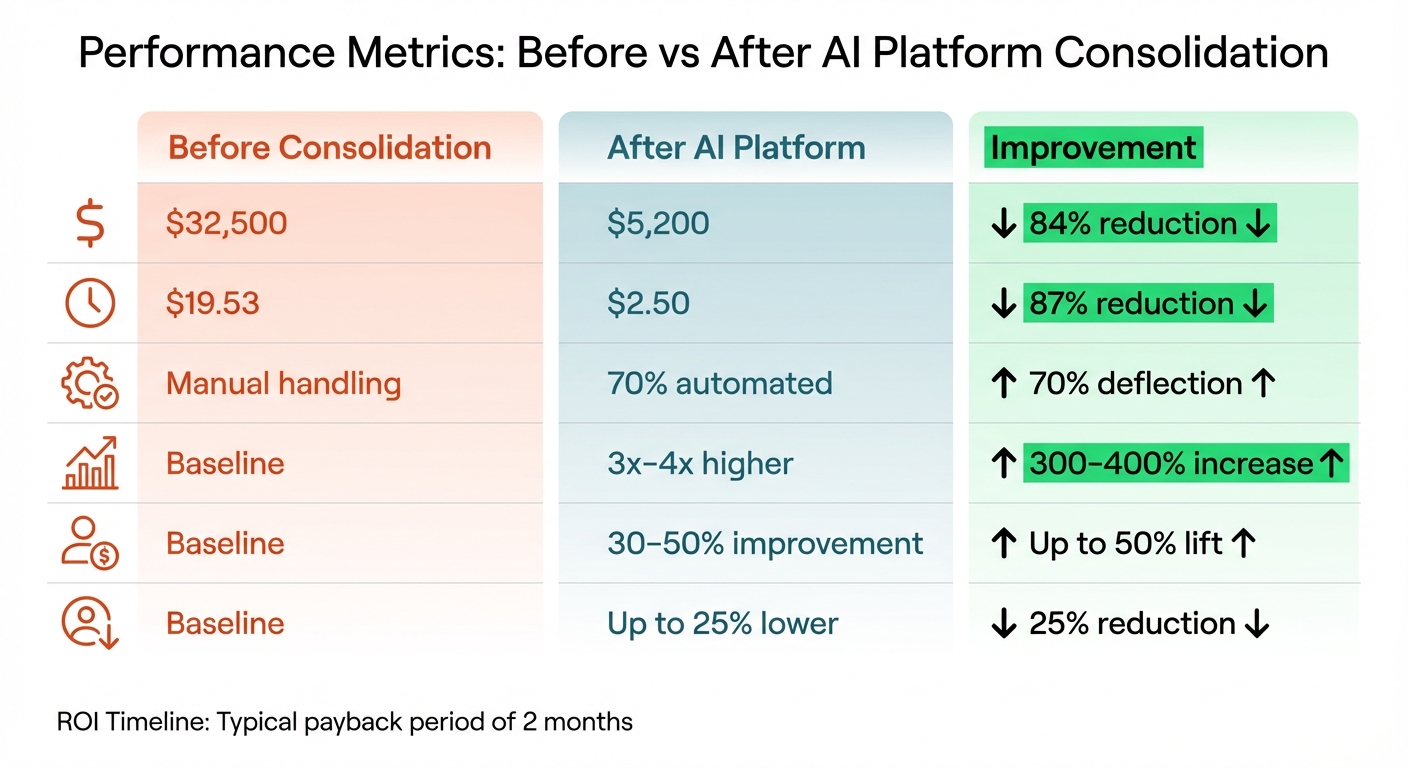
Before vs After: Impact of Unified AI Customer Support Platforms
Case studies show that consolidating support tools into a single AI customer support platform doesn't just cut costs - it also boosts responsiveness and efficiency. These real-world examples highlight how replacing multiple disconnected systems with a single integrated solution leads to measurable cost savings and productivity gains.
Case Study: E-Commerce Company Cuts Costs and Improves Speed
Switching to a unified AI customer support platform brings quick, tangible results. Companies relying on fragmented AI tools often spend 3 to 5 times more than those using a single, integrated platform.
There are also hidden costs to consider. Constantly switching between multiple applications eats into productivity, wasting valuable time and reducing overall efficiency. This underscores the importance of a unified solution.
The operational benefits are hard to ignore. AI-driven customer service agents can independently resolve at least 70% of routine issues, which translates to an 84% reduction in operational costs. Many businesses find that their AI systems pay for themselves in about two months, offering a fast return on investment.
Performance Metrics Before and After the Switch
The following table highlights the clear benefits of adopting a unified AI customer support platform:
| Metric | Before Consolidation | After AI Platform | Improvement |
|---|---|---|---|
| Annual Cost per Agent | $32,500 | $5,200 | 84% reduction |
| Cost per Productive Hour | $19.53 | $2.50 | 87% reduction |
| Routine Issue Resolution | Manual handling | 70% automated | 70% deflection |
| Agent Productivity | Baseline | 3x–4x higher | 300–400% increase |
| Lead Conversion Rate | Baseline | 30–50% improvement | Up to 50% lift |
| Customer Churn Rate | Baseline | Up to 25% lower | 25% reduction |
By consolidating support tools, companies not only save money but also unlock significant productivity gains. Eliminating the need for constant app switching allows agents to focus on complex, high-value tasks that genuinely require human attention.
Section Summary:
Switching to a unified AI platform slashes costs by 84%, automates 70% of routine tasks, and boosts productivity by 3–4 times. These systems typically recoup their costs within two months. Next, we'll explore how to transition to a unified AI customer support platform smoothly.
How to Switch to a Unified AI Customer Support Platform
Switching to a unified AI customer support platform takes careful planning. It involves evaluating your current tools, managing the transition effectively, and monitoring results to ensure you achieve the desired outcomes.
Review Your Current Support Tools
Start by listing every tool your support, sales, and success teams use. This process helps uncover what some call a "Frankenstack" - a jumbled mix of disconnected tools that slow down workflows.
For each tool, determine its primary function and identify overlaps where multiple tools handle the same tasks or store duplicate data. Calculate the total cost of ownership, including subscription fees, integration costs, and administrative efforts.
Try to summarize each tool's role in one sentence. If you can’t, it’s likely redundant or unnecessary. Before deciding to keep a tool, ask yourself: Does it excel at its job? Does it save significant time? Can it integrate smoothly without disrupting workflows?
This audit lays the foundation for streamlining support automation, helping you consolidate systems to improve efficiency and reduce costs.
Plan Your Migration and Train the AI
After auditing your tools, focus on planning a smooth migration. Start by cleaning and standardizing your data. This step ensures your new platform learns from accurate, organized information, which is essential for delivering precise, context-aware responses.
Consider a phased rollout. Begin with a pilot group or a less critical workflow to gather feedback before scaling up. Record key performance metrics from your current system - such as resolution speed and accuracy - to compare against the new platform’s performance.
AI-driven migration can speed up timelines by up to 60% and reduce costs by up to 50%. While setting up your new system, prioritize clear communication, challenge assumptions, and address uncertainties to help the AI learn effectively.
Track Results and Make Improvements
Once the migration is underway, ongoing measurement is crucial. Set 1–3 specific goals and compare the new platform’s performance to your baseline. Examples include cutting ticket resolution time by 25% or increasing deflection rates by 40%.
Evaluate operational efficiency by tracking time saved from reduced context switching, customer experience improvements through response and conversion rates, and financial benefits from eliminating unnecessary licenses.
Automated AI validation can maintain data quality above 90% with continuous testing. Regular performance reviews will help you adjust AI settings and optimize results over time.
Section Summary:
Switching to a unified AI customer support platform starts with auditing your tools, planning a clean migration, and tracking key metrics. By following these steps, you can achieve greater efficiency and cost savings while improving overall performance.
Conclusion
Switching to a unified AI customer support platform isn’t just practical - it’s a smart move for both operations and finances. These platforms eliminate the chaos of juggling multiple tools and help teams reclaim lost productivity.
By consolidating tools, you can cut down on licensing fees and operational overhead while boosting efficiency through automation. Plus, a unified system ensures smoother, more consistent customer interactions. Support agents won’t have to dig through disconnected tools for information, and AI for customer support can access complete conversation histories to deliver precise, context-aware responses.
Take a close look at your current support tools. Identify redundancies, pinpoint workflows that involve constant app switching, and streamline where possible. This process can unlock faster workflows, improve team productivity, and enhance customer satisfaction - all in one go. Get a free demo here.
.png)



