.png&w=96&q=75)

Zendesk AI and dedicated AI models are two distinct approaches to scaling customer support. Here's the key takeaway:
- Zendesk AI: Quick to set up, no coding required, and natively integrates with Zendesk's ticketing platform. Best for fast-growing teams seeking fast deployment and minimal maintenance. Starts working immediately with pre-trained models, handling up to 80% of interactions. However, customization is limited, and it's tied to the Zendesk ecosystem.
- Dedicated AI Models: Fully customizable and built to meet specific needs. Offers control over data, compliance, and workflows. Ideal for complex or niche requirements. But, it’s resource-intensive, with high upfront costs ($180K–$320K) and ongoing maintenance demands.
Quick Comparison
| Feature | Zendesk AI | Dedicated AI Models |
|---|---|---|
| Setup Time | Minutes | 14–22 weeks |
| Customization | Limited (no-code/low-code) | Full control over logic |
| Cost | Subscription + usage fees | High upfront + maintenance costs |
| Scalability | 3x ticket capacity | High but resource-intensive |
| Maintenance | Low (automated updates) | High (manual monitoring) |
| Integration | Seamless with Zendesk tools | Flexible with third-party tools |
Bottom Line: Zendesk AI is ideal for teams prioritizing speed and simplicity, while dedicated AI models suit organizations with technical expertise and specific customization needs.
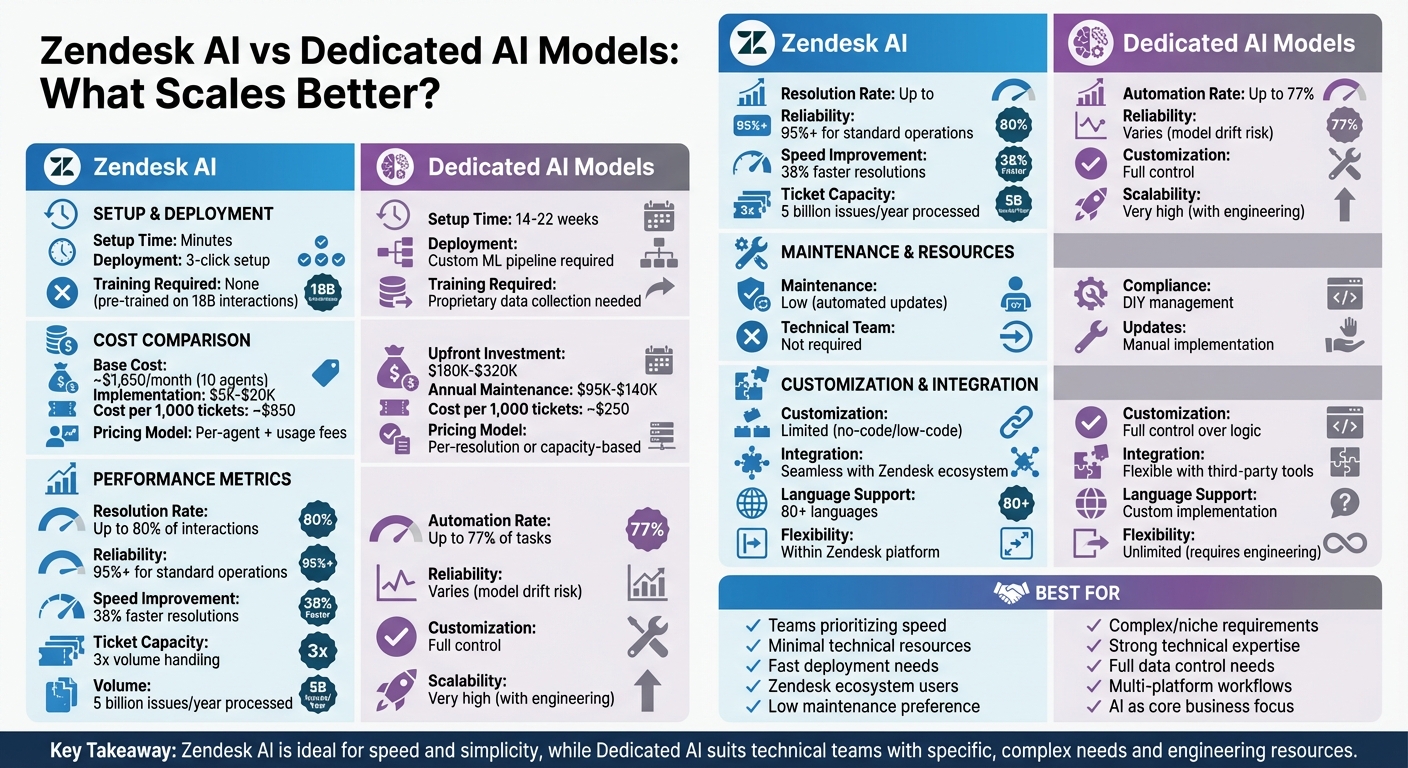
Zendesk AI vs Dedicated AI Models: Complete Comparison Chart
We Automated 80% of Customer Support With One AI Agent (No Code)
sbb-itb-97114f1
What Is Zendesk AI?
Zendesk AI is an automation suite built directly into the Zendesk platform. It integrates AI agents, Copilot, QA, and Analytics into a unified system designed to handle support workflows without requiring external tools or integrations.
What sets Zendesk AI apart is its training on over 18 billion customer service interactions. This gives it the ability to understand industry-specific language and scenarios right out of the box. Unlike general-purpose AI models, it doesn’t require manual training or developer intervention to get started.
"Zendesk AI Agents, Copilot, QA, Knowledge, and Analytics all run on a single Resolution platform... integration is guaranteed - it's built to resolve and it starts working immediately." - Reetu Kainulainen, VP of Product, AI Agents at Zendesk
Zendesk AI comes in two tiers: Essential and Advanced. The Essential version is included with all Suite and Support plans, offering basic features like generative replies and self-service automation. The Advanced tier, available as an add-on, introduces more sophisticated capabilities such as agentic AI, API orchestration, and in-depth analytics. If you're already using Zendesk products, these tools integrate seamlessly into the existing Agent Workspace.
Setup is quick and straightforward. Administrators can describe workflows in plain language, allowing the AI to configure itself without requiring coding or complex setup.
Now, let’s dive into the features that make Zendesk AI a powerful tool for streamlining customer support.
Main Features of Zendesk AI
Zendesk AI is packed with tools to automate repetitive tasks and assist human agents. Here’s a closer look at its key features:
- AI Agents: These can independently handle up to 80% of customer interactions across channels like messaging, email, and social media. They use over 150 customer data points to provide personalized responses at the start of each conversation.
- Agent Copilot: Embedded directly in the Agent Workspace, this tool offers real-time support to human agents. It suggests replies, refines tone, and even performs actions on behalf of agents. For instance, Catapult, a sports tech company, cut its first reply time by 50% using these tools.
- Intelligent Triage and Routing: This feature identifies customer intent, sentiment, and language in over 80 languages. Liberty London, a retail company, improved ticket routing, reducing first response times by 73% and boosting CSAT scores by 9%.
- AI-Powered Quality Assurance: The system evaluates 100% of interactions - both human and AI - to highlight coaching opportunities and flag potential churn risks. For example, Buffer reduced manual ticket review time by 50% after adopting Zendesk QA. It also includes Voice AI, which provides live suggestions during calls and generates transcripts and summaries automatically.
- Natural Language Configuration: With the AI agent builder, admins can describe workflows in simple English, and the system translates these into functional automations - no coding or flow diagrams needed.
These features collectively aim to reduce manual effort and improve response times, making Zendesk AI a valuable tool for customer support teams.
Pros and Cons
Zendesk AI offers a range of benefits, especially for teams already using the Zendesk platform. It’s designed for quick deployment, often taking just minutes thanks to its "three-click" launch process. Since it’s natively integrated, there’s no need for complicated API setups or middleware. Plus, the pre-trained models deliver results immediately, without requiring additional data preparation.
Teams using Zendesk AI report resolving customer issues 38% faster compared to those without these tools. Its billing model is also outcome-focused, charging based on successful resolutions rather than overall usage, which can help control costs.
That said, there are some drawbacks. Customization options are limited compared to building AI models from scratch. Advanced features like agentic AI and API orchestration are only available with the Advanced tier, which comes at an extra cost. Additionally, Zendesk AI is locked into the Zendesk ecosystem, which may pose challenges for companies considering a move to a different platform.
For highly specialized teams, the natural language builder might feel restrictive compared to the flexibility of custom-coded solutions.
Bottom line: Zendesk AI shines in its ability to deploy quickly and deliver immediate results, making it ideal for teams already using Zendesk who want automation without heavy engineering effort. However, its reliance on the Zendesk ecosystem and limited customization may not suit every organization.
What Are Dedicated AI Models?
Dedicated AI models are tailor-made, in-house solutions built from scratch. This involves creating an entire machine learning pipeline, training the model with proprietary data, and developing an AI-powered support tool designed specifically for your needs.
Unlike pre-trained, off-the-shelf solutions, these models give you complete control over how the AI operates. You get to define its decision-making processes, safety measures, compliance protocols, and even integrate custom fallback rules. This level of control also means you can switch between different large language models to prioritize factors like reasoning complexity, speed, or cost. Essentially, you can embed your unique business logic into the AI, something generic platforms simply can’t accommodate. Plus, you're not tied to any specific vendor's roadmap or limitations.
That said, this approach comes with hefty trade-offs. Building a custom AI chatbot typically requires an upfront investment of $180,000 to $320,000, along with yearly maintenance costs ranging from $95,000 to $140,000. And while pre-built solutions can be up and running in days, custom models often take 14 to 22 weeks to go live.
"If you're not in the business of customer service, building your own AI agent probably isn't worth it." - Reetu Kainulainen, Vice President, Product, AI Agents at Zendesk
Surveys show that many customer experience (CX) leaders hesitate to pursue this route due to the engineering overhead and maintenance it demands. Security challenges and ongoing upkeep are often underestimated during the planning process, making this a less straightforward option than it may initially seem.
Main Features of Dedicated AI Models
Dedicated AI models stand out by offering capabilities that go far beyond what standard platforms provide. One of their key strengths is the ability to train the AI using your specific datasets. This ensures the model understands the unique terminology and scenarios relevant to your industry. You can also design specialized autonomous agents that collaborate to solve complex, niche problems.
Another standout feature is data control. With dedicated models, you retain full ownership of your training data and security protocols. For industries like healthcare, finance, or legal services - where compliance is critical - you can implement deterministic, auditable reasoning to meet strict regulatory standards.
These models also allow for performance fine-tuning. You can establish in-house benchmarks and feedback systems to measure how well the AI meets your service goals. As your business grows or changes, you have the flexibility to retrain or expand the model without waiting for vendor updates.
For example, in 2024, German renewable energy company ABO Wind leveraged dedicated AI models to streamline its operations. Partnering with WATsNEXT, they used two Named Entity Recognition models - one for text and one for tables - to analyze wind and photovoltaic project opportunities. This led to an 80% boost in efficiency, eliminating manual data extraction and improving their position in France's contracts auction system.
However, this level of customization comes with challenges. Dedicated models require skilled MLOps teams to handle retraining, monitoring, and security. Additionally, as data patterns evolve, the risk of model drift increases, adding to the maintenance burden.
Key takeaway: While dedicated AI models excel at solving highly specific problems using proprietary data, they demand significant engineering resources and ongoing attention - factors that are often underestimated.
Pros and Cons
The biggest advantage of dedicated AI models is their deep level of customization. You’re not limited by a vendor’s predefined features or workflows, which means you can design the AI to handle unique edge cases and implement logic tailored to your business needs.
In theory, having full control over the stack allows for seamless integration with your existing tech ecosystem. However, in practice, integration can become a lengthy process. Custom connectors, fragile APIs, and versioning issues can turn what should be simple setups into months of work.
Challenges don’t stop at integration. Developers, often costly, may spend more time troubleshooting bot behavior than building new features. Plus, you’re responsible for all aspects of safety, security, and compliance. From preventing prompt injection attacks to maintaining hallucination-free customer service and certifications like SOC 2 and ISO 27001, every detail falls on your team. And as the system scales, costs can rise rapidly, especially since large language model providers only offer discounts at extremely high usage volumes, which even big enterprises may not meet.
Another hurdle is orchestrating multiple specialized agents. Designing how these agents interact and ensuring they work harmoniously is no small task. Smaller teams, in particular, can quickly find themselves overwhelmed with constant tuning and support demands.
"Custom AI actually impedes flexibility with more constraints, slower timelines, and unexpected challenges... smaller in-house teams can struggle to keep up." - Reetu Kainulainen, VP of Product, AI Agents at Zendesk
Bottom line: While dedicated AI models offer unparalleled customization, they require significant resources and expertise. This contrasts with Zendesk AI's plug-and-play simplicity, making the trade-off between control and ease of use a critical consideration.
Teams that still want that control often build on a data platform instead: Databricks the data and AI company, runs apps, agents, and AI on your own data, with governance in one place.
How They Compare on Scalability
Zendesk AI brings automation into helpdesk workflows, allowing teams to manage three times the ticket volume without adding more staff. It’s ready to deploy in just minutes, making it a great choice for companies that can’t afford to spend weeks on setup and engineering.
On the other hand, dedicated AI models offer full customization and control over scaling. However, they come with challenges like the need for ongoing engineering to manage multiple specialized agents. These systems also face hurdles with fragile API integrations and version control, which can slow down scaling - especially when speed is critical.
When it comes to handling large-scale ticket volumes, Zendesk's Resolution Platform processes nearly 5 billion issues annually through its unified architecture, which automatically updates and optimizes performance. Dedicated models can automate up to 77% of tasks, but achieving and maintaining this level of efficiency requires constant monitoring and adjustments to prevent model drift.
The infrastructure requirements differ significantly. Zendesk operates on a SaaS model with built-in security certifications like SOC 2 and GDPR compliance, eliminating the need for companies to manage these aspects themselves. Dedicated models, however, require businesses to handle hosting, security, and compliance on their own.
"Every AI system becomes more expensive the more you scale, and LLM providers will only give you discounts above volumes that even large enterprises can hardly achieve." - Reetu Kainulainen, VP of Product at Zendesk
Scalability Comparison Table
Here’s how the two approaches stack up when it comes to scalability:
| Factor | Zendesk AI | Dedicated AI Models |
|---|---|---|
| Volume Handling | High (3x agent capacity, billions of interactions) | Very High (77%+ automation possible, but requires heavy engineering) |
| Deployment Speed | Minutes (three-click setup) | Months (requires custom ML pipelines) |
| Customization Depth | No-code/Low-code admin controls | Full-code control over every decision |
| Training Data | Pre-trained on billions of CX interactions | Requires proprietary data collection and training |
| Infrastructure Needs | SaaS-based with automatic updates and compliance | DIY hosting, security, and compliance management |
| Maintenance Burden | Low (automated QA and model tuning) | High (constant monitoring for model drift) |
Bottom line: Zendesk AI offers fast, efficient scaling with minimal engineering effort, making it a top choice for teams that need quick, hassle-free deployment. Dedicated AI models, while capable of deeper customization and potentially higher automation rates, demand significant technical resources and ongoing maintenance as the system scales.
Key Takeaway: If your priority is speed and simplicity, Zendesk AI delivers a low-maintenance, scalable solution. However, for organizations that need extensive customization and are ready to invest in technical infrastructure, dedicated AI models might be worth considering.
Performance and Resolution Rates
Zendesk’s AI agents are capable of resolving up to 80% of customer issues while maintaining a 95%+ reliability rate for standard operations. The integration of GPT-5 has further enhanced performance, reducing fallback escalations by over 20%. This means fewer customer tickets need to be escalated to human agents, streamlining the support process.
On the other hand, dedicated AI models, though powerful, come with their own hurdles. A major issue is model drift, which can cause unexpected performance drops and requires continuous fine-tuning. Additionally, 62% of CX leaders have pointed out that the complexity of developing custom AI models is slowing down broader AI adoption. These obstacles make it harder to maintain consistent and scalable performance over time.
Zendesk AI tools also help agents work faster. They enable agents to resolve interactions 38% quicker, and the GPT-5 integration has boosted live support speeds by 25–30%, allowing for faster customer responses without sacrificing quality. These improvements significantly enhance operational efficiency.
In April 2025, sports tech company Catapult adopted Zendesk's generative AI tools to summarize conversations and refine agent tone. The result? A 50% reduction in first reply time, along with more thorough and effective resolutions.
"GPT-5 delivered more complete responses with fewer missed details, reducing agent handoffs and helping customers get answers more quickly." - Shashi Upadhyay, President, Products, Engineering and AI at Zendesk
Key Takeaway: Zendesk AI stands out for its consistent performance and minimal upkeep, while dedicated AI models require ongoing engineering efforts to address issues like model drift. This reliability makes Zendesk AI a strong choice for scalable, long-term support solutions.
Flexibility and Customization Options
Let’s take a closer look at how these solutions adapt to changing customer support needs, focusing on flexibility and customization.
Zendesk AI now leverages its "Agentic AI" for autonomous and adaptable operations. With this system, businesses can outline their procedures in plain language, and the AI handles planning and execution independently. The Advanced tier introduces hybrid workflows that merge generative and scripted responses, along with "Action Builder", a low-code tool for API orchestration and automation.
"Using our AI agent builder, we simply describe business procedures in natural language and the AI agent is ready to go. No flows, no code, no developer support needed." - Austin Lacey, Director, Chatbots, AI & Automation at Zendesk
Dedicated AI models, on the other hand, provide more flexibility when integrating with external knowledge sources like Confluence, Notion, Slack, or Google Docs - areas where Zendesk’s native integrations may fall short. Tools such as PixieBrix enable simultaneous AI actions across platforms like Jira, Salesforce, and Slack, which highlights a key difference: Zendesk thrives within its own ecosystem, while dedicated models excel in workflows that span multiple external tools.
When it comes to testing, both approaches have their strengths. Dedicated AI tools often include simulation modes for testing historical ticket data, while Zendesk provides AI reasoning controls to ensure response quality.
Key Takeaway: Zendesk is ideal for quick deployment within its ecosystem, cutting setup times from days to minutes. Meanwhile, dedicated models are better suited for workflows that involve multiple third-party platforms or require extensive customization beyond standard scenarios. Your choice ultimately depends on whether your processes are centered in Zendesk or distributed across various external tools.
Next, we’ll explore how these customization options fit into your existing workflows and toolsets.
Integration with Existing Tools
How quickly you can integrate AI into your workflow often makes or breaks a project. Zendesk AI stands out with its seamless connection to its own ticketing system, knowledge base, and CRM. From the very first conversation, it pulls over 150 customer data points from support systems, ensuring interactions are rich in context right away.
"Zendesk is really the hub of our entire support operation. Everything builds off of that. If we can just integrate something with Zendesk, then we've got this magical pipeline of data and information." - Brad Harris, Global Customer Support Director, Bitly
On the other hand, dedicated AI models come with a different hurdle: integration drag. Setting up custom connectors and dealing with fragile APIs can stretch deployment timelines from weeks to months. However, these models shine when your knowledge base isn’t centralized in Zendesk but spread across platforms like Confluence, Notion, Google Drive, or Slack. While Zendesk AI focuses on training with its native help center, dedicated solutions can pull from multiple platforms at once. This highlights a key trade-off: rapid native integration versus the ability to connect with diverse, external systems.
In short, Zendesk AI is perfect if your support infrastructure is centralized within its ecosystem, offering quick, easy deployment. But if your workflows span multiple platforms, dedicated models might be worth the extra engineering effort for their broader compatibility.
Key Takeaway: Zendesk AI enables fast, three-click deployment within its ecosystem, while dedicated models require more effort but offer greater flexibility with third-party tools. Your decision should hinge on where your documentation is housed and how much engineering bandwidth you can dedicate.
Cost Comparison at Scale
When considering scalability and integration, cost becomes a key factor in choosing between Zendesk AI and dedicated AI models. The pricing structures of these two options differ significantly. Zendesk AI uses a layered pricing model: there’s a base subscription fee per agent, an additional $50 per agent monthly for AI features, and usage fees for automated resolutions. For instance, a 10-agent team using Suite Professional with Advanced AI would cost about $1,650 per month, excluding resolution fees.
In contrast, dedicated AI models often use outcome-based pricing, which isn’t tied to the number of agents.
Both options come with additional costs. Zendesk implementations typically range from $5,000 to $20,000 for setup, plus $1,500 to $5,000 for staff training. Dedicated models, on the other hand, avoid hefty setup fees but require ongoing engineering efforts for updates and maintenance. At higher ticket volumes, Zendesk’s cost per 1,000 tickets averages $850, while dedicated AI models hover around $250.
Here’s a side-by-side breakdown for clarity:
Cost Comparison Table
| Cost Factor | Zendesk AI | Dedicated AI Models |
|---|---|---|
| Pricing Model | Per-agent seat + $50/agent add-on + usage | Per-resolution or capacity-based |
| Monthly Base (10 agents) | ~$1,650 (Suite Professional + AI) | $0–$500 (varies by platform) |
| Cost per 1,000 Tickets | ~$850 | ~$250 |
| Implementation | $5,000–$20,000 | Typically low/no-code setup |
| Training Costs | $1,500–$5,000 | Minimal to none |
| Automation Rate | 39–66% (typical) | 74–77% (reported) |
This comparison highlights the trade-offs between the two approaches. Zendesk AI's costs grow with team size and require a significant upfront investment, but its bundled system may simplify budgeting for teams already committed to its ecosystem. Meanwhile, dedicated AI models offer a more flexible, volume-based cost structure, often resulting in lower per-ticket expenses for operations handling high ticket volumes.
Examples of Scaling in Practice
Looking at the scalability metrics we touched on earlier, here are some real-world examples that highlight how businesses handle growth during peak demand.
Grubhub dealt with a staggering 100% increase in ticket volume. To manage this, they introduced automated workflows that let customers modify orders and process refunds through self-service. The result? Contacts per order dropped by 37%, showing how automation can handle sudden demand spikes without overburdening human agents.
For startup Vagaro, deploying a Zendesk AI agent integrated with their knowledge base delivered immediate results. On day one, their deflection rate skyrocketed from 4% to 47%, proving how quickly AI can take over routine tasks, especially for smaller teams.
Retailer Liberty London used intelligent triage to enhance ticket routing, slashing first response times by 73% and increasing CSAT scores by 9%. This highlights how AI-driven routing not only balances workload among agents but also keeps service quality intact.
"Each quarter, we resolve over 60,000 support requests with AI agents that carry out full workflows, execute backend actions, and adapt in real time to what our customers need."
– Austin Lacey, Director, Chatbots, AI & Automation, Zendesk
These examples underline how automation can handle high volumes of inquiries, reduce response times, and scale operations without needing extra staff. They also show how businesses can address specific AI-related challenges while maintaining service standards, regardless of their size or industry.
Key Takeaway: These cases reinforce the idea that targeted automation not only eases manual workloads but also scales support operations seamlessly, aligning with the broader comparison of Zendesk AI and dedicated AI models. Choosing the right solution for your needs is critical to achieving these outcomes.
Which Solution Scales Better?
When deciding which solution scales better, it all boils down to your resources, technical know-how, and future growth plans.
Zendesk AI is the go-to choice if you're looking for a fast, dependable solution that works right out of the box. It’s designed for teams aiming to scale without the hassle of hiring AI engineers or managing complex systems. With features like Zendesk AI agents and chatbots, automated model updates, and built-in compliance, it takes the technical workload off your plate entirely.
On the other hand, dedicated AI models offer unmatched control and customization but come with a hefty price tag in terms of engineering effort. You’ll need a team to manage challenges like model drift, debugging, and ongoing integration upkeep. If AI isn’t your core focus, this option could quickly drain resources and even hurt your competitive edge.
"If you're not in the business of customer service, building your own AI agent probably isn't worth it."
– Reetu Kainulainen, Vice President, Product, AI Agents, Zendesk
For enterprises managing complex ecosystems and requiring strict governance, Zendesk AI provides the stability to handle millions of interactions across more than 80 languages. But for startups or mid-market companies with strong technical expertise and niche workflow needs, dedicated models might offer the flexibility you’re after.
Key Takeaway: For most businesses, Zendesk AI is the more scalable option. It eliminates the need for engineering resources, keeps you updated with the latest models instantly, and uses outcome-based pricing that ties costs to actual results. Dedicated models, however, only scale effectively if you’re ready to make AI development a core part of your operations. The right choice depends entirely on your team’s capabilities and priorities.
.png)



