.png&w=96&q=75)

Claude AI is transforming how businesses handle customer support. It automates conversation analysis, helping teams identify trends, detect sentiment, and route tickets more effectively. The result? Faster responses, reduced workload, and actionable insights from customer interactions.
Key Benefits:
- Analyze thousands of conversations across channels like email and chat.
- Spot recurring issues, customer frustrations, and potential churn signals.
- Reduce resolution times by up to 87% and improve decision accuracy by 30%.
How It Works:
- Prepare Data: Collect and anonymize support tickets from tools like Zendesk or Intercom.
- Automate Analysis: Claude processes messages, identifies themes, and detects sentiment.
- Act on Insights: Use findings to train agents, prioritize fixes, and improve workflows.
Example in Action:
Lyft used Claude to analyze support tickets, cutting resolution times and launching a new program for older riders.
Takeaway: Claude AI helps businesses turn support data into insights, improving efficiency and customer satisfaction. Start small by analyzing a sample of 100–200 conversations, then scale as needed.
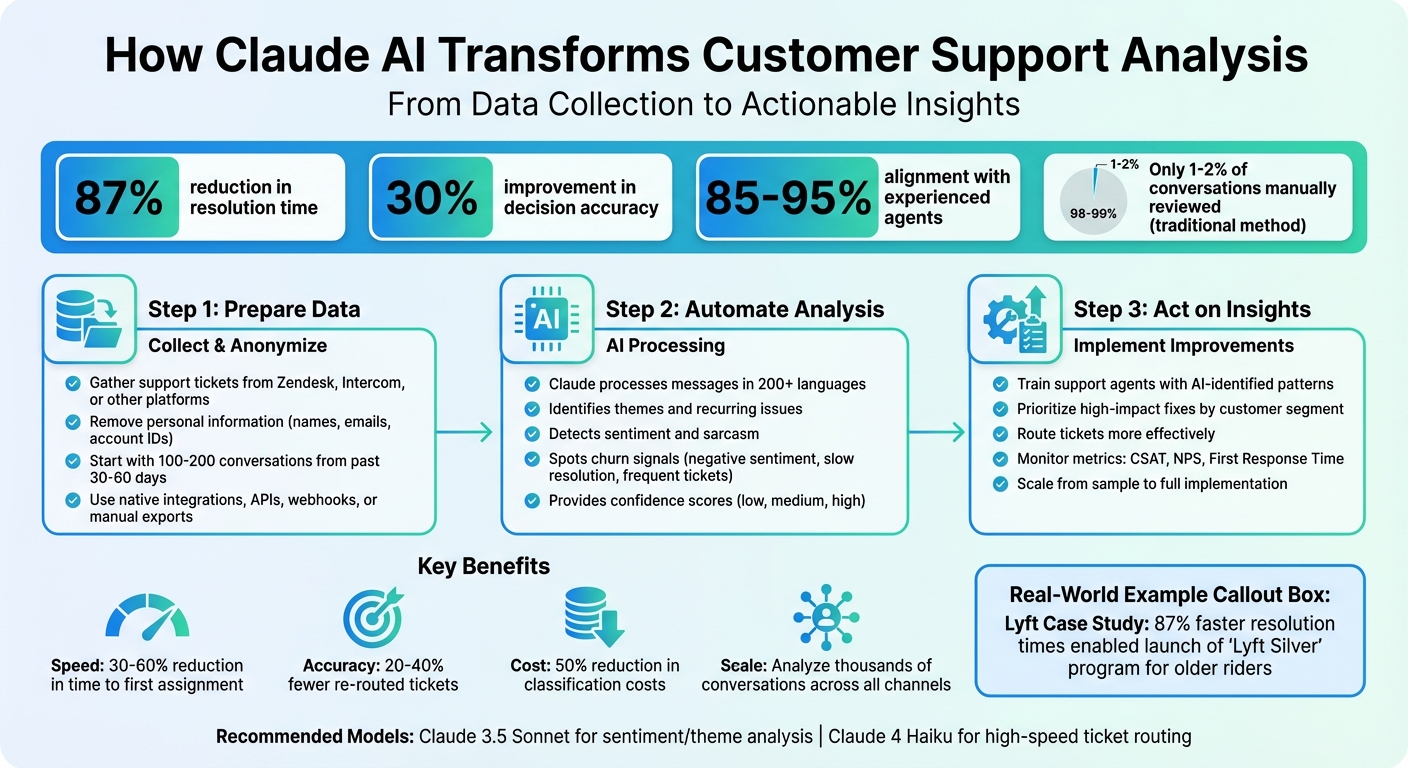
How Claude AI Analyzes Customer Support Conversations in 3 Steps
How Intercom is redefining customer support with Claude
sbb-itb-97114f1
Why You Should Analyze Customer Support Conversations
Customer interactions are a treasure trove of insights - if you know how to tap into them. Support tickets can highlight growing issues, pinpoint which customer segments are struggling, and even guide your product roadmap. Every conversation is a data point with the potential to shape your strategy.
Yet, with only 1-2% of these conversations being manually reviewed, countless insights slip through the cracks. This gap underscores the need for a more systematic approach to analyzing customer support interactions.
What Customer Conversations Can Tell You
Support conversations are like a mirror reflecting recurring themes across different channels. If the same complaint shows up in Intercom chats, NPS surveys, and user interviews, it’s not just a one-off issue - it’s a signal pointing to a deeper product or service need.
These conversations also reveal the speed at which problems escalate. For example, a steady flow of password reset requests is one thing, but a sudden surge in billing errors? That’s a red flag that demands immediate attention. Tracking this trend velocity helps teams separate minor inconveniences from urgent crises.
Another hidden gem in these conversations is churn signals. Factors like negative sentiment, slow resolution times, or frequent tickets from the same account can indicate a higher likelihood of cancellation. Spotting these signals early gives your team a chance to step in and retain customers before they leave.
Despite these benefits, manual analysis often struggles to keep up with the volume and complexity of support data.
Problems with Manual Analysis
Manual methods face serious limitations, especially as ticket volumes grow. Teams simply can’t keep up with the sheer number of conversations, leading to incomplete and inconsistent analysis. This approach might work for small-scale operations, but it quickly falls apart as the volume increases.
Keyword filters are another weak spot. Customers often use varied phrasing or combine multiple issues in a single message. For instance, a ticket saying, "I love your product but can't figure out billing," contains both praise and a problem. Simple keyword-based systems miss this nuance entirely.
Surveys don’t fare much better. With a response rate of just 5-10%, they represent a small, often biased sample of your customer base. This leaves the majority of your audience unheard, skewing your decisions.
How Claude AI Addresses These Problems
Claude AI offers a smarter way to analyze support conversations. It processes unstructured messages in over 200 languages, capturing the full context rather than relying on keywords. This ensures no conversation is overlooked and no pattern goes unnoticed.
The AI excels at understanding nuance. For example, when a customer writes "Great, another bug," Claude picks up on the sarcasm and frustration, something traditional filters would miss. This level of contextual understanding eliminates the blind spots of manual and keyword-based methods.
In 2023, Lyft adopted Claude to handle rider and driver support interactions. The results were game-changing: an 87% reduction in resolution time and a 30% boost in decision-making accuracy. These efficiency gains allowed Lyft to reallocate resources and launch "Lyft Silver", a dedicated support program for older riders.
"Our customers were conversing more and opening up about the issues they were having, which then enabled us to solve them better." - Elyse Hovanesian, Product Lead for AI in Support, Lyft
Claude also provides confidence scores for its analysis. When the confidence is low, it flags tickets for human review. This safety net ensures a balance of speed, accuracy, and trust, making your support operation more effective and reliable.
Preparing Your Support Data for Analysis
Getting your support data ready for Claude AI is straightforward. The key is to focus on collecting the right conversations and ensuring customer privacy. By doing so, you can uncover actionable insights from your support interactions.
Here's how to collect, secure, and sample your data for the best results.
Collecting Data from Your Support Tools
Many support platforms offer flexible ways to connect with Claude AI. Choose the method that works best for your team's workflow and technical setup:
- Native integrations: For example, Intercom users can enable built-in connectors in Claude's settings for easy, automatic data access.
- Webhooks (push-based): Platforms like Zendesk can send ticket data in real-time as new tickets are created.
- API calls (pull-based): Set up scheduled API calls to pull new tickets from your helpdesk regularly.
- Manual exports: Export data in formats like CSV, XLSX, or PDF for one-time analyses or smaller team needs.
- Model Context Protocol (MCP): This secure framework allows real-time ticket and account context sharing via servers like Thena.
For ongoing analysis, consider using a lightweight middleware service. This tool can extract the necessary fields, validate outputs, and log decisions, ensuring a smooth and auditable process.
Protecting Customer Privacy and Anonymizing Data
Before sending data to Claude AI, remove all personal information such as names, emails, phone numbers, account IDs, and physical addresses. While Anthropic has automated processes to filter sensitive data, it's important to perform your own anonymization to comply with GDPR and other regulations.
"The best practice is to anonymise or pseudonymise customer data before sending it to Claude - for example, masking names, account numbers, email addresses and other identifiers." - Reruption
Your choice of the Claude plan also impacts how data is handled. Consumer plans (Free, Pro, Max) may use your data for model training unless you opt out. On the other hand, commercial plans - like Team, Enterprise, or API access through Amazon Bedrock or Google Cloud Vertex AI - do not use customer data for training. For highly sensitive data, the API or Enterprise plans offer Zero Data Retention options and support Data Processing Addendums to ensure compliance with GDPR.
Once your data is anonymized and secure, the next step is determining the right sample size for analysis.
Selecting the Right Number of Conversations
To start, analyze 100–200 conversations from the past 30–60 days. This sample size helps establish a solid baseline for accuracy. When focused on well-defined categories, such as billing or account inquiries, organizations often see alignment rates of 85–95% with experienced agents.
Instead of segmenting by communication channel, group conversations by risk level:
- Low-risk issues: Tasks like password resets or order status updates are ideal for initial analysis.
- High-risk cases: Legal complaints or VIP escalations require more careful handling.
Be sure to include both typical and borderline cases for each category. This approach helps Claude understand nuanced scenarios. Additionally, ask the AI to provide confidence scores (low, medium, high) for its analysis. Use low-confidence results to flag cases for human review, allowing you to balance automation with quality control as you expand your efforts.
Key Takeaway: Successful data preparation hinges on three steps: easy data collection via integrations or exports, thorough anonymization to protect privacy, and starting with a manageable sample size of 100–200 recent conversations to validate results before scaling up.
How to Analyze Conversations with Claude AI
Once your data is ready, you can use Claude AI to extract meaningful insights from conversations. By crafting precise prompts, conducting sentiment and theme analysis, and interpreting the results effectively, Claude becomes a powerful tool for understanding customer interactions.
Writing Prompts for Claude AI
The foundation of accurate analysis lies in creating clear, focused prompts. Start by assigning Claude a specific role, like "customer support quality analyst" or "ticket classification system." This helps set the context for the task.
Structure prompts using XML tags to organize the information. For instance, use <category_list> to define intent categories <ticket_content> for the conversation text and <reasoning> to guide Claude’s internal logic. This setup makes it easier to extract and interpret the results.
Include 4–5 examples of correctly analyzed tickets in your prompt to improve Claude's tone and accuracy. For sentiment analysis, ask for structured JSON output that includes a sentiment score (ranging from -1.0 for very negative to 1.0 for very positive) and a escalation_trigger boolean to flag frustrated customers.
Request a confidence level (low, medium, high) for each analysis. This helps identify ambiguous cases that may need human review. For more complex tasks, instruct Claude to explain its reasoning before delivering a final decision.
"Claude is uniquely skilled at understanding and following intricate, multi-step processes with high accuracy. It can navigate the nuanced business logic of each company's support processes, while catching potential errors before they happen." - Ashwin Sreenivas, CTO and co-founder
With structured prompts in place, you can move on to advanced sentiment and theme analysis.
Running Sentiment and Theme Analysis
In sentiment analysis, Claude assigns scores to customer messages, capturing the emotional tone. Activating Extended Thinking mode allows for deeper insights across large volumes of feedback.
For theme detection, Claude identifies recurring patterns in conversations. It groups related feedback, filters out noise, and tracks how issues evolve. This helps differentiate between steady complaints and emerging problems.
Using similarity search retrieval with vector databases can boost classification accuracy from 71% to 93%. For businesses with numerous intent categories, a hierarchical classification system works well - starting with broad categories like "Technical" and "Billing", then narrowing down with specialized sub-classifiers.
For tasks requiring complex reasoning, like handling refunds or cancellations, Claude 3.5 Sonnet is ideal. For high-speed, low-latency needs like ticket routing, Claude 4 Haiku balances speed and quality effectively.
| Analysis Type | Recommended Model | Key Output Fields |
|---|---|---|
| Sentiment Analysis | Claude 3.5 Sonnet | score [-1.0, 1.0], emotions, escalation_trigger |
| Ticket Routing | Claude 4 Haiku | category, priority, assigned_team, confidence |
| Theme Detection | Claude 3.5 Sonnet | theme_name, frequency, representative_quotes, urgency |
Example: Finding Billing Problems in SaaS Support Tickets
Let’s see how these techniques work in practice. Imagine you’re analyzing SaaS support tickets to identify billing issues. You could create a classification prompt with categories like Billing, Technical, Shipping, and Refund. Focus on the <ticket_content> field and ask Claude to provide a <reasoning> section that highlights specific complaints - such as overcharging or payment failures.
For a 30-day batch of tickets, Claude can categorize each one and flag those with highly negative sentiment scores. The analysis might reveal a pattern of unexpected charges or failed payment notifications. Claude can also organize this data into an Excel workbook with tabs for "Theme Classification", "Trend Analysis", and "Representative Quotes", making it easy for product and finance teams to act on the findings.
"Claude Sonnet delivers the best accuracy, which is crucial for our highly sensitive use cases like refunds and cancellations." - Chyngyz Dzhumanazarov, Co-founder and CEO
By structuring your prompts and leveraging Claude’s capabilities, you can prioritize fixes based on data-driven insights rather than relying on anecdotal evidence.
Key Takeaway: The success of conversation analysis depends on crafting well-structured prompts with clear roles, XML tags, and examples. Use Claude 3.5 Sonnet for detailed sentiment and theme analysis, and always request confidence scores to ensure balanced automation and oversight. Real-world applications, like identifying billing issues in SaaS tickets, highlight how AI can uncover actionable patterns in a fraction of the time.
Using Insights to Improve Your Support Operations
Once you've analyzed your support data with Claude AI, the next step is putting those insights to work. It's not just about uncovering patterns - it's about using them to enhance team performance and address customer challenges effectively.
Training Support Agents with Analysis Results
Use the patterns identified by Claude AI to train your support team. For instance, if Claude highlights specific phrases customers frequently use to describe billing confusion, share these insights with your team. This helps agents quickly recognize and address similar issues in real time.
Kick things off with an AI-assisted triage model. Here, Claude suggests categories, and agents confirm or adjust them. This process not only builds trust in the system but also creates labeled data to refine the AI’s accuracy. Pay close attention to instances where agents heavily edit Claude's suggestions - these moments can reveal gaps in training or areas where your documentation needs improvement.
You can also transition experienced agents into quality assurance roles. Their focus shifts from repetitive tasks to validating AI classifications and refining prompts. This allows senior staff to concentrate on coaching and handling complex cases. Meanwhile, monitor how often agents agree with Claude’s suggestions. This agreement rate acts as a health check for the system and ensures alignment between the AI and your team.
"With Claude, we're not just automating customer service - we're elevating it to truly human quality. This lets support teams think more strategically about customer experience and what makes interactions genuinely valuable." - Fergal Reid, VP of AI
With your team now equipped with actionable insights, the next step is tackling the most pressing issues.
Fixing High-Impact Issues First
Claude’s ability to detect recurring themes helps you prioritize fixes based on data, not guesswork. By categorizing insights by customer type - like Enterprise or SMB - you can focus on high-value accounts first.
Take it a step further by using Claude to pull representative customer quotes for each theme. These quotes can act as persuasive evidence when presenting issues to product or leadership teams, helping you advocate for changes that matter. Additionally, tracking the "velocity" of issues - how quickly they’re increasing in frequency - can help distinguish between long-standing concerns and emerging problems that need immediate attention.
The results speak for themselves. Companies using Claude for support analysis have reported a 87% reduction in resolution time and a 30% improvement in decision-making accuracy. These efficiencies free up resources for more strategic initiatives, like personalized customer programs.
Subsection Takeaway: By addressing high-priority issues based on Claude’s analysis, your team can make meaningful improvements that enhance customer satisfaction and operational efficiency.
After training your team and addressing critical issues, the final step is keeping a close eye on performance metrics to ensure lasting success.
Monitoring Metrics to Measure Results
Set clear goals before rolling out changes. Common benchmarks include achieving 95% accuracy in AI classifications and cutting the cost per classification by 50% compared to manual methods.
Operational metrics like First Response Time and Average Resolution Time can show whether AI-driven insights are streamlining workflows. At the same time, customer experience metrics like CSAT and NPS will confirm if these operational improvements are translating into better service. Many teams experience a 30–60% reduction in time to first assignment and 20–40% fewer re-routed tickets when AI is implemented effectively.
To maintain quality, create a "golden set" of human-verified answers and regularly compare Claude’s outputs against it. If Claude is automating tasks like processing refunds, track how often the tool executes API calls correctly. This ensures the system is meeting expectations.
By monitoring these metrics, you’ll have a clear view of how Claude AI is driving efficiency and improving the overall customer experience.
Subsection Takeaway: Regularly tracking accuracy, efficiency, and customer satisfaction metrics ensures that Claude AI continues to deliver measurable improvements for your support operations.
Key Takeaway: Transforming Claude AI insights into actionable improvements involves three key steps: training agents with AI-identified patterns, prioritizing fixes based on data-driven analysis, and monitoring metrics to validate results and sustain progress.
Conclusion
Claude AI's customer support analysis is changing the way businesses respond to customer needs. Automating the analysis of conversations helps companies identify patterns in days that might otherwise take weeks to uncover manually, turning those insights into actionable improvements almost immediately.
Organizations have seen impressive results, such as an 87% reduction in resolution time and a 50% decrease in classification costs compared to older methods. These efficiencies don't just save money - they free up resources for initiatives that improve customer experiences. For instance, Lyft used the savings to enhance its dedicated human support team.
But the benefits go beyond cost reduction. Claude AI improves service quality by identifying sentiment, spotting emerging issues, and routing tickets efficiently - achieving an accuracy rate between 85% and 95%. This means customers get faster, more relevant assistance, while support teams can focus on solving complex problems that need human insight and empathy. The combination of AI-powered insights and human expertise creates a more effective and responsive support system.
Starting small is key to success. Consider beginning with assisted triage, where Claude suggests classifications that your team can confirm. Use the data to train your staff, address high-priority fixes, and track important metrics. This gradual approach builds confidence in the system while improving efficiency and customer satisfaction.
Whether you're managing hundreds or thousands of daily interactions, Claude AI delivers the intelligence required to turn support data into a strategic advantage. Its ability to recognize patterns and provide human-like reasoning makes it an invaluable tool for businesses looking to refine their support operations.
.png)



