.png&w=96&q=75)

AI ticket routing is a faster, more accurate way to classify and assign customer support tickets compared to traditional rules-based systems. While rules-based systems struggle with accuracy (40–50%), AI-driven setups can reach up to 89% accuracy by analyzing ticket content and understanding customer intent. This reduces misroutes, speeds up response times, and improves customer satisfaction.
Key takeaways:
- AI routing uses machine learning to classify tickets based on content, urgency, and customer needs.
- It works best in high-volume environments (1,000+ tickets/week) or when ticket categories are complex.
- Proper setup involves cleaning historical ticket data, defining clear categories, and testing the system before full rollout.
- Essential steps include setting confidence thresholds, creating intent-based ticket fields, and using skills-based routing for agent assignments.
- Regular monitoring and retraining are critical to improving accuracy over time.
With AI ticket routing, teams can cut triage time from 4 minutes to under 45 seconds, reduce SLA breaches, and even auto-resolve up to 65% of tickets. Follow a structured setup process, and you’ll see measurable improvements in support efficiency and customer experience.
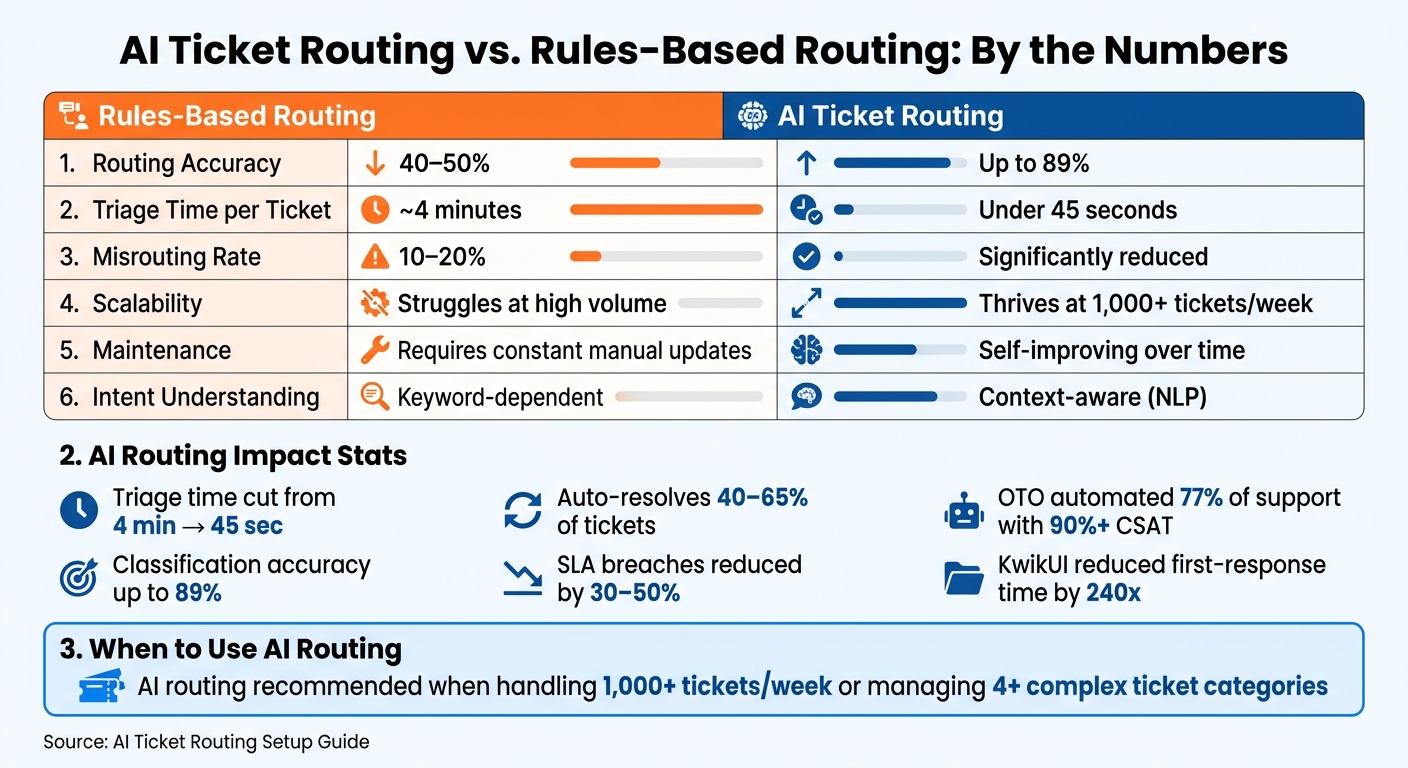
AI vs Rules-Based Ticket Routing: Key Stats & Performance Metrics
What Is AI Ticket Routing and When Should You Use It?
Understanding customer intent is the backbone of accurate ticket routing. AI ticket routing automates the process of classifying, prioritizing, and assigning support tickets by leveraging machine learning and natural language processing (NLP). By analyzing the content of each ticket, AI can quickly identify the customer's intent and direct the request to the appropriate queue or agent in seconds.
The key difference between AI and rules-based routing lies in how they interpret intent. Rules-based systems rely on specific keywords, such as "refund" or "broken." However, if a customer phrases their issue differently, like saying, "I was charged twice", the system might misroute the ticket. AI, on the other hand, understands the context behind the words, making it far more reliable for large-scale operations where precision matters.
How AI Ticket Routing Works
AI ticket routing uses historical data to analyze incoming tickets. By recognizing patterns, it determines the topic, urgency, and intent behind each ticket, then matches it to the most suitable team or agent. Over time, the system learns and improves, refining its accuracy with every interaction.
One of the most noticeable benefits is the drastic reduction in triage time. Teams that shift from manual sorting to AI-driven classification have reported cutting per-ticket triage time from about 4 minutes to less than 45 seconds. This isn't just a small improvement - it's a fundamental shift in how efficiently support queues are managed. With this speed and accuracy, AI routing clearly outshines traditional systems.
When AI Outperforms Rules-Based Routing
Rules-based routing works well in environments with a limited number of predictable, consistently phrased ticket types. But as ticket volumes grow or the variety of customer intents increases, these systems start to falter. They require constant manual updates and can fail without warning, leading to misrouted tickets and frustrated customers.
AI routing thrives in high-volume, complex environments where rules-based systems can't keep up. Take OTO, a retail operation handling massive ticket volumes. By implementing AI routing, they automated 77% of their customer support and maintained over 90% CSAT scores - something no keyword-dependent system could achieve.
For many teams, the tipping point comes at 1,000+ tickets per week. Below that, well-maintained rules might suffice. But when ticket categories expand to include billing issues, technical problems, onboarding, and account changes, AI consistently outperforms static systems in both speed and accuracy. This sets the stage for the configuration steps we'll explore next.
sbb-itb-97114f1
Preparing Your Data and Queues Before Setup
Skipping proper data preparation is one of the biggest reasons AI routing doesn’t perform well after launch. Before diving into configuration, make sure your historical ticket data is clean, consistent, and well-organized. Otherwise, the model might end up learning from messy or irrelevant data.
Mapping Your Current Ticket Flows
Start by pulling 90 days’ worth of ticket data and focusing on four key metrics: inbound volume by category, average first response time, SLA breach rate, and the top 10 tags. These metrics will help you spot where routing failures are happening.
On average, manual triage has a 10–20% misrouting rate, meaning about 1 in 10 tickets ends up with the wrong team. Identify which ticket types are bouncing around the most and pinpoint queues that are consistently overloaded.
Once you’ve mapped out the problem areas, it’s time to clean up your tags and ticket fields to make AI training more accurate.
Cleaning Tags and Ticket Fields
Inconsistent or redundant tags can throw off AI classification. For example, helpdesks often have overlapping tags like "refund", "refunds", "refund-request", and "needs-refund", which can confuse the model. To avoid this, consolidate these into 8–15 high-level intent categories that are clear and mutually exclusive (e.g., billing, technical issue, onboarding).
Here’s a real-world example: KwikUI revamped its Freshdesk issue types in February 2026 before rolling out AI routing. The result? A massive improvement - first-response times were reduced by 240x, and 65% of incoming tickets were auto-resolved within weeks.
Once your data is cleaned up, the next step is to define the dimensions the AI will use to route tickets.
Defining Your Routing Dimensions
You’ll need to decide which variables the AI will rely on for routing. The four most important dimensions to consider are issue type, urgency, customer tier, and product area. For urgency, map signals like "down", "can’t access", or "charged twice" to specific priority scores.
Customer tier is another critical factor, especially for tiered SLAs. For instance, a billing issue submitted by an enterprise customer should be handled differently from one from a free-tier user. When these dimensions are clearly defined, classification accuracy can jump from 40–50% to as high as 89% in practical use cases.
How to Configure AI Ticket Routing in Zendesk and Freshdesk
Once you've organized your data and set up your taxonomy, the next step is configuring three key components: custom ticket fields, a 70% confidence threshold for auto-routing, and skill-based agent routing. These steps are essential to fully realize the potential of your preparation, which can lead to classification accuracy as high as 89%.
Setting Up Ticket Fields and Triggers
Start by defining three crucial ticket fields: intent, product area, and priority. These fields act as the foundation for your AI's decision-making when routing tickets.
After creating these fields, connect them to triggers. In both Zendesk and Freshdesk, the logic follows a simple pattern: condition → action. For instance, if a ticket's subject line contains the word "refund", a trigger can set the intent to billing and assign the ticket to the billing queue.
To ensure accuracy, use specific and high-signal keywords tied directly to your 8–15 intent categories. Avoid vague terms like "help" or "issue", as these can create unnecessary noise and reduce the precision of your triggers.
Using Confidence Thresholds and Escalation Logic
AI routing should only occur when the system is confident in its classification. A confidence threshold of 0.7 (or 70%) is a good starting point. Tickets that meet or exceed this score can be routed automatically without human intervention, while those below the threshold should be flagged for manual review.
This approach is critical because early-stage AI models typically achieve classification accuracy in the 60–70% range, whereas more mature models can exceed 85%. Automatically routing every ticket before your AI is fully trained can lead to misrouted tickets, eroding trust among your support agents.
Additionally, set up escalation rules for urgent tickets, regardless of confidence scores. For example, keywords like "can't access", "system down", or "charged twice" should trigger immediate priority escalation. Similarly, tickets from high-value customers, such as enterprise accounts, should bypass confidence scoring and receive priority handling.
Once these elements are in place, the next step is to match tickets to the right agents through skills-based routing.
Configuring Skills-Based Routing
Skills-based routing ensures that tickets are assigned not just to the appropriate queue but to the most qualified agent. In Zendesk, this is managed through the Skills feature within Omnichannel Routing settings. In Freshdesk, it’s handled via Round Robin or Skill-Based assignment under Automation.
Tag agents with specific skills, such as language proficiency (e.g., Spanish, French), product expertise (e.g., API, billing), or account type (e.g., VIP, enterprise). Then, create routing rules that align ticket attributes with these skills. For example, a ticket tagged with intent: onboarding and language: Spanish will only be routed to agents who possess both tags.
CoSupport AI integrates seamlessly with Zendesk and Freshdesk, enhancing native routing rules by automatically populating intent, priority, and customer tier fields before any triggers are activated. For example, Ocus, a company managing 6,000 tickets per month on Zendesk, reduced handle time from 4 minutes to just 47 seconds by combining automated pre-classification with skills-based routing.
Testing, Monitoring, and Adjusting Your Setup
Staged Rollout and Testing
Start by deploying the AI in shadow mode with one high-volume queue. In shadow mode, the AI only classifies tickets without taking any action. Compare its classifications to the actions taken by agents. If the AI achieves at least 80% accuracy across more than 200 tickets, you can move on to the next queue.
This step-by-step rollout ensures the setup in tools like Zoho Desk, Zendesk, or Freshdesk works as intended and highlights any adjustments needed. A phased approach helps catch issues early, before they affect customers.
Once shadow mode accuracy is confirmed, the next step is to monitor key performance metrics closely.
Tracking Key Metrics
Certain metrics will show whether your ticket routing system is on track. Focus on these three: misrouted ticket rate, reassignment count, and average handle time (AHT). Among these, reassignment rate is the quickest indicator of success - improvements here often appear within the first two weeks.
Additionally, monitor first contact resolution (FCR) and SLA breach rate on a weekly basis. If SLA breaches increase after launch, consider raising the AI's confidence threshold to somewhere between 0.75 and 0.80.
Adjusting Based on Data
Set aside time each week during the first 60 days to review metrics and adjust intent triggers or escalation rules. Analyze misrouted tickets by grouping them into intent categories to identify patterns. For instance, if "returns" tickets frequently end up in the billing queue, you may need to refine trigger keywords or clarify the boundaries between categories in your intent taxonomy.
Create a feedback loop by having agents tag tickets when they reassign them. Feed this labeled data back into the model every month. This iterative process is key to improving classification accuracy. Many implementations achieve 89% accuracy - not because they start perfectly, but because they refine the system over time. As your ticket patterns evolve, the model will improve, but only if it receives clean, labeled data for training.
Conclusion: Getting AI Ticket Routing Right
To make AI ticket routing truly effective, you need clean data, a well-defined intent taxonomy, and a staged implementation process. These elements are the backbone of a system that works smoothly and avoids unnecessary complications. Nail these steps, and you'll start seeing tangible results.
When done right, AI ticket routing can deliver impressive outcomes: reducing SLA breaches by 30-50% in just weeks and auto-resolving 40-65% of incoming tickets. These gains come from maintaining feedback loops, conducting weekly metric reviews, and using accurately labeled retraining data - all strategies covered in this guide.
If you're ready to see these principles in action, check out CoSupport AI's automated ticket resolution. It integrates with Zendesk or Freshdesk in under 10 minutes.
Want to explore how it can handle your ticket volume and queue structure? Book a demo to get a personalized walkthrough.
.png)

.png&w=96&q=100)



.png&w=96&q=100)